17
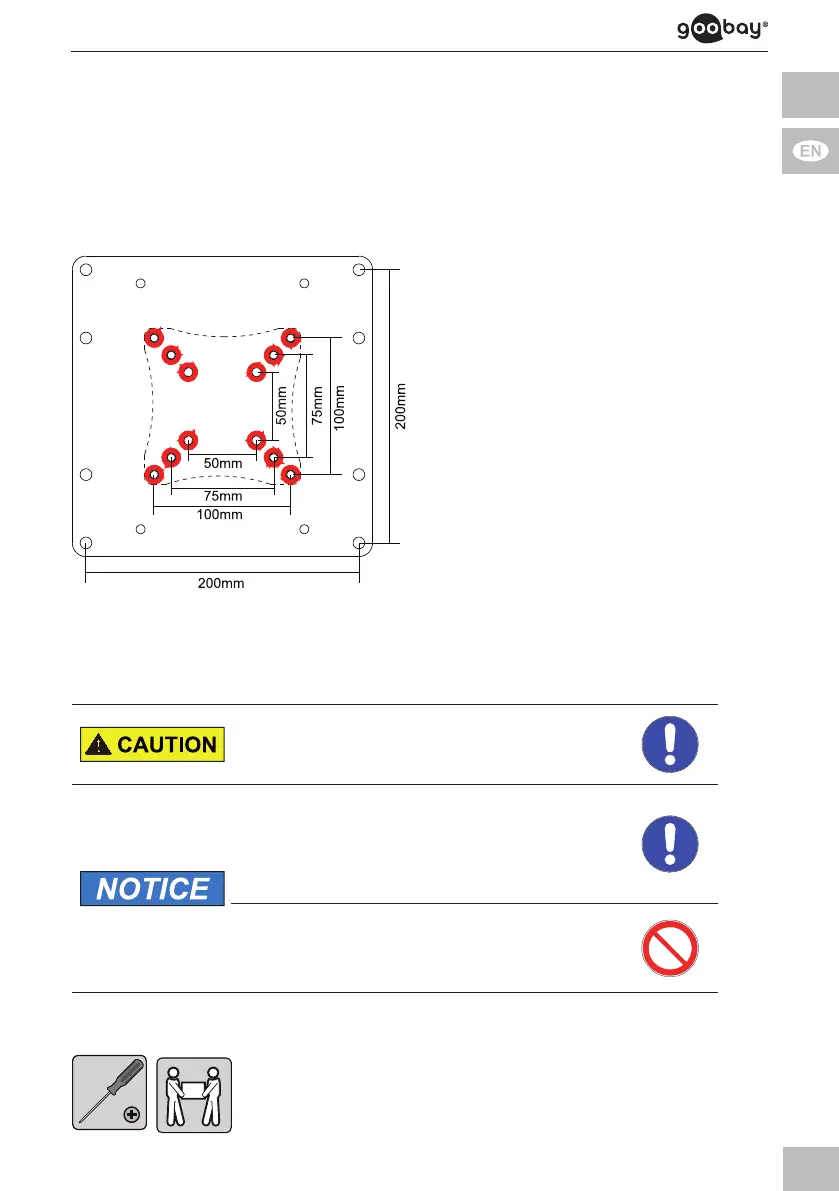
The inner 12 mounting holes are for installing the TV wall mount. These are
indicated by the conical depressions.
1. TurntheVESAAdapter(A)so,thattheconical12installationholesfaceto
you.
1. Attach the VESA Adapter (A) with the screws (B) and nuts (C) on the
matching VESA hole spacing on your TV wall mount plate as shown.
Forthispurpose,useoneoftheinner
3 VESA hole spacings:
>>
50x50mm,
>> 75x75mm or
>> 100x100mm
Fig. 7: inner VESA hole spacings
4.3 Mountingtheatscreen
Risk of injury by tripping and falling
>> Place,transportandinstallproduct,parts
and acceories in a safe way.
Risk of material damage by improper
procedure
>> Onlyusemoderateforcewhentightening
thescrewsinordertoavoiddamaging
threads.
>>
>>
NEVER set the screen on the front during
installation!
Donotdamagetheatscreenbytoo
long screws.
Tab. 14: Mounting the at screen


 To Next Page