Power
Your Action Camera has a 900 mAh rechargeable battery.
To maintain the lifespan, fully charge it before first use. To do so:
• Turn off the Action Camera and take it out of
the waterproof case.
• Connect the USB charging cable to the micro USB port
and a compatible USB port.
• Whilst charging, the charging indicator light will illuminate red.
Once the battery has charged fully, the charging indicator light
will turn off.
• Carefully disconnect both ends of the USB charging cable
and store it safely for future use.
WARNING: DO NOT ATTEMPT TO CHARGE
THE ACTION CAMERA WITH ANY CABLE
OTHER THAN THE ONE PROVIDED. DO NOT LEAVE
THE ACTION CAMERA UNATTENDED
WHILST CHARGING.
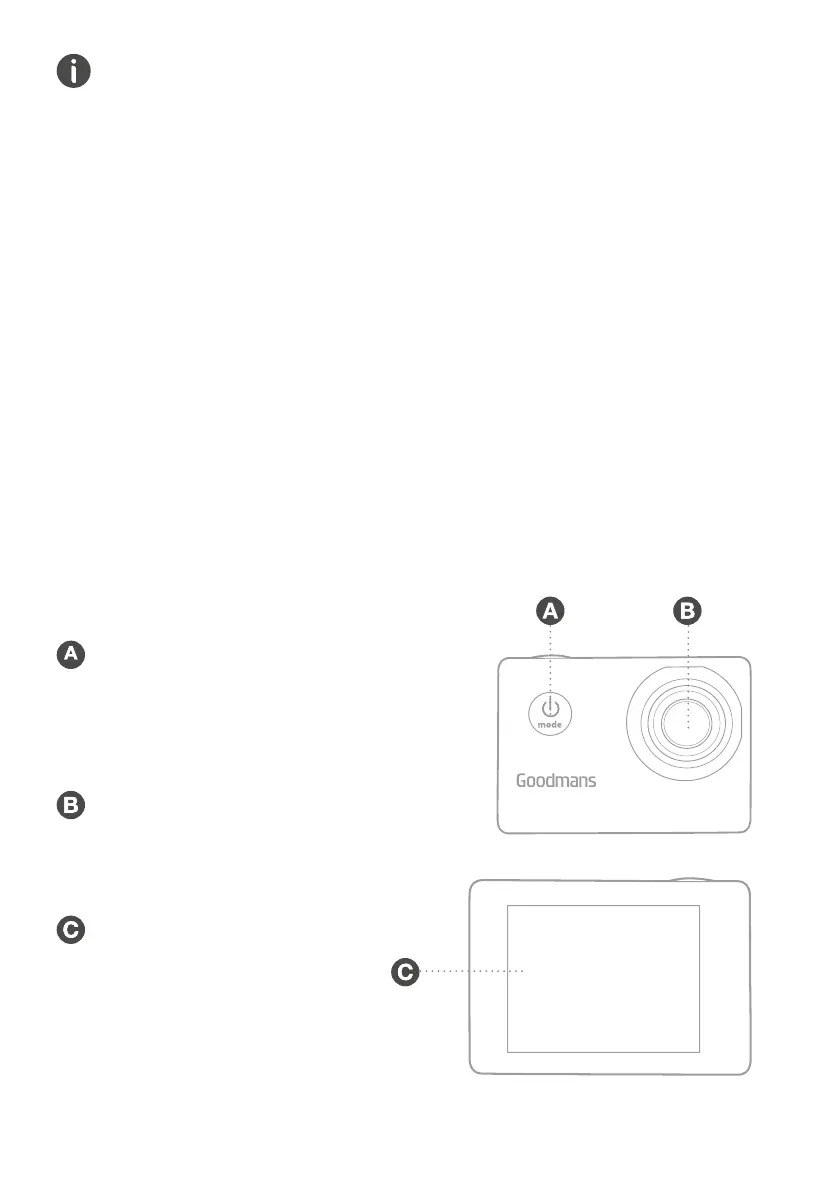
2.2 Front View
POWER/MODE Button
Press and hold to turn the
Action Camera
on/off. Single press to select
camera, video or playback mode.
Lens
2.3 Rear View
LCD Display
FULL HD ACTION CAMERA


 To Next Page