
 Need help?
Do you have a question about the Goodmans 330377 and is the answer not in the manual?
Lists all items included in the camera package for user verification.
Details the components and buttons on the front of the action camera.
Details the components and display on the rear of the action camera.
Details the components and buttons on the left side of the action camera.
Details the components and ports on the right side of the action camera.
Details the components and buttons on the top of the action camera.
Illustrates and names the various accessories provided with the action camera.
Explains how to fit the camera into its protective shield for added durability.
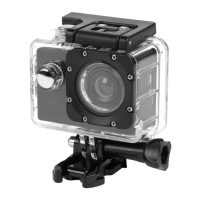
Guides on inserting the camera into the waterproof case for underwater protection.
Instructions for attaching the action camera to a handlebar using the provided mount.
Instructions for attaching the action camera to a helmet using the provided mount.
Details how to attach the action camera to smooth surfaces using the suction cup mount.
Instructions for inserting and removing a micro SD card, crucial for saving media.
Explains how to turn the camera on/off and switch between modes (camera, video, playback).
Step-by-step guide on how to start and stop video recording.
Instructions on how to view recorded videos and photos in playback mode.
Details how to navigate and change system-wide settings like sound and power save.
Guides on adjusting camera-specific settings like resolution and burst mode.
Explains how to modify video recording settings such as movie size and date stamp.
Provides steps for transferring recorded photos and videos from the camera to a PC.
 General
| Frame Rate | 30fps |
|---|---|
| Battery Life | 90 minutes |
| Display Size | 2.0 inches |
| Resolution | 1080p |
| Storage | MicroSD (up to 32GB) |
| Waterproof | Yes (up to 30m with case) |

 To Next Page