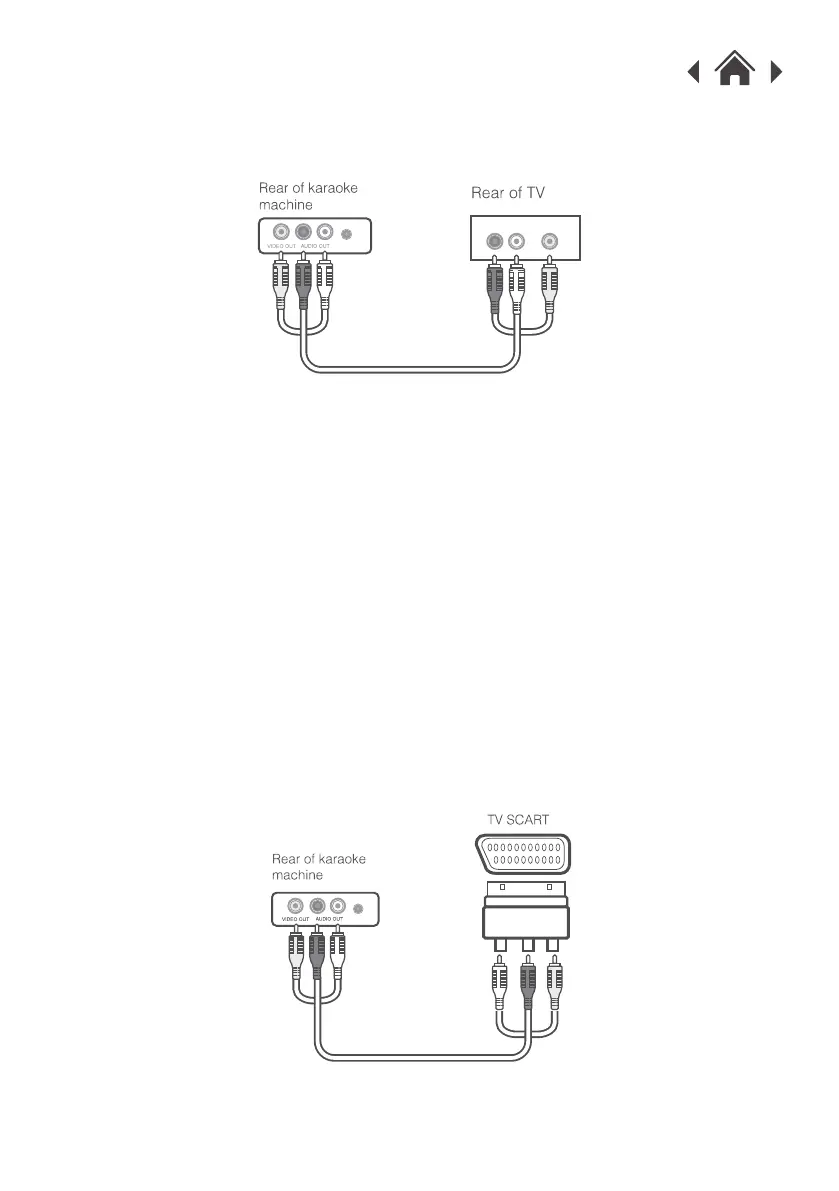
3.4 TV Connection with SCART Adapter
If your TV does not have the same red, white & yellow input sockets, you can
use a RCA to SCART adapter (not supplied).
Connect the YELLOW (video) jack of the supplied AV cable to the 'VIDEO
OUT' socket on the rear of the karaoke machine.
1.
Connect the RED & WHITE jacks of the supplied AV cable to the 'AUDIO
OUT' sockets on the rear of the karaoke machine. Take care to match the
socket colours to the jack colours.
2.
Connect the other end of the cables to the matching coloured sockets on
the SCART adapter.
3.
Connect the SCART adapter to the SCART input on your TV.4.
Select the appropriate video channel on your TV to view the lyrics
on-screen and hear the sound from the TV speakers.
5.
Select the appropriate video channel on your TV to view the lyrics
on-screen and hear the sound from the TV speakers.
5.
AUDIO IN
VIDEO IN


 To Next Page