P. 7
Goodmans Product Information Helpline (0870) 873 0080
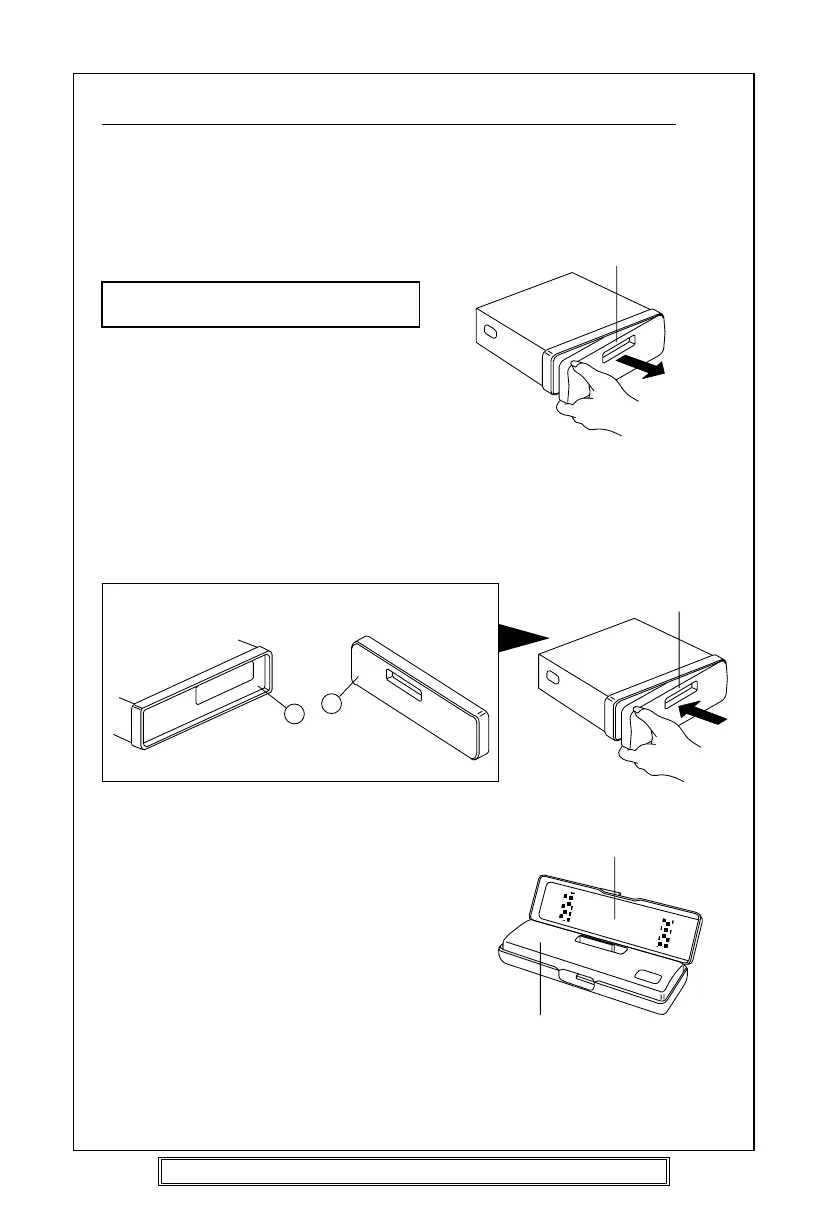
DETACHING AND ATTACHING THE FRONT PANEL
The front panel of this unit can be detached in order to prevent the unit from being stolen.
DETACHING THE FRONT PANEL
Press the RELEASE button and detach the
panel by pulling it towards you as illustrated.
Warning! The front panel may become hot
in use.
Note:
Be sure not to drop the panel when
detaching it from the unit.
ATTACHING THE FRONT PANEL
Apply the right hand side of the front
panel to the unit by attaching the part B
of the front panel to the part A of the
unit as illustrated and push until it clicks.
Notes:
• Make sure that the front panel is the
right way up when attaching it to the
unit as it cannot be attached upside down.
• Do not press the front panel hard
against the unit when attaching it. It
can be easily attached by pressing it
lightly against the unit.
• Do not press hard or put excessive
pressure to the control buttons of the
front panel when attaching it to the unit.
Note: When the detachable panel is removed the red anti theft LED will flash.
Panel case
Front panel
Front panel
Main unit Rear of the front panel
A
B
Front panel



 To Next Page