HELPLINE PHONE NUMBER 0870 873 0080
- 11 -
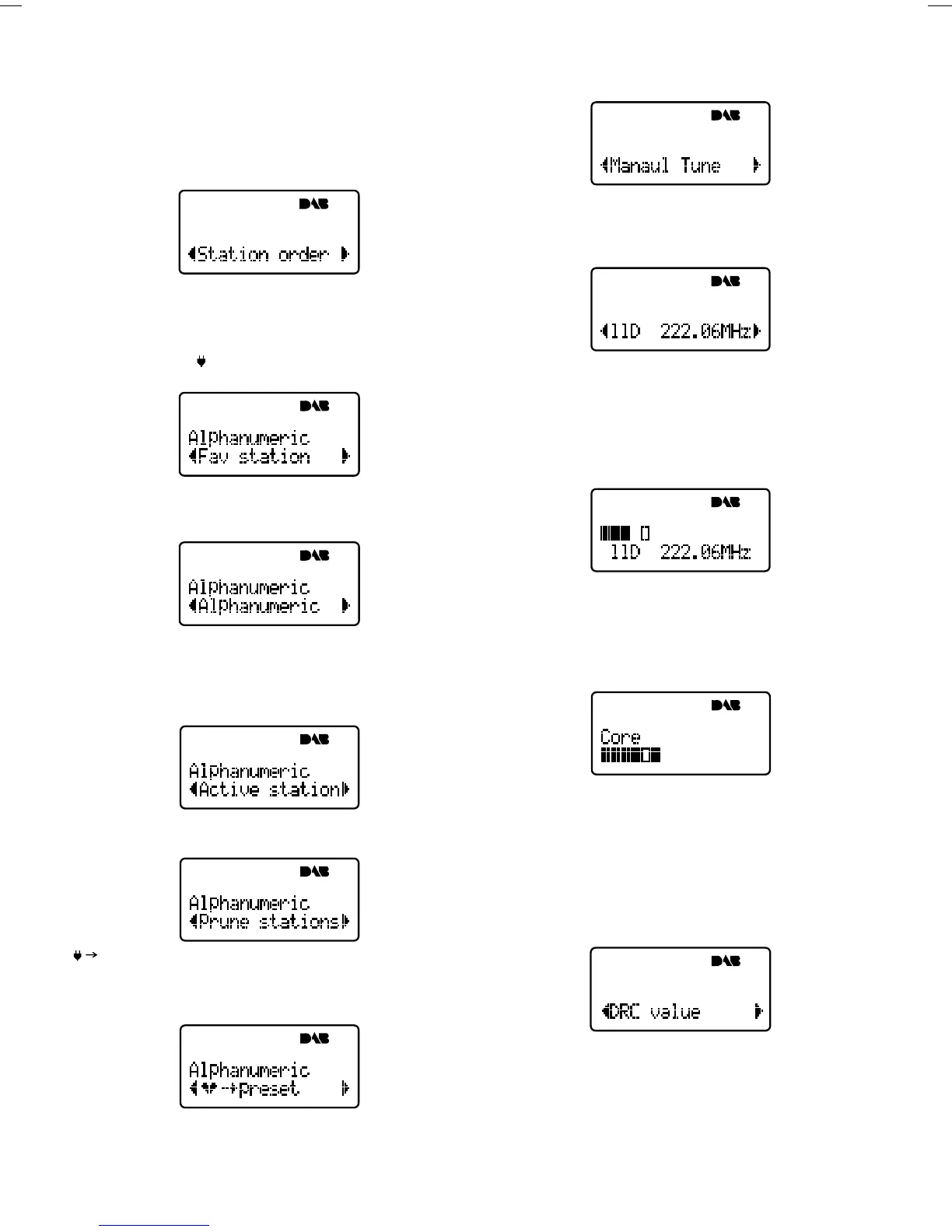
Station Order
This option enables you to choose the order in which
stations appear as you scroll through the station list.
When you select this option you see the currently selected
order on the top row of the display and a scroll list on the
bottom. Press the SCROLL button to scroll through the
following options and press the select button to select
one:
Fav station
Displays the ten most listened to stations at the top of
the station list in alphanumeric order and the rest below
in alphanumeric order. You favourite stations will be
displayed with a
next to the station name when you
scroll through the station list.
Alphanumeric
Displays all stations in alphanumeric order. This is the
default setting.
Active station
Displays active stations at the top of the service list in
alphanumeric order and inactive ones at the bottom in
alphanumeric order. See Selecting a station on page 9
for information on active stations.
Prune stations
Removes inactive stations from the station list.
Presets
Available only when Fav station order (above) has been
selected. Transfers the top six stations for your 10
favourite stations to the preset buttons.
Manual Tune
This option provides a signal quality display which you
can use to find the best position for your radio and aerial.
When you select this option, the bottom line of the display
shows the channel identifier and frequency. See useful
addresses which you can contact to find the channel
identifier for a multiplex you want to receive.
1. Press the SCROLL button to scroll through different
channels and press the select button to select one.
Note the list includes all channels, UK stations are
in the range 11B to 12D. You see a signal quality
display. The empty block indicates the minimum
required level for reception and the solid blocks
indicate the current level.
2. Move your aerial or radio whilst watching the display
and to try to raise the current level to the empty
block or beyond. The display will change to show
the multiplex name on the bottom line of the display
once a good signal is received and the multiplex will
be added to the service list.
DRC Value
DRC (Dynamic Range Control) enables you to alter the
dynamic range of the received audio (dependent on
broadcast material) by making the quieter sounds in a
broadcast more audible. This may be useful in noisy
environments or particularly quiet parts of programmes.
The DRC level of a broadcast is set by a broadcaster and
transmitted with the service. Changing this DRC value
enables you to apply a scaling factor to this level.


 To Next Page