64 65
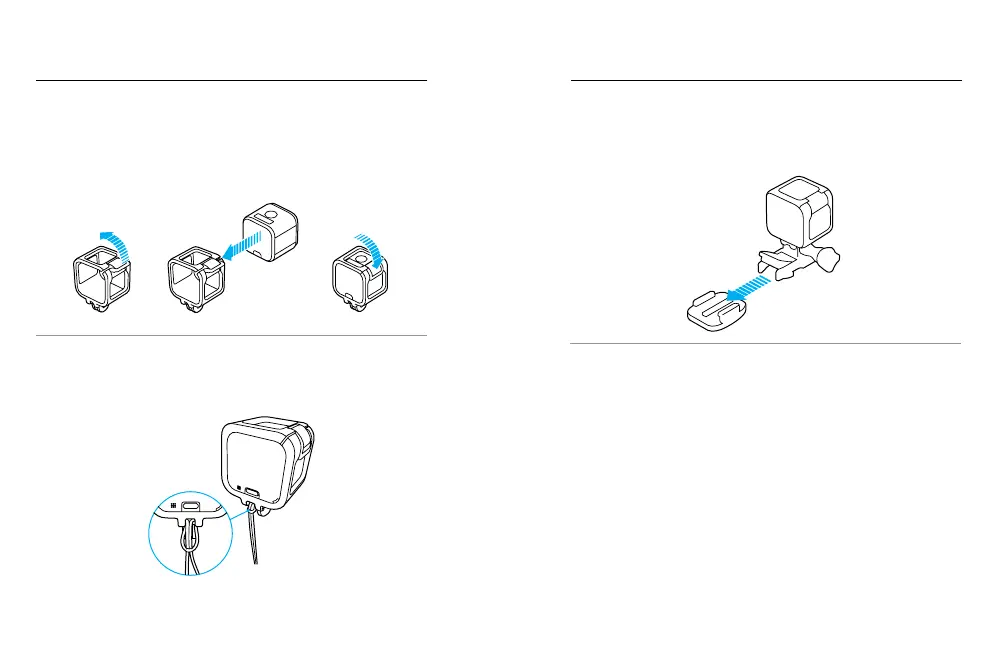
Securing the Camera in The Frame
1. Open the latch.
2. Rotate the camera to the desired orientation, and then slide it into the
frame. The back of the frame has a raised edge. Be sure the back of
the camera sits flush against it.
3. Close the latch.
PRO TIP: During water activities, use Camera Tethers for added security
and use a Floaty to keep your camera afloat (both sold separately). Tether
the frame to the mount by looping the tether over the small bar behind the
mounting fingers. For more information, visit gopro.com.
MOUNTING YOUR CAMERA MOUNTING YOUR CAMERA
ATTACHING MOUNTING BUCKLES TO MOUNTS
1. Flip up the mounting buckle plug.
2. Slide the buckle into the mount until it clicks into place.
3. Press down on the plug so that it sits flush with the buckle.
PRO TIP: If you mount your HERO5 Session upside down, the camera
automatically changes the orientation of your image to be right-side up.



 To Next Page