6 7
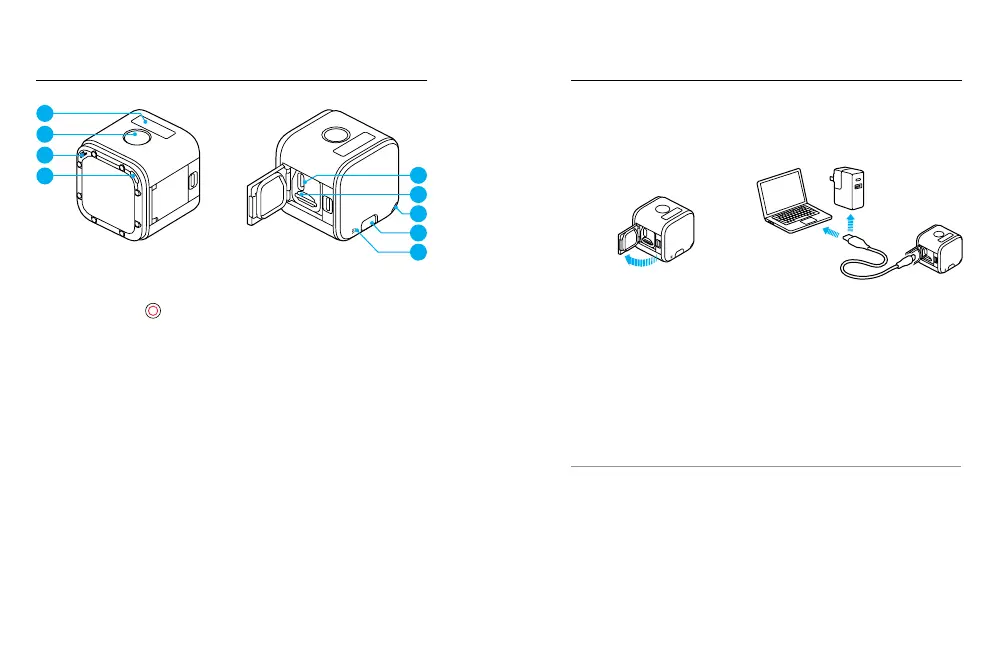
1. Camera Status Screen
2. Shutter Button [
]
3. Microphone
4. Camera Status Light
5. USB-C Port
6. microSD Card Slot
7. Menu Button
YOUR HERO5 SESSION
GETTING STARTED
CHARGING THE BATTERY
For the best experience with your new camera, we recommend fully
charging the battery before first use.
1. Open the door. 2. Charge the battery using the
included USB cable.
Note: The battery cannot be removed from the camera.
The camera status lights turn on during charging and turn off when
charging is complete. When charging with a computer, be sure that the
computer is connected to a power source. If the camera status light does
not turn on, use a different USB port.
The battery charges to 100% in about 2 hours. For more battery
information, see Battery
(page 70).
PRO TIP: For fastest charging, use GoPro’s Supercharger (sold
separately). You can charge your camera with a USB-compatible wall
charger or auto charger.
1
2
3
4
5
6
4
7
3



 To Next Page