INFORMATION!
Remote control access menu can also be accessed via a shortcut.
When the Wi-Fi module is enabled and the connections have been
successfully set up, long-press the auto bake key to activate remote
oven control rEEn.
INFORMATION!
For safety reasons, some functions are not available via remote access.
• If the oven is in standby mode and you open the oven door, remote control has to be enabled
again.
• If oven door is opened during the baking process, remote control option on the oven is
disabled.
• Any user activity on the control unit will automatically disable the remote control option on
the oven.
• Switching off the oven is the only option that remains available regardless of whether remote
control is enabled or not.
WARNING!
Always make sure the oven is used correctly and in compliance with the instructions,
especially when using remote control. Do not run the oven via remote access unless you
are certain about what exactly is in the oven.
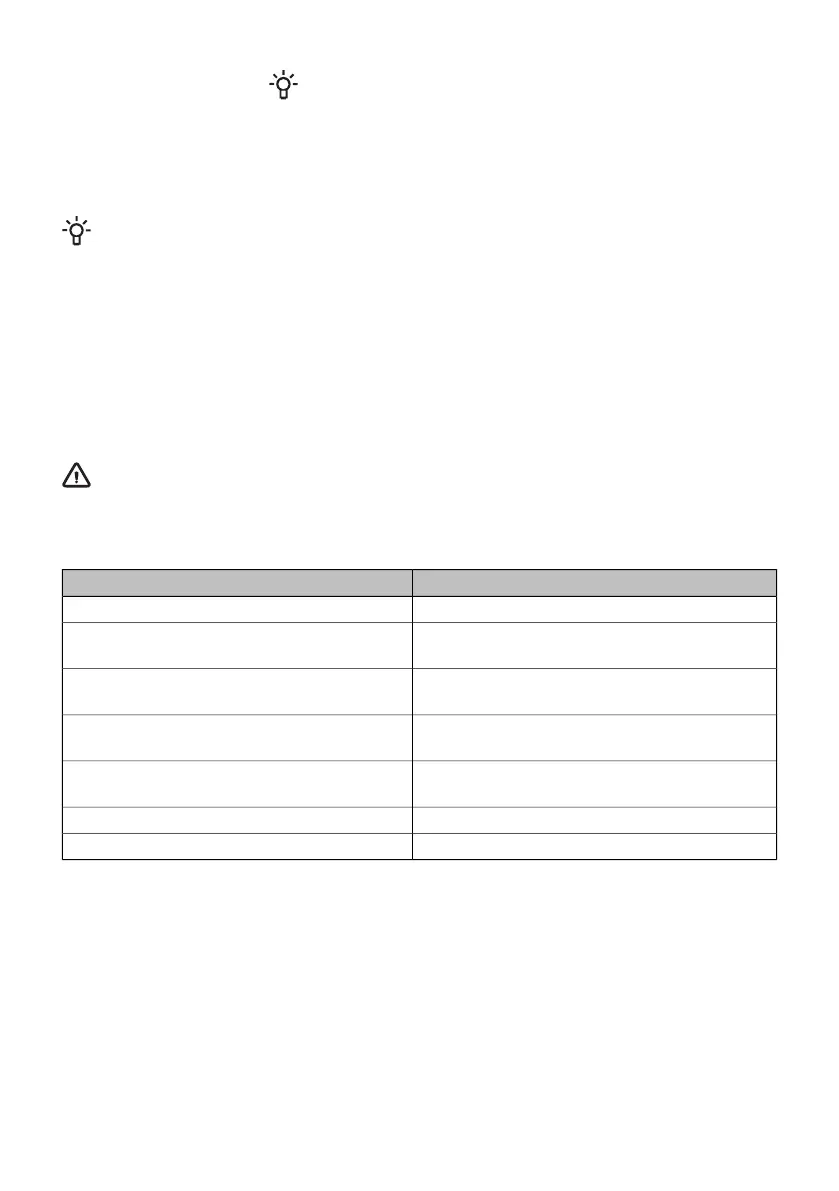
Wi-Fi symbol is displayed.Wi-Fi status
Wi-Fi symbol is not displayed on the screen.Wi-Fi is disabled.
Wi-Fi icon is dimly lit, and it is flashing.Wi-Fi is enabled, connection to the server is
being established.
Wi-Fi icon is fully lit and flashes.Wi-Fi is enabled, it is in the setup process or in
the process of establishing connections.
Wi-Fi is dimly lit.Wi-Fi is enabled, there are no connections to
the server.
Wi-Fi icon is fully lit.Wi-Fi is enabled and it is successfully connected
to the server.
REMOTE sign is not lit on the display unit.Remote control of the oven is not enabled.
REMOTE sign is fully lit on the display unit.Remote control of the oven is enabled.
35




 To Next Page