The GoScribe Mini ID Tag Engraving System is a compact and efficient device designed for engraving personalized identification tags, primarily for pets. Weighing 16 pounds, it is built for tabletop use and offers a user-friendly interface for quick tag customization.
Function Description:
The primary function of the GoScribe Mini is to engrave text and graphics onto various ID tags. It allows users to personalize tags with names, addresses, phone numbers, and a selection of over 59 popular graphics. The system is designed for ease of use, enabling users to engrave their first tags within minutes of unpacking.
Important Technical Specifications:
- Weight: 16 pounds
- Warranty: 1-year limited warranty covering mechanical and electrical components.
- Power: Requires connection to a protected power strip to prevent damage from electrical surges.
- Graphics: Over 59 popular graphics available for engraving.
Usage Features:
Unpacking and Setup:
Upon receiving the GoScribe Mini, users should carefully lift the engraver from its shipping carton and place it on a solid table. The shipping box should be retained for potential future repairs or upgrades. The inventory includes the GoScribe Machine, a power cord, a mini keyboard, ID tag holders, and a selection of ID tags.
Operation:
- Connection: Plug the mini keyboard into the side of the GoScribe, then connect the power cord to the GoScribe and a protected power strip.
- Power On: Turn on the engraver using the switch next to the power plug.
- Tag Selection: Choose a tag to engrave by pressing the corresponding function key on the mini keyboard or by touching the tag image on the LCD screen. Left and right arrows on the keyboard or LCD allow scrolling through additional tag options.
- Safety Feature: The machine will not operate with the door open. Opening the door acts as an emergency stop. If the door is opened during operation, a "red Aborted" message will appear. To reset, press Escape and then select the tag function key again to rehome the machine.
- Tag Insertion: The LCD screen will prompt "Insert tag and close door." Open the engraver door, place the correct tag holder with the tag inserted, and close the door.
- Text Input: Type the personalized tag information using the mini keyboard. The text will automatically appear centered on the tag displayed on the LCD.
- Font Selection: To choose alternative fonts, press Control + F. Available fonts include standard engravers block font (wide, tall) and a fancy script. The manual suggests using tall block font for round tags and wide block font for bone and dog tags to optimize space.
- Text Sizing: To make a line larger or smaller, use the down arrow keys to select a specific line, then hold Shift and press the Up/Down arrow. This feature is useful for emphasizing pet names or owner names.
- Graphics Mode: To engrave a graphic, press "g" from the main screen to enter graphics mode. Select the tag shape function key for the desired tag, insert the tag, and close the door. Press G to display available graphics. Use the left and right arrows to scroll through graphics options. Once a graphic is highlighted, press Enter. The LCD will display the graphic on the tag. Press R to rotate the image if needed.
- Engraving: Press the green "Go" button on the GoScribe to start the engraving process. The machine will complete scribing, return to its home position, and stop, allowing the user to open the door and remove the tag.
- Deeper Engraving: If a deeper scribe is desired, the user can choose the tag shape again and press Go to engrave the same data a second time.
Quick Key Options (displayed below the tag on screen):
- ESC: Returns to the beginning screen.
- Control + N: Erases information from a previous tag, useful for starting new tags with new data.
- Control + F: Changes font style.
- GO: Starts the engraving process.
- Shift + Up/Down Arrow: Customizes text height for individual lines.
- CAPS: Indicates when all caps is active (displayed in blue).
Memory Feature:
The GoScribe Mini retains the data from the last engraved tag. This is beneficial for engraving multiple tags with similar information (e.g., 10 pet tags with the same address and phone number but different pet names), requiring only the pet name to be edited. For completely new tags, Control + N can clear all data.
For bone tags with Swarovski crystals, it is recommended to add two spaces before and two spaces after the pet name to ensure the engraving is smaller and avoids hitting the crystals. The back of the tag can be scribed normally.
Maintenance Features:
The GoScribe Mini requires minimal maintenance. Periodically, the inside of the machine should be cleaned with a soft cloth to remove dust and engraving particles. Always unplug the machine before cleaning. All reachable parts can be wiped with a soft cloth. The pink vacuum material can be cleaned with soap and water and then dried.

 Need help?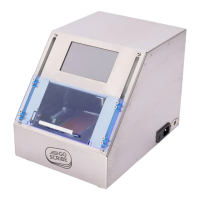

 To Next Page
 General