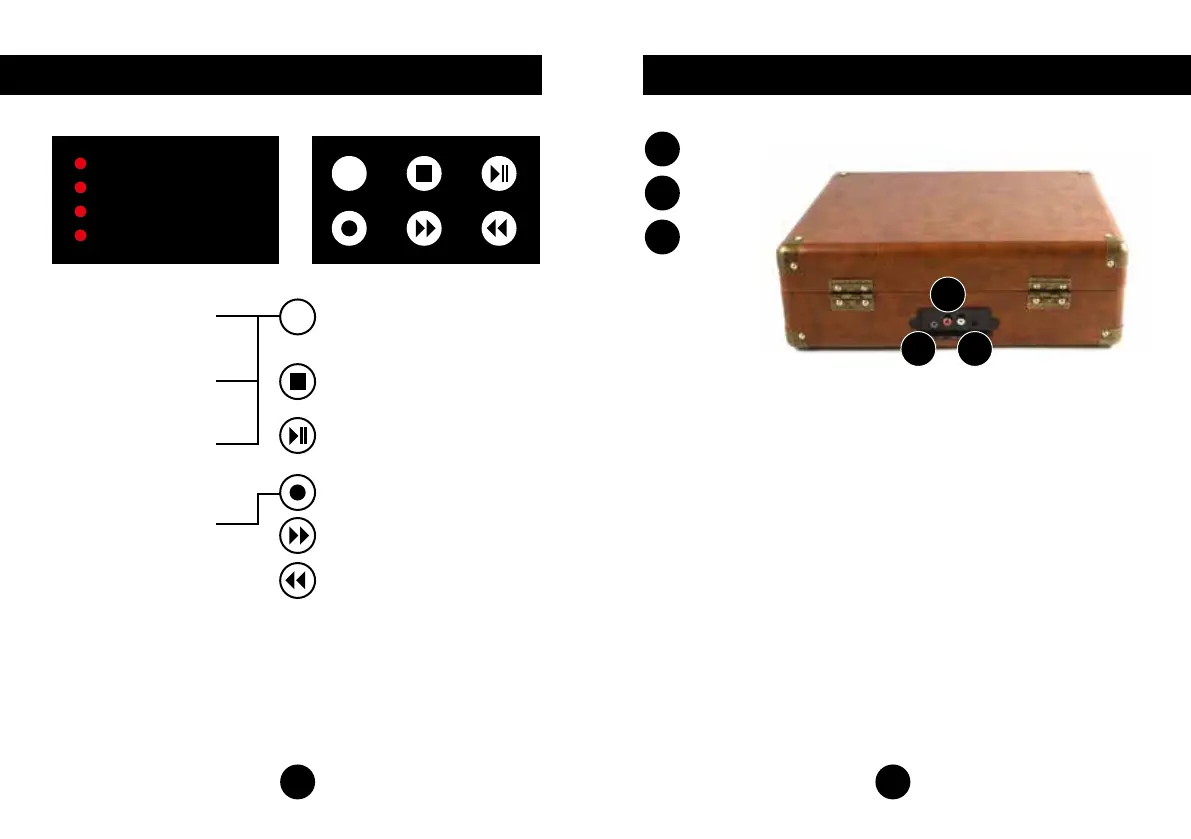
Control Buttons
Turntable Mode
Play vinyl record through
built-in speakers.
USB Mode
Play MP3 files stored on
USB disk.
AUX-IN Mode
Play music from you MP3, apple
or smart device through built in
speakers.
Record Mode
Record vinyl to USB disk.
Press this button to switch between
turntable, USB and aux in mode.
Press to STOP music playing in USB
mode.Press to STOP vinyl recording in
Record mode.
PLAY or PAUSE the music under
USB mode.
Press to record your vinyl records, more
information in record section.
Press to the NEXT song under
USB mode.
Press to the PREVIOUS song under
USB mode.
3
M
M
Turntable
USB
AUX-IN
Record
Input and Output
AUX-IN
4
A
A C
B
AUX-OUT
B
DC-IN
C


 To Next Page