EasyManua.ls Logo

GPS TK06A - Installation Instructions; Preparation for Installation

GPS TK06A
17 pages
Print Icon
To Next Page IconTo Next Page
To Previous Page IconTo Previous Page
Loading...
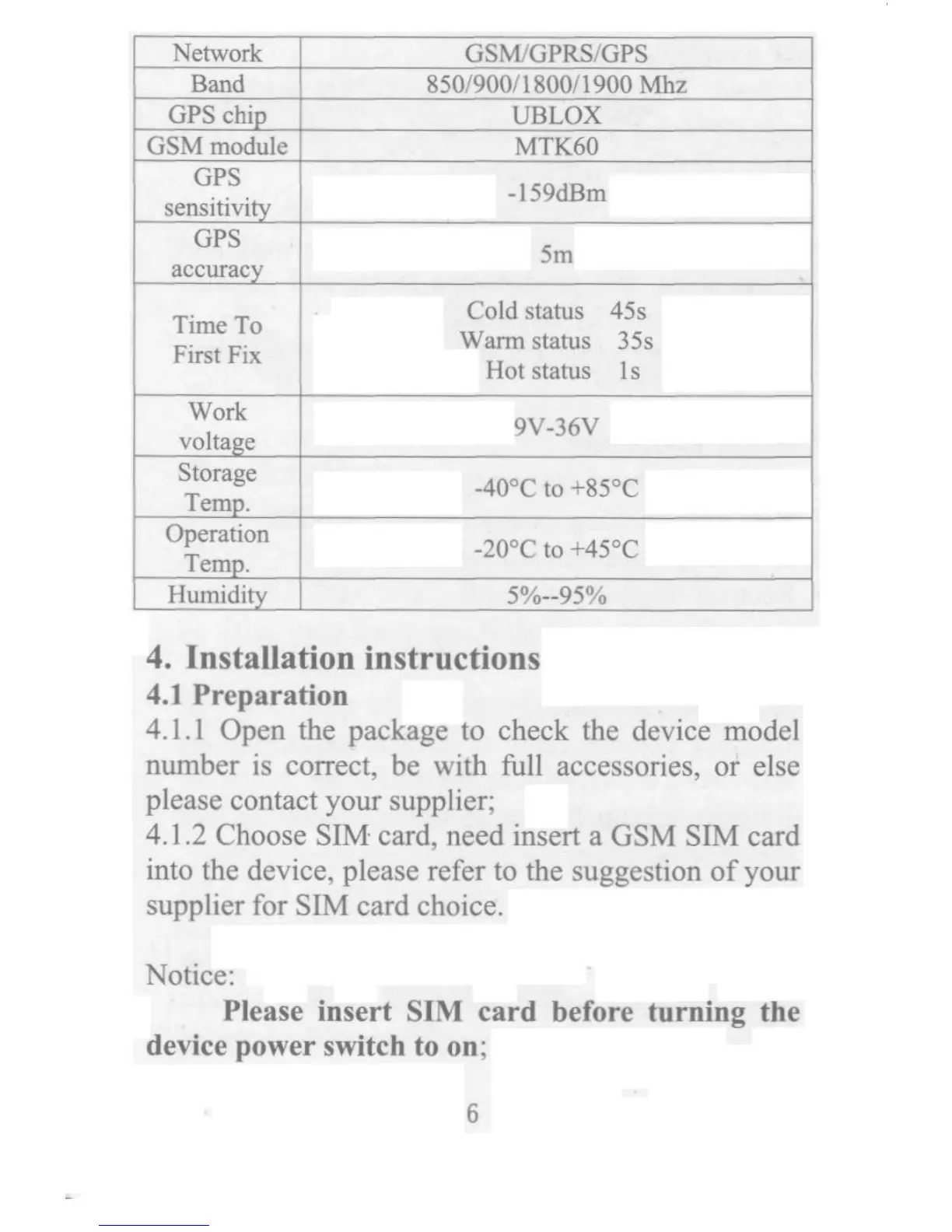
_TFTT F 2Hoo9cv_36v cc _Nemo_k Gsm/GPRs/GPs _B 8so/9oo/ 1 8oo/ 1 9oa Mhz _G_s chi0 uBLox _GsMmodule mTK6o GPS ... -5 Bm "n_!p'_' Sm "CCU'"C . Caldstatus 4Ss ImeTO . . W4_Stat4S 35S IrSt IX OtStatuS lS Work volta0oe Storage +gso -400C tO em0.O perat ion +4so - tO em 0. _Humid it so/o--9so/o 4. In_talla_on in_tructions 4.IPreparatio_ 4. 1. l Open the package to check the device model n4mber is co_ect, be with _ll accessories, or else please contact yo4r supplier; 4. I .2 Choose SIM_ card, need inse_ a GSM SIM card into the device, please refer to the suggestion of yo4r s4pplier for SIM card choice. Notice: Plea_e in_ert SIM card be Fore turning the device power smtch to on; 6

Related product manuals