GPX 8
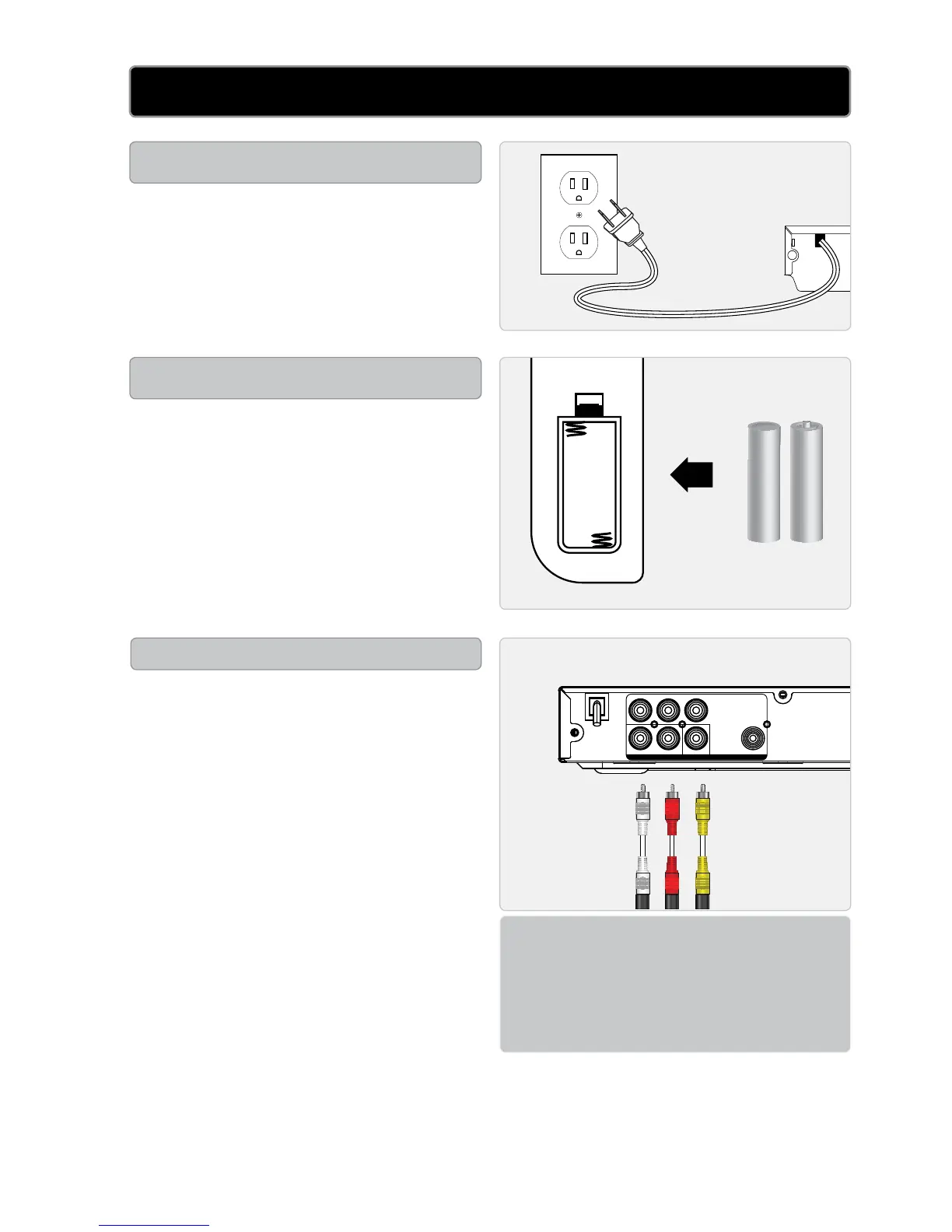
Plug the attached AC cord into
a standard AC power outlet to
power the home theater system.
Requires 2 AAA size batteries
(not included)
setuP
PoWer
remote
comPosIte VIDeo
120V ~ 60Hz
teleVIsIon
1PlugtheincludedRCAaudio/
videocableintotheCOMPOSITE
VIDEO OUTPUT (yellow)onthe
DVDplayerandthecomposite
videoinput(yellow)ona
television.
2Plugtheremainingplugsonthe
includedRCAaudio/videocable
intotheRCA STEREO AUDIO
OUTPUTS (redandwhite)onthe
DVDplayerandtheRCAstereo
audioinputs(redandwhite)ona
television.
3Adjustthetelevision’sinputsetting
tocorrespondtotheinputsused
whenconnectingtheDVDplayer.
STEREO
AUDIO
INPUTS
COMPOSITE
VIDEO
INPUT


 To Next Page