stereo system
teleVIsIon
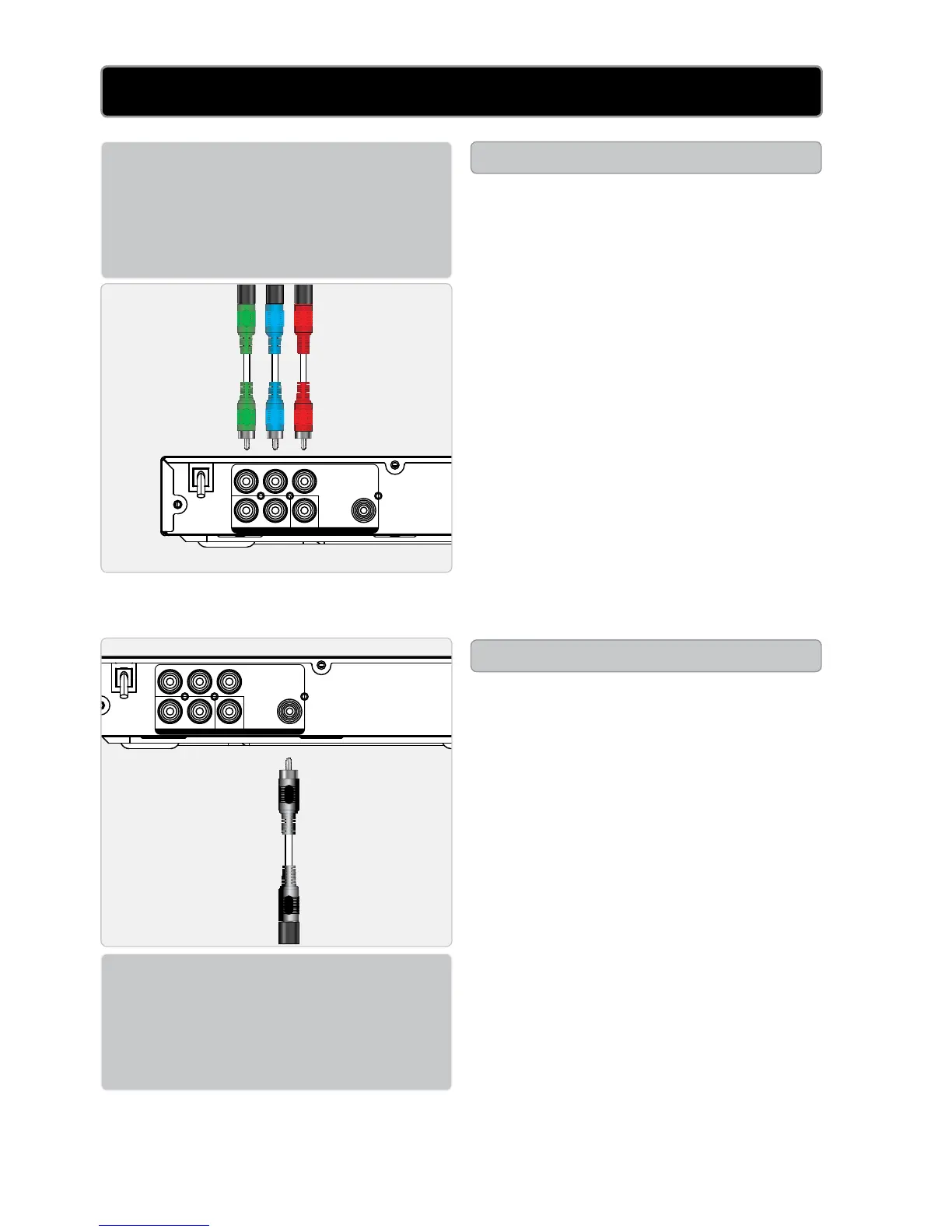
Requiresacomponentvideocable
(notincluded).
1Plugacomponentvideocable
intotheCOMPONENT VIDEO
OUTPUTS (green,blue,red)
ontheDVDplayerandthe
componentvideoinput(green,
blue,red)onatelevision.
2PlugtheincludedRCAaudio/
videocableintotheRCA STEREO
AUDIO OUTPUTS (redandwhite)
ontheDVDplayerandtheRCA
stereoaudioinputs(redand
white)onatelevision.
3Adjustthetelevision’sinputsetting
tocorrespondtotheinputsused
whenconnectingtheDVDplayer.
Requiresacoaxialdigitalaudio
cable(notincluded).
1Plugacoaxialdigitalaudiocable
intotheCOAXIALDIGITAL
AUDIO OUTPUT ontheDVD
playerandthecoaxialdigitalaudio
inputonatelevisionorstereo
system.
2Adjustthetelevisionorstereo
system’sinputsettingto
correspondtotheinputused
whenconnectingtheDVDplayer.
DIGITAL AUDIO INPUT
COMPONENT VIDEO INPUT


 To Next Page