EasyManua.ls Logo

GPX PD808 - Powering and Charging the Portable DVD Player; Connecting to AC and DC Power Sources; Procedure for Charging the Internal Battery

GPX PD808
24 pages
Print Icon
To Next Page IconTo Next Page
To Previous Page IconTo Previous Page
Loading...
Powering the Unit
5
AC Power
COAXIAL
OUTPUT
DC 9V~12V IN
S-VIDEO
OUTPUT CHARGE
POWER
ON
SD/MMC CARD
COAXIA
L
OU
TP
UT
DC
9
V~12V I
N
S
-VIDE
O
OU
TP
UT
C
HAR
G
E
PO
WE
R
O
N
D
MM
AR
AV
OUT
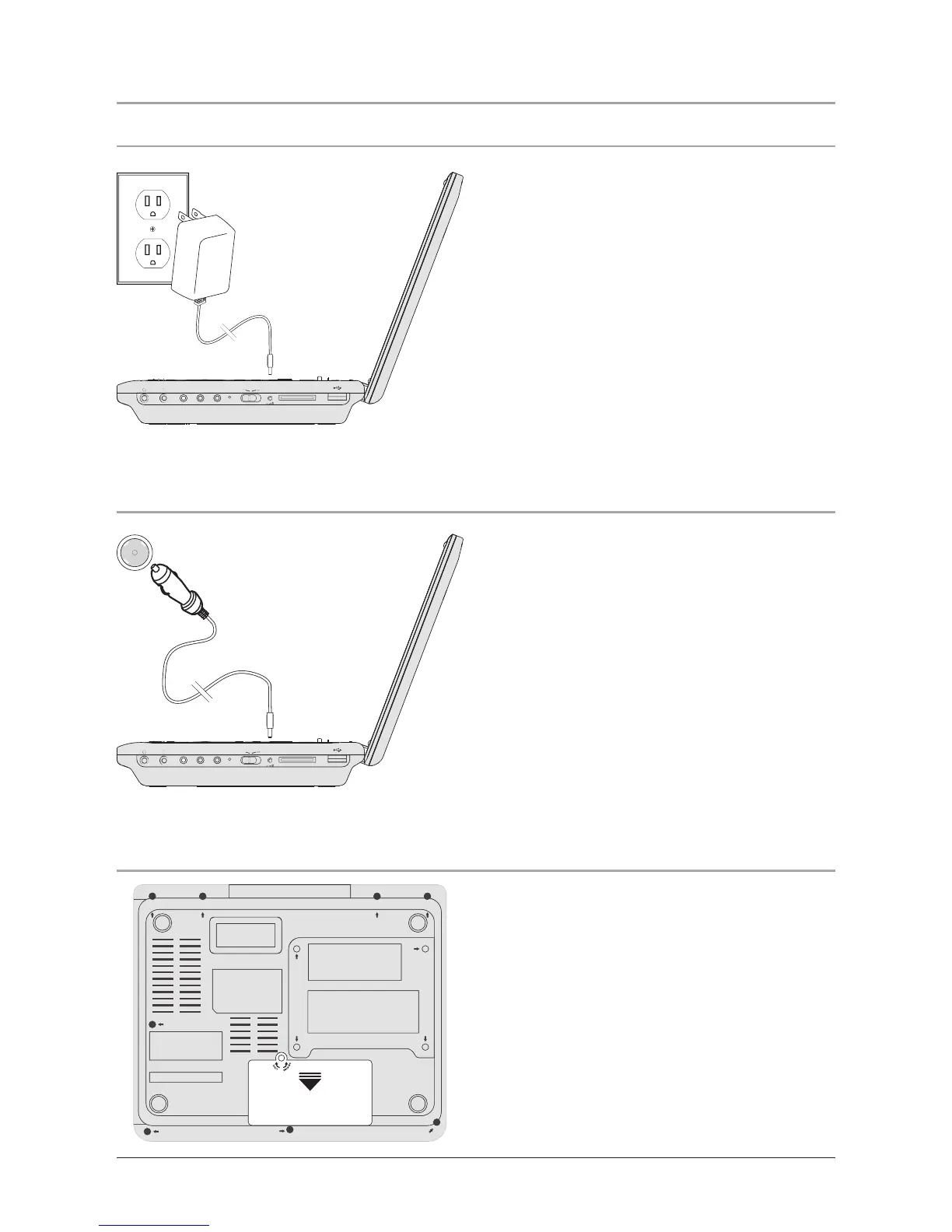
1. To charge the unit, simply connect
it to an AC outlet using the AC/DC
Adapter, or connect it to a DC car
outlet using the DC Car Adapter.
2. It takes approximately 4-5 hours to
charge the unit completely.
DC Power
Battery Power
COAXIAL
OUTPUT
DC 9V~12V IN
S-VIDEO
OUTPUT CHARGE
POWER
ON
SD/MMC CARD
COAXIA
L
OU
TP
UT
DC
9
V~12V I
N
S
-VIDE
O
OU
TP
UT
C
HAR
G
E
PO
WE
R
O
N
D
MM
AR
AV
OUT
1. When plugged into a compatible DC
car outlet, the unit’s built-in battery
will charge.
1. When plugged into a compatible AC
outlet, the unit’s built-in battery will
charge.
120V/60Hz
DC car outlet/cigarette lighter

Other manuals for GPX PD808

Related product manuals