1 2
3
4
5
6
7
8
9
Language selection
Follow the steps below to change the language settings for the
machine.
1. Press the STOP button and wait for 3 seconds.
2. Press button (4), “Normal programme selection”, five times.
3. The display shows the following:
4. Press the START button for “Select” and continue changing
the language, or press the STOP button to cancel.
5. The display shows the following:
6. Scroll using the buttons for the short or long programme to
step through the list of languages. Select a language by pressing
the START button.
7. Then press the STOP button to quit programming mode.
Select washing with or without granules
Washing with granules (6) is selected for all potwashing. However,
the programme without granules (7) should be selected when
washing canteens and utensils where granules may be trapped in
cavities, and for transparent plastic items.
Select required wash time
Short 2 min, 40 s.
Normal 4 min, 40 s.
Long 6 min, 40 s.
All three programmes are 1 minute shorter when washing without
granules.
Starting
Press the start button (1). The machine is preprogrammed so
that it cannot be started if the temperature in the wash tank is
lower than 65 °C at the time of the first start once the water has
been added. The lock is set to 60 °C for subsequent starts so as
to achieve complete washing. Washing at too low a temperature
increases the risk of foam formation and the items to be washed
failing to wash clean. Reprogramming may be carried out by
authorised personnel only.
While the programme is running, the display shows which pro
-
gramme is being run, how much programme time is remaining
and the temperatures in the wash tank and rinse tank.
11
65°C 85°C
Normal program
with granuler
Time remaining:
3:10min
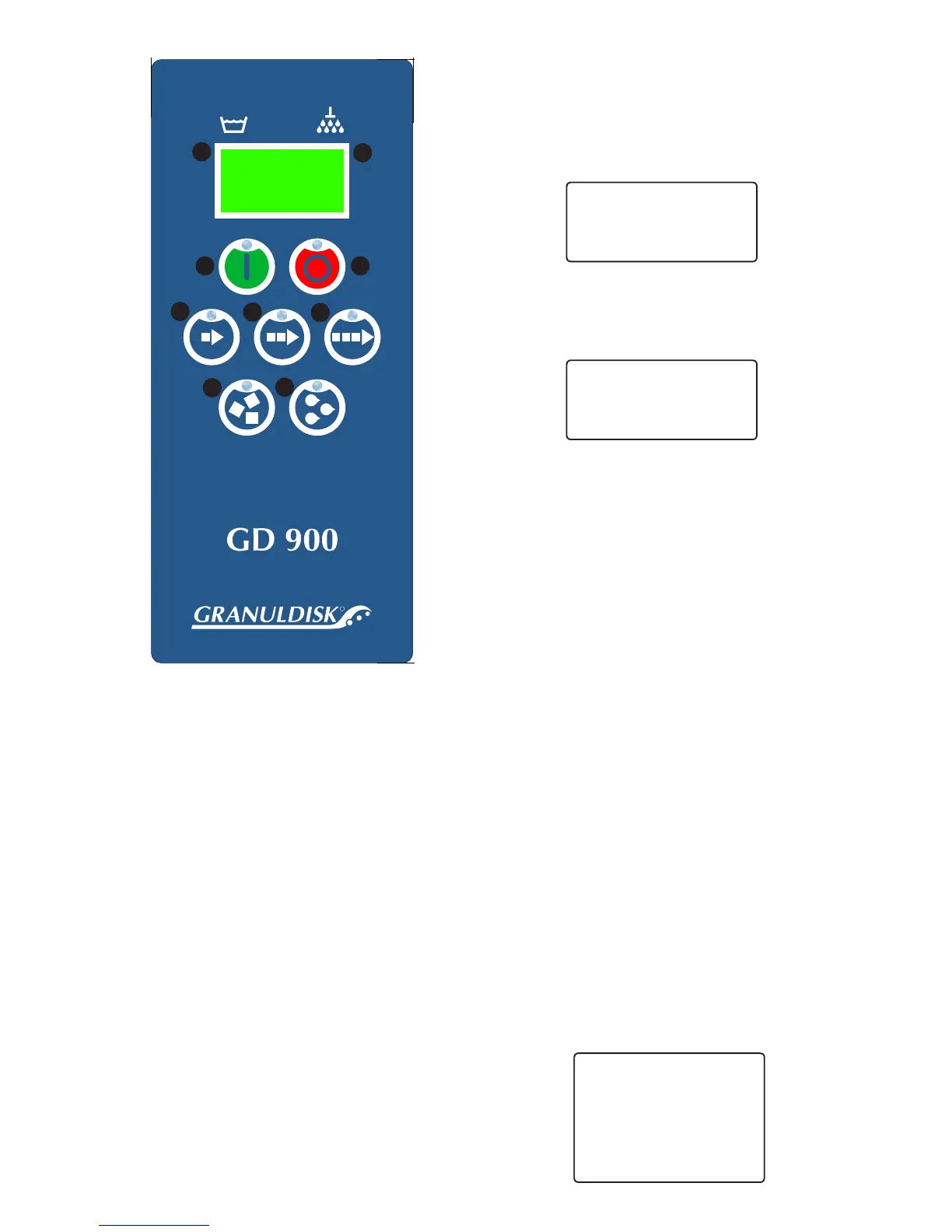
Control Panel
(1) START button
This button starts the wash program described in the dis
-
play. This button is also used to answer “Yes” to a question
shown in the display window.
(2) STOP button
This button stops all ongoing activities in the machine and
resets any alarms.
(3) Short programme selection
(4) Normal programme selection
(5) Long programme selection
(6) Washing with granules
(7) Washing without granules
Display
Temperature indication
The temperatures in the wash tank (8) and rinse tank (9) are
always displayed. If the figures are flashing, the water is being
heated.
Other Indications
How much time is remaining for the wash programme is always
shown while washing is in progress. Various error codes may also
be displayed. How these are to be rectified is described in section
4 of this manual.
Language
English
Choose Back
Language
< English >
OK Cancel


 To Next Page
 Loading...