GB - 23
SERVICING BATTERY
NOTE: Unit comes equipped with a
maintenance-free battery that requires no
regular maintenance except cleaning the
terminals and periodic charging.
Battery Removal and Installation
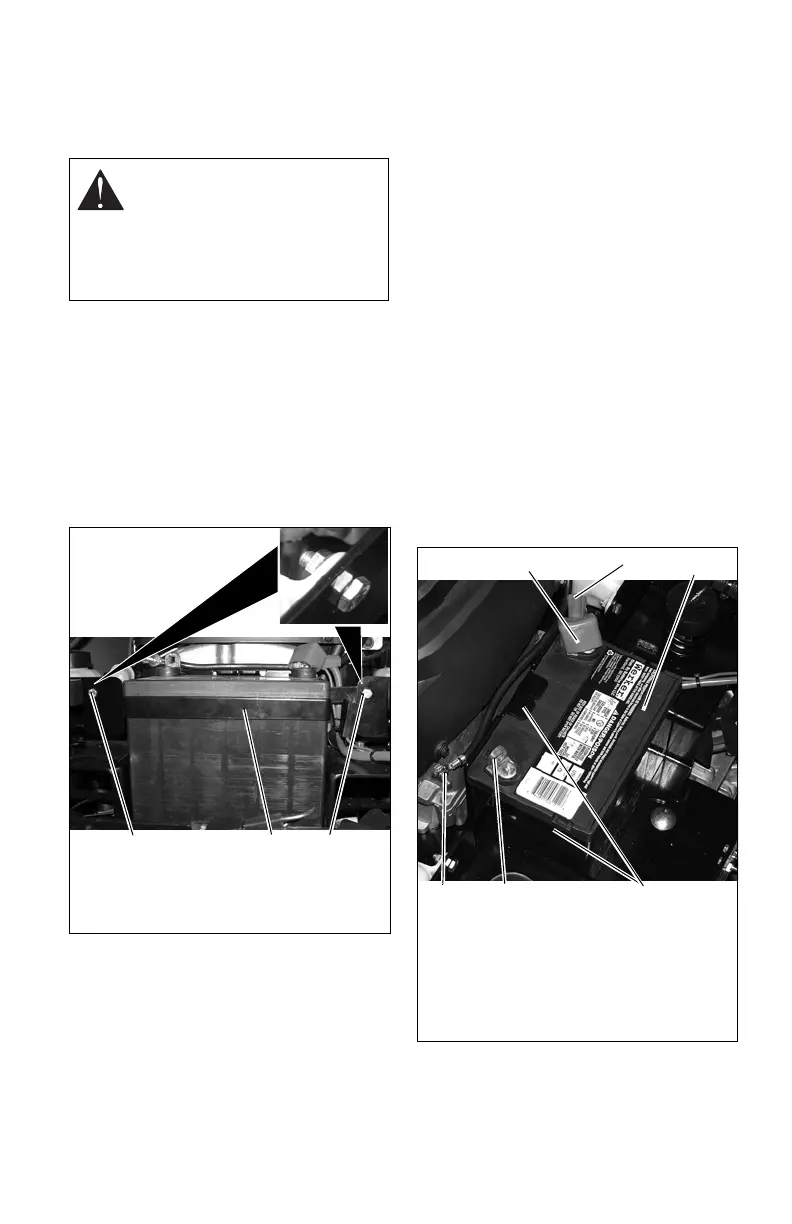
Remove
(Figure 18)
1. Tip seat forward (see TIPPING SEA
T
FORWARD on page 20).
2. Disconnect negative (–) cable first, then
positive (+)
cable.
3. Loosen and remove bolts.
4. Remove battery hold-down bracket and
batte
ry from unit.
Install
(Figure 19)
1. Install battery on the unit with battery
hold-d
own bracket.
2. Connect positive (+) cable first, then
neg
ative (–) cable.
3. Apply petroleum jelly or dielectric
grease
to battery cable ends and terminals.
4. Tip seat back (see TI
PPING SEAT
FORWARD on page 20).
Cleaning Battery and Battery Cables
(Figure 19)
1. Tip seat forward (see TIPPING
SEAT
FORWARD on page 20).
2. Disconnect negative (–) cable first, then
positive (+)
cable.
3. Clean battery cable ends, negative (–)
t
erminal, and positive (+) terminal with a
wire brush and rinse with a weak baking
soda solution.
4. Connect positive (+) cable first, then
neg
ative (–) cable.
5. Apply petroleum jelly or dielectric
grease
to battery cable ends and terminals.
6. Tip seat back (see TI
PPING SEAT
FORWARD on page 20).
WARNING: Battery post
s,
terminals and related accessories
contain lead and lead
compounds, chemicals known to
the State of California to cause
cancer and reproductive harm.
Wash hands after handling.
Figure 18
1. Battery Hold-Down Bracket
2. Bolts
1
2
2
Figure 19
1. Battery Hold-Down Bracket
2. Negative (–) Cable
3. Negative (–) Terminal
4. Battery
5. Positive (+) Cable
6. Positive (+) Terminal
1
5
2
4
6
3



 To Next Page