Need help?
Do you have a question about the GreatCall Lively Mobile+ and is the answer not in the manual?
Identifies and describes the components included in the Lively Mobile Plus box.
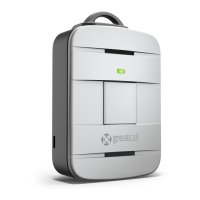
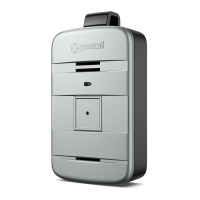
Provides a visual guide and explanation of the device's front components.
Explains the charging dock, its components, and its function for charging the device.
Guides users on how to correctly set up the charging dock for the device.
Details the initial steps to power on and activate the Lively Mobile Plus device.
Instructs users on how to properly place and use the charging dock with their device.
Advises on the optimal times and conditions for charging the device's battery.
Explains the meaning of different battery indicator light patterns on the device.
Provides instructions for powering the device on and off using the power button.
Outlines scenarios for using the device and its operational coverage.
Details the process of contacting 5Star Service for assistance and emergency help.
Explains how to directly contact 9-1-1 services for critical emergencies.
Describes how to answer calls received on the Lively Mobile Plus device.
Guides users on how to access urgent care services through the device.
Explains the meaning of the service indicator light patterns for cellular coverage.
Details how to use the clip accessory and magnetic lanyard with the device.
Explains how the device uses algorithms and accelerometer to detect falls.
Describes the automatic process when a fall is detected and the device calls 5Star.
Guides users on how to verify if the Fall Detection service is active on their device.
Specifies how the device must be worn with the magnetic lanyard for accurate fall detection.
Outlines the device's response and user actions following a fall detection event.
Explains how to manage your 5Star account and personal profile online.
Details the importance and content of the personal emergency profile for agents.
Guides on using the test call feature to confirm device functionality.
Describes how to use the "Ping My 5Star" feature to locate a lost device.
Explains how to view the device's location and share information with family.
Information on adding notes for 5Star Agents to assist during calls.
How to access and update billing address and credit card information.
Outlines the legal agreement, user rights, obligations, and service terms.
Explains how 5Star service works, its limitations, and comparison to 9-1-1.
Details user obligations, prohibited uses, and monthly charges for the service.
Explains arbitration, dispute resolution, and the applicable governing law.
Provides guidelines for safe device operation, FCC compliance, and medical device considerations.
 General
| Category | Medical Equipment |
|---|---|
| Connectivity | Cellular |
| GPS Tracking | Yes |
| Fall Detection | Yes |
| Two-Way Communication | Yes |
| Emergency Button | Yes |
| Device Type | Medical Alert Device |
| Emergency Response | 24/7 |
| Mobile App | Yes |

 To Next Page