EasyManua.ls Logo

Gree FGR20Pd/DNa-X - User Manual

Gree FGR20Pd/DNa-X
41 pages
Print Icon
To Next Page IconTo Next Page
Loading...
Owner's Manual
Original Instructions
Commercial Air Conditioners
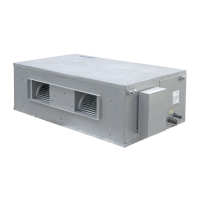
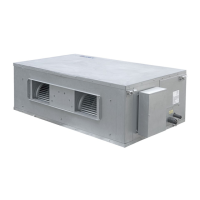
Ducted Type Split Air-Conditioner Units(Inverter
Series)
Models:
FGR20Pd/DNa-X
FGR25Pd/DNa-X
FGR30Pd/DNa-X
FGR40Pd/D(2)Na-X

Other manuals for Gree FGR20Pd/DNa-X

Questions and Answers

  • Q
    qmillerAug 6, 2025
    How to troubleshoot a Gree Air Conditioner that doesn't work?
    • M
      Monica PayneAug 6, 2025
      If your Gree Air Conditioner isn't working, check the following: * **Fuse or circuit breaker:** Replace the fuse or reset the circuit breaker. * **Power failure:** The unit should restart automatically when power is restored. * **Power connection:** Ensure the unit is properly connected to a power source. * **Remote controller battery:** Replace the batteries in the remote controller. * **Remote controller range:** Make sure you are within 8 meters of the unit when using the remote.
  • J
    Jason BrownAug 25, 2025
    What to do if my Gree FGR20Pd/DNa-X Air Conditioner runs but stops immediately?
    • A
      Ann MyersAug 25, 2025
      If your Gree Air Conditioner starts but then stops immediately, the air inlet or outlet of the indoor or outdoor units might be blocked. Clear any obstructions to ensure proper airflow.
  • V
    Valerie PenaNov 14, 2025
    Why is my Gree Air Conditioner not cooling or heating properly?
    • W
      William PhamNov 14, 2025
      If your Gree Air Conditioner isn't cooling or heating properly, consider these potential causes and solutions: * **Airflow Obstructions:** Clear any blockages from the air inlet or outlet of both the indoor and outdoor units. * **Temperature Settings:** Adjust the temperature settings on the remote or wired controller. * **Fan Speed:** Increase the fan speed using the remote or wired controller. * **Wind Direction:** Correct the wind direction using the remote or wired controller. * **Open Doors/Windows:** Ensure all doors and windows are closed. * **Direct Sunlight:** Close curtains or louvers to block direct sunlight. * **Too many people:** Reduce the number of people in the room. * **Excessive Heat Sources:** Reduce the number of heat sources in the room. * **Dirty Fi...
  • А
    АқылбекJun 26, 2026
    Ассалямуғалейкум подскажите что за ошибка , не на че не реагируют другие кнопки

    Summary

    1 Safety Precautions

    1.1 Safety Notices

    Important warnings and prohibitions regarding unit operation and user safety.

    1.2 Power Supply Demand

    Requirements for electrical power supply, wiring, and grounding for safe operation.

    2 Installation of Indoor Unit

    2.1 Selection Proper Installation Location

    Guidelines for choosing the optimal location for the indoor unit installation.

    2.2 Outline Dimension and Installation Spots

    Physical dimensions and recommended installation spots for the indoor unit.

    2.3 Drainage Pipe Installation and Drainage System Testing

    2.3.1 Notice for Installation of Drain Pipe

    Key considerations and precautions for the proper installation of the drain pipe.

    2.3.2 Drainage Pipe Installation

    Detailed steps and methods for installing the drainage pipe correctly.

    2.3.3 Test of Drainage System

    Procedures for conducting a test of the drainage system to ensure it functions correctly.

    2.4 Installation of Air Duct

    2.4.1 Installation of Air-out Duct

    Specific instructions and guidelines for installing the air-out duct.

    2.5 Indoor unit static pressure notch adjustment

    2.6 Installation of Wired Controller

    2.7 Wiring Work

    2.7.1 Connection of Wire and Patch Board Terminal

    Detailed steps for connecting wires to the patch board terminal.

    2.7.2 Connect Communication Wire of Wired Controller

    Instructions on how to connect the communication wire for the wired controller.

    2.7.3 Illuminate for Connection of Wired Controller and Indoor Units Network

    Information on connecting wired controllers within the indoor unit network.

    3 Installation of Outdoor Unit

    3.1 Dimension of Outdoor Unit and Mounting Hole

    Physical dimensions and mounting hole specifications for the outdoor unit.

    3.2 Installation Space Requirement

    Required clearances and space specifications for the outdoor unit installation.

    3.3 Refrigerant Pipe Connection

    Guidelines, principles, and permitted values for connecting refrigerant pipes.

    3.4 Vacuum Pumping, Refrigerant Adding

    3.4.1 Vacuum Pumping

    Procedure for vacuum pumping the indoor unit and connection pipes.

    3.4.2 Refrigerant Adding

    Steps and considerations for adding refrigerant to the system.

    3.5 Electric Wiring

    3.5.1 Notices for Wiring

    Crucial notices and requirements for performing electrical wiring safely and correctly.

    3.5.2 Wiring Diagram

    Diagram illustrating the wiring connections between outdoor, indoor units, and wired controller.

    3.5.2 Wiring Diagram

    Wiring diagrams and specifications for circuit breakers and power cords for different models.

    4 Check Items after Installation and Test Operation

    4.1 Check Items after Installation

    Checklist of critical items to verify after the installation is completed.

    4.2 Test Operation and Debugging

    4.2.1 Prepare The Test Operation and Debugging

    Steps and precautions to take before performing test operation and debugging.

    4.2.2 Test Operation and Debugging

    Detailed procedure for performing test operation and debugging of the unit.

    4.2.2 Test Operation and Debugging

    Explanation of buttons and display tubes on the motherboard for unit control and configuration.

    4.2.2.1 Basic Operation of Project Debugging

    Steps for initiating, managing, and completing project debugging sessions.

    4.2.2.2 Debugging Process

    4.2.2.2 Debugging Process

    Debugging stages for confirming indoor unit quantity and detecting outdoor unit components.

    4.2.2.2 Debugging Process

    Debugging stages for component inspection, compressor preheating, and valve status confirmation.

    5 Common Malfunctions and Troubleshooting

    Unit Doesnt Work

    Troubleshooting steps when the unit fails to start or operate.

    Unit Runs But Stops Immediately

    Diagnosing and resolving issues where the unit stops unexpectedly after starting.

    Abnormal Cooling or Heating

    Addressing problems related to inefficient or incorrect cooling and heating performance.

    Following Circumstances Are Not Malfunctions

    Identification of normal operating conditions that may appear as malfunctions.

    6 Error Indication

    Indoor Error Codes

    Specific error codes and their meanings for the indoor unit.

    Outdoor Error Codes

    Specific error codes and their meanings for the outdoor unit.

    Debugging Error Codes

    Error codes related to the debugging process of the unit.

    Status Codes

    Codes indicating various operational statuses of the unit.

    Debugging Error Codes (Continued)

    Further error codes for debugging and system management.

    Status Codes (Continued)

    Additional status codes indicating operational modes and conditions.

    7 Maintenance and Care

    7.1 Outdoor Heat Exchanger

    Instructions for cleaning and maintaining the outdoor heat exchanger.

    7.2 Drain Pipe

    Procedures for checking and maintaining the drain pipe to ensure proper drainage.

    7.3 Notice before Seasonal Use

    Essential checks and preparations before operating the unit seasonally.

    7.4 Maintenance after Seasonal Use

    7.5 Parts Replacement

    8 After-sales Service

    Gree FGR20Pd/DNa-X Specifications

    General IconGeneral
    BrandGree
    ModelFGR20Pd/DNa-X
    CategoryAir Conditioner
    LanguageEnglish

    Related product manuals