Need help?
Do you have a question about the GreenTech PureAir Sport and is the answer not in the manual?
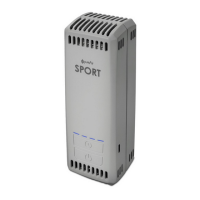
Visual representation of the pureAir SPORT device, highlighting key components like indicator lights, timer button, power button, and micro-USB port.
Technical details including model, dimensions, weight, voltage, battery capacity, ozone output, and warranty information.
Charge the battery completely before first use for optimal performance. Charging time varies based on USB outlet amperage.
A flashing blue light indicates charging; solid blue lights represent charge level, with four solid lights signifying a full charge.
Turn on the device by holding the power button; set the desired run time using the timer button and green indicator lights.
Place the device in the same compartment as items needing odor elimination, avoiding excessively wet items.
Turn off the device by holding the power button; check the battery charge level by pressing the power button briefly.
Enable continuous operation by connecting the unit to a powered USB source, suitable for items like sports pads.
Wipe the exterior with a slightly damp cloth; use compressed air or vacuum for internal dust or fibers.
Do not allow liquid to enter the device and avoid disassembling the pureAir SPORT to prevent damage or injury.
 General
| Brand | GreenTech |
|---|---|
| Model | PureAir Sport |
| Category | Air Cleaner |
| Language | English |

 To Next Page