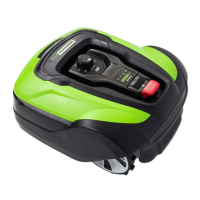
This document is an operator's manual for the Greenworks Optimow robotic lawnmower, covering models Optimow 25H, Optimow 50H, Optimow 25, and Optimow 50. It provides essential information for safe operation, installation, maintenance, and troubleshooting.
Function Description:
The Greenworks Optimow is a robotic lawnmower designed to autonomously cut grass in open and level areas. It operates within a defined boundary, which is established using a boundary wire. The mower is capable of charging itself by returning to its charging station. It is intended for residential use and is designed to simplify lawn care by automating the mowing process. The device is equipped with safety features to prevent injury and damage, and it requires a safety key for operation.
Important Technical Specifications:
- Models: Optimow 25H, Optimow 50H, Optimow 25, Optimow 50
- Dimensions (H x L x W):
- Optimow 25H/50H: 12.2 in (31 cm) x 25.0 in (63.5 cm) x 20.0 in (51 cm)
- Optimow 25/50: 10.3 in (26 cm) x 24.8 in (63 cm) x 19.7 in (50 cm)
- Weight:
- Optimow 25H/50H: 26.4 lbs (12 kg)
- Optimow 25/50: 24.2 lbs (11 kg)
- Battery: Special Lithium-Ion battery, 24V/4.0Ah (Part No. T0100273-00 / T0100609-00)
- Power Supply: 100-120 V/29 V DC
- Low Voltage Cable Length: 33 ft (10 m)
- Mean Energy Consumption at Maximum Use:
- Optimow 25H/25: 10 kWh/month for a working area of 1/4 acre (0.10 ha)
- Optimow 50H/50: 12 kWh/month for a working area of 1/2 acre (0.20 ha)
- Charge Current:
- Optimow 25H/25: 1.3 A DC
- Optimow 50H/50: 2.4 A DC
- Average Charging Time:
- Optimow 25H/25: 270 minutes
- Optimow 50H/50: 70 minutes
- Average Cutting Time: 150 minutes (all models)
- Cutting System: Three pivoted cutting blades
- Average Power Consumption During Cutting: 25 W ± 20% (all models)
- Cutting Height:
- Optimow 25H/50H: 2.4-4.0 in (6-10 cm)
- Optimow 25/50: 0.8-2.4 in (2-6 cm)
- Cutting Width: 8.7 in (22 cm) (all models)
- Narrowest Possible Passage: 24 in (60 cm) (all models)
- Maximum Slope for Cutting Area: 35% (all models)
- Maximum Slope for Boundary Wire: 15% (all models)
- Maximum Length Boundary Wire: 2600 ft (800 m) (all models)
- Working Capacity*:
- Optimow 25H/25: 1/4 acre (0.10 ha)
- Optimow 50H/50: 1/2 acre (0.20 ha)
- Recommended Area Capacity:
- Optimow 25H/25: 0-0.2 acre (0-0.08 ha)
- Optimow 50H/50: 0.1-0.4 acre (0.04-0.16 ha)
- IP Classification:
- Mower: IPX5
- Charging Station: IPX3
- Power Supply: IP67
- Radio Frequency Data Sheet:
- LTE Cat M1: Band 2 1900 MHz, Band 4 1700 MHz, Class 3 (23 dBm)
- Short Range Devices (SRD) (Boundary Wire): 0-148.5 KHz
Usage Features:
- Installation: The manual provides instructions for connecting the power supply and installing the boundary wire. The power supply should be in a cool, dry environment, out of direct sunlight. If outdoors, it must be approved for outdoor use. The low voltage cable can be stapled down or buried. The boundary wire can be secured with pegs (recommended for initial adjustment) or buried 0.4-8 inches into the ground.
- Starting the Mower: To start, insert the safety key and rotate counter-clockwise to position "1", slide the START button latch backward, and press the START button.
- Stopping the Mower: To stop, press the STOP button on the mower and remove the safety key.
- Safety Precautions: Emphasizes reading the operator manual, removing the safety key before maintenance, keeping a safe distance from rotating parts, and supervising children and pets. It also warns against operating with defective guards or without safety devices.
- Indicator LEDs: The mower features LEDs (Green for operating, Blue for connectivity, Yellow for security, Red for error) to indicate its status and guide troubleshooting.
- Connectivity: The mower attempts to connect to an internet server, indicated by a flashing blue LED. A solid blue LED means it's connected.
- Security: Requires PIN code authorization (flashing yellow LED) which can be done via a mobile app.
- Troubleshooting: Provides a table of LED statuses, their meanings, and recommended actions for common issues like recovery mode, connectivity problems, and errors.
Maintenance Features:
- General Maintenance: Users are advised to keep all nuts, bolts, and screws tight, replace worn or damaged parts for safety, and ensure only correct replacement cutting means are used.
- Battery Replacement: Instructions are provided for replacing the battery. This involves turning the mower upside down, removing four Torx T20 screws and the battery cover, disconnecting the old battery, inserting the new one, and reassembling. Users are warned to press the STOP button, remove the safety key, and wear protective gloves before replacing batteries. Only original replacement parts should be used.
- Battery Safety: Warnings about electrolyte leakage (flush with water/neutralizing agent, seek medical help if in eyes), using the original charging station, and the battery's limited service life (2-4 years).
- Environmental Protection: Strict guidelines for disposing of Li-ion batteries are provided due to their toxic and corrosive materials. Users are instructed to contact local waste disposal agencies for specific instructions and to take batteries to certified recycling centers. Warnings against recharging cracked/broken batteries, attempting repairs, or disposing of them in household trash are highlighted. Terminals should be covered with heavy-duty adhesive tape before disposal.
- Boundary and Guide Wire Breaks: Suggests inspecting the entire boundary wire and guide wire (if installed) from the charging station for physical damage and checking all couplings.

 Need help?
 General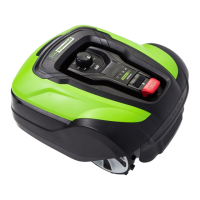


 To Next Page