2. Line up the recesses of the side discharge chute (12)
below the pivot.
3.
Close the side discharge door.
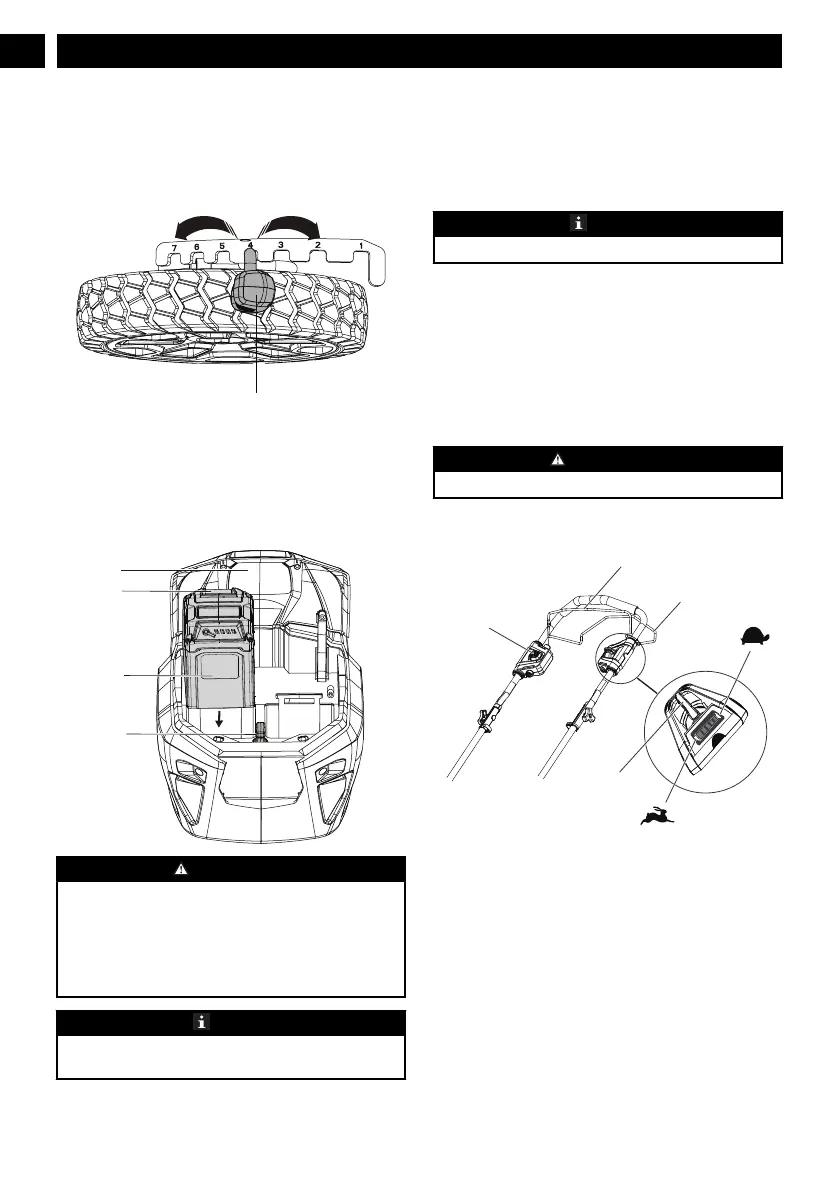
7.7 SET THE CUTTING HEIGHT
The machine can be set to different cutting heights.
1. Pull the height adjustment lever (8) rearward to increase
the cutting height.
2.
Pull the height adjustment lever forward to decrease the
cutting height.
7.8 INSTALL THE BATTERY PACK
W
ARNING
• If the battery pack or charger is damaged, replace the
battery pack or the char
ger.
• Stop the machine and wait until the engine stops before
you install or remove the battery pack.
• Read, know, and do the instructions in the battery and
charger manual.
NOTE
The machine has a battery storage compartment that helps
store the battery pack.
1. Open the battery door (9).
2. Align the lift ribs on the battery pack (20) with the
grooves in the battery compartment.
3. Push the battery pack into the battery compartment until
the battery pack locks into place.
4. When you hear a click, the battery pack is installed.
5. Close the battery door.
NOTE
The motor starts only when you put in the safety key (21).
7.9 REMOVE THE BATTERY PACK
1. Open the battery door (9).
2.
Remove the safety key (21).
3. Push and hold the battery release button (19).
4. Remove the battery pack from the machine.
8 OPERATION
W
ARNING
Wear eye protection during operation.
8.1 START THE MACHINE
1. Put in the safety key.
2. Push and hold the start button (2).
3. While you hold the start button, pull the bail switch (1) in
the direction of the handle bar.
4. Release the start button to start the machine.
Soft-Start
This Li-ion machine has a “soft-start” feature.
When you start the machine, it goes to full speed after
approximately 3 seconds.
10
English
EN





 To Next Page