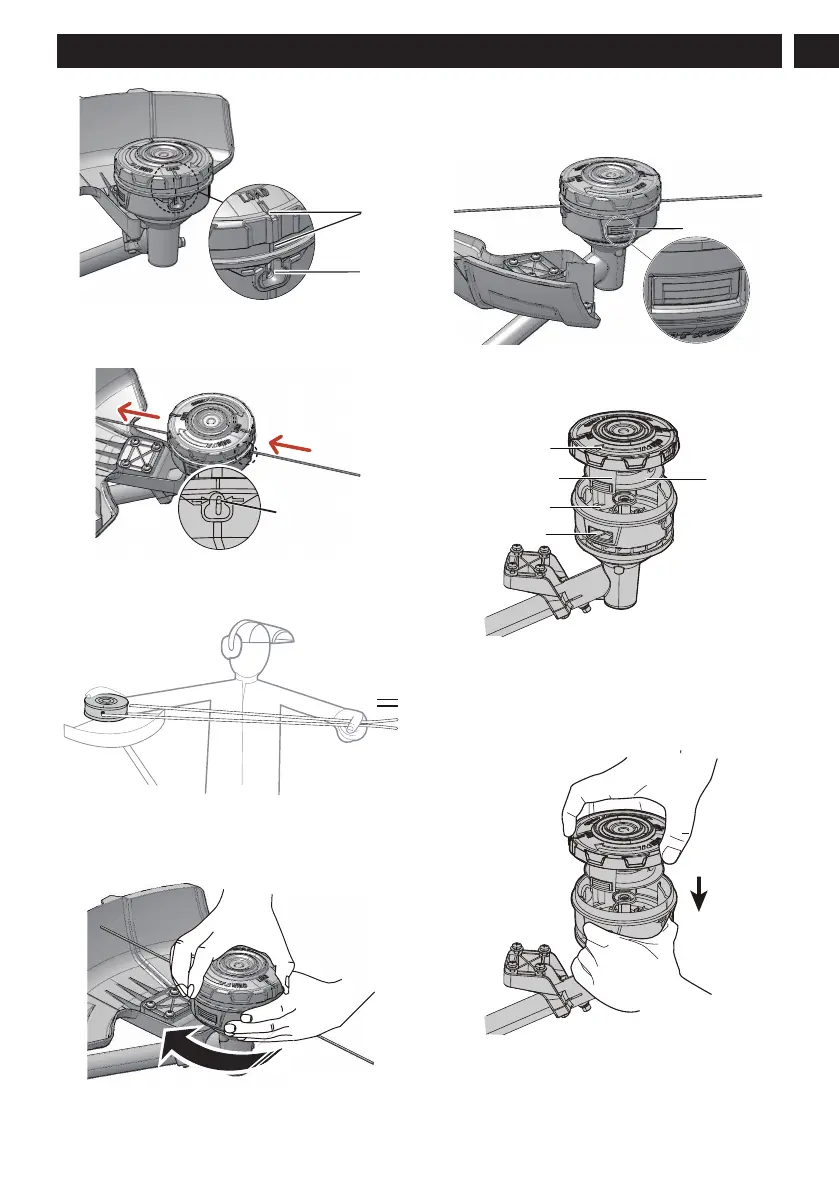
3. Insert the line into the mounting hole, which is located
inside the eyelet (b). Push the cutting line until it exits the
opposite hole.
Mounting Hole
inside
the
E
yelet
4. Pull the cutting line through until there is an equal
quantity of cutting line on each side.
5. Rotate the spool cover clock-wise in the arrow direction
to wind the cutting line into the trimmer head. Keep
approximately 5 in of cutting line above out of each side
of the trimmer head.
10.5 REPLACE EXCESS LINE
1. Push the tabs (a) on the sides of the trimmer head at the
same time.
2. Pull and remove the spool cover (b).
3. Remove any remaining line.
4. Clean dirt and debris from all parts. Replace spool (d) if it
is worn or damaged.
5. Align the spool tabs (a) with the tab openings in the base
of the spool (e).
6. Push the spool cover until it clicks into position.
11
English
EN






 To Next Page