EasyManua.ls Logo

Greyline Instruments PTFM 1.0 - User Manual

Greyline Instruments PTFM 1.0
45 pages
Print Icon
To Next Page IconTo Next Page
Loading...
www.greyline.com
USER'S GUIDE
Installation & Operation
Instructions
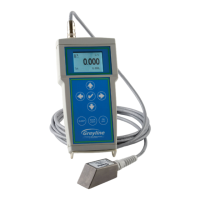
Portable Transit Time Flow Meter
Model PTFM 1.0
Manual Series A.1.6

Questions and Answers

  • Z
    Zachary FisherAug 3, 2025
    What to do if my Greyline Instruments Measuring Instruments show reading when there is no flow?
    • C
      Caitlin BlanchardAug 3, 2025
      If your Greyline Instruments Measuring Instruments display a meter reading despite there being no flow, it could be due to several reasons. First, erratic measurements might be caused by electrical noise or poor signal quality. Try setting the Calibration/Damping to 5% and, with zero flow, use the Setup/Tare function. Another potential cause is Variable Speed Drive interference, so follow the drive manufacturer's wiring and grounding instructions, or try relocating the flowmeter, sensors, and wiring away from the VSD. Finally, check the sensor cable connections to ensure they are correctly connected and tightened.
  • C
    Cindy MatthewsAug 12, 2025
    Why does my Greyline Instruments Measuring Instruments show a meter reading when there is no flow?
    • M
      Monica WagnerAug 12, 2025
      A meter reading on your Greyline Instruments Measuring Instruments when there is no flow can stem from a few issues. It might be due to erratic measurement caused by electrical noise or poor signal quality. You can check this by setting damping to 0%. Variable Speed Drive interference could also be the culprit; ensure you're following the drive manufacturer's wiring and grounding instructions and consider moving the flowmeter, sensors, and wiring away from the VSD. Also, make sure the sensor cable connections are correctly connected and tightened.
  • K
    Kristy WebbAug 22, 2025
    How to fix a Greyline Instruments Measuring Instruments that shows a reading when there is no flow?
    • E
      Eddie ClarkAug 23, 2025
      To address a meter reading on your Greyline Instruments Measuring Instruments when there is no flow, start by checking for erratic measurements due to electrical noise or poor signal quality. You can set the Calibration/Damping to 5% and with zero flow, use the Setup/Tare function. Also, ensure that you follow the Variable Speed Drive manufacturer's wiring and grounding instructions. Relocating the flowmeter, sensors, and wiring away from the VSD might help. Finally, verify that all sensor cable connections are correctly inserted into terminals and tightened.

Summary

Device Features and Setup

BATTERY

Provides power for 18 hours continuous operation when fully charged.

CONNECTIONS

Details the ports for power, USB, and transducer.

QUICK BENCH TEST

SENSOR INSTALLATION

CALIBRATION MENU

Setup Configuration

Parameters for pipe and fluid properties.

Calibration Settings

Adjustments for 4-20mA output and damping.

Data Logging Setup

Options for configuring data logging parameters.

Special Functions

Access to language, password, and reset options.

DISPLAY SCREENS

LOGGING AND SECURITY

PASSWORD

Set a password to prevent unauthorized access to calibration.

UNITS AND MODES

SETUP PROCEDURES

Sensor Selection

Choose the appropriate sensor type for the application.

Fluid and Pipe Properties

Enter details like fluid type, temperature, pipe OD, and wall thickness.

CALIBRATION PROCESS

4-20 mA Calibration

Set flow rates corresponding to 4mA and 20mA analog output.

Flow and Damping Settings

Adjust minimum flow rate and damping for stability.

DATA LOGGING SETUP

Log Configuration

Set log site ID, mode, date, time, and interval.

SPECIAL FUNCTIONS

SENSOR MOUNTING GUIDELINES

Location Considerations

Guidelines for optimal sensor placement on pipes.

SENSOR MOUNTING HARDWARE

SEPARATION DISTANCE MEASUREMENT

SENSOR COUPLING TECHNIQUES

SENSOR MOUNTING RECOMMENDATIONS

FIELD TROUBLESHOOTING

Meter Reading Issues

Addresses problems like no flow, low readings, and no echo indication.

COMMON QUESTIONS AND ANSWERS

PRODUCT SPECIFICATIONS

General Specifications

Technical details like flow rate, pipe size, power, and display.

Electronics and Accuracy

Information on operating temperature, enclosure, and measurement accuracy.

Greyline Instruments PTFM 1.0 Specifications

General IconGeneral
Accuracy±1% of reading
Temperature Range-40°F to 200°F (-40°C to 93°C)
DisplayLCD with Backlight
TypePortable Transit Time Flow Meter
Measurement PrincipleTransit Time Ultrasonic
Fluid TypesClean Liquids
Outputs4-20mA
Measurement Range0.1 to 40 ft/sec (0.03 to 12 m/sec)
Power Supply12-28 VDC
Operating Temperature-4°F to +140°F (-20°C to +60°C)

Related product manuals