EasyManua.ls Logo

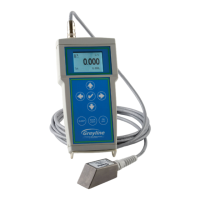
Greyline Instruments PDFM 5.1 - User Manual

Default Icon
31 pages
Print Icon
To Next Page IconTo Next Page
Loading...
USER'S GUIDE
Installation & Operation
Instructions
Portable Doppler Flow Meter
Model PDFM 5.1
Manual Series A.1.1

Questions and Answers

  • R
    Randy EvansAug 2, 2025
    Why is my Greyline Instruments Measuring Instruments meter reading too high?
    • W
      William WatkinsAug 2, 2025
      A meter reading that's too high can stem from several causes: * **Calibration error:** Review the UNITS/MODE menu and Pipe ID. * **Vibration or noise:** Try installing the device in another location. * **Pipe not full:** Remount the sensor on a vertical pipe. * **Nearby velocity increasing device:** Relocate the sensor more than 30 pipe diameters away from the device. * **Variable Speed Drive interference:** Adhere to the drive manufacturer's wiring and grounding instructions, and relocate the flowmeter, sensor, and wiring away from the VSD.
  • L
    Lisa PorterAug 6, 2025
    What to do if Greyline Instruments Measuring Instruments meter reading is lower than expected?
    • M
      Michael BrownAug 6, 2025
      A lower-than-expected meter reading can be due to several reasons: * **Calibration Error:** Review the UNITS/MODE menu and Pipe ID. * **Lower flow rate:** Investigate the pump/valves and compare the velocity with an alternate instrument. * **Signal penetration:** Relocate the sensor closer to elbows or flow disturbances. * **Improper sensor mounting:** Reinstall the sensor with careful application of coupling compound. * **Pipe not full:** Remount the sensor on a vertical pipe.
  • E
    eharrisonAug 11, 2025
    What causes erratic readings on my Greyline Instruments Measuring Instruments?
    • D
      Donald BrownAug 11, 2025
      Erratic meter readings can occur if the sensor is mounted too close to a valve, pump, or elbow. To resolve this, change the sensor placement. It's recommended to position it 6-10 pipe diameters from elbows and 30 pipe diameters from pumps, controlling valves, orifice plates, nozzles, or open pipe discharge.
  • Y
    Yvette KhanAug 17, 2025
    Why Greyline Instruments Measuring Instruments shows reading when there is no flow?
    • K
      khillAug 17, 2025
      If your meter is showing a reading when there is no flow, consider these possibilities: * **Vibration on pipe:** Adjust the Status / Signal Cutoff setting or install in another location. * **Variable Speed Drive interference:** Follow the drive manufacturer's wiring and grounding instructions. Relocate the flowmeter, sensor, and wiring away from the VSD. * **Incorrect sensor connections:** Refer to the connections diagram.
  • K
    Kelly PerkinsAug 22, 2025
    What to do if Greyline Instruments Measuring Instruments has no flow indication?
    • R
      Robert HollandAug 22, 2025
      If there is no flow indication, relocate the sensor in a more turbulent pipe section and mount the sensor at the 12 o'clock position on a horizontal pipe. This issue may arise if there aren't enough suspended particles or gases in the fluid.
  • D
    Deborah WardAug 27, 2025
    How to condition the battery of Greyline Instruments Measuring Instruments?
    • L
      Leah JonesAug 27, 2025
      To restore or condition your PDFM 5.1 battery for best performance fully discharge the unit (leave it on with backlight lit until it switches off) and then charge for 6 hours, disconnect charger momentarily, reconnect and charge again for 6 hours.

Summary

Battery and Connections

Keypad System Overview

Calibration Menu Structure

Calibration Settings

Describes settings for 20mA, 4mA, minimum velocity, pipe ID, and damping adjustments.

Data Logging Setup

Covers setup for logging site ID, date, time, and interval for data recording.

Special Functions Configuration

Details options for language, backlight, totalizer reset, negative totals, and password settings.

Main Display Information

24 Hour Log and Password

Password Protection

Explains the password protection for accessing the calibration menu and setting a new password.

Units and Mode Selection

Detailed Calibration Procedures

Data Logging Operations

Advanced Special Functions

Simulation and Power Modes

Sensor Mounting Location Guidelines

Sensor Mounting Process

Sensor Coupling Recommendations

Sensor Mounting and Coupling Best Practices

Field Troubleshooting Guide

Troubleshooting and Battery Care

Common Questions and Answers

Technical Specifications

PSE4 Doppler Sensor Details

Greyline Instruments PDFM 5.1 Specifications

General IconGeneral
TypePortable Doppler Flow Meter
Operating Temperature-20 to 60°C
Temperature Range-20 to 60°C
Electronics EnclosureNEMA 4X (IP66)
Sensor MaterialStainless Steel
ApplicationFlow measurement in full pipes
Velocity Range0.03 to 12.2 m/s
Pipe Size Range12.5 mm to 4.5 m
Output4-20 mA, RS232
Power Supply12-24 VDC
Process ConnectionsClamp-on
DisplayLCD

Related product manuals