5
| | 5 20 20
Clutch modes and bite-point adjustment
To make the most out of the dual clutches installed, they need to be set-up to your
liking and intended use.
Mode selection
We offer multiple modes for different uses. This can be changed on the fly on the
wheel itself. The three modes are:
• Dual-clutch: The 2 clutch paddles are working as 1 analog input. Left-side is the
adjustable bite-point clutch and the right-side clutch is the master.
Bite-point adjustment available ONLY in this mode.
• Analog: The 2 clutch paddles are working as 2 separate analog inputs.
• Switch: The 2 clutch paddles are working as a momentary switch.
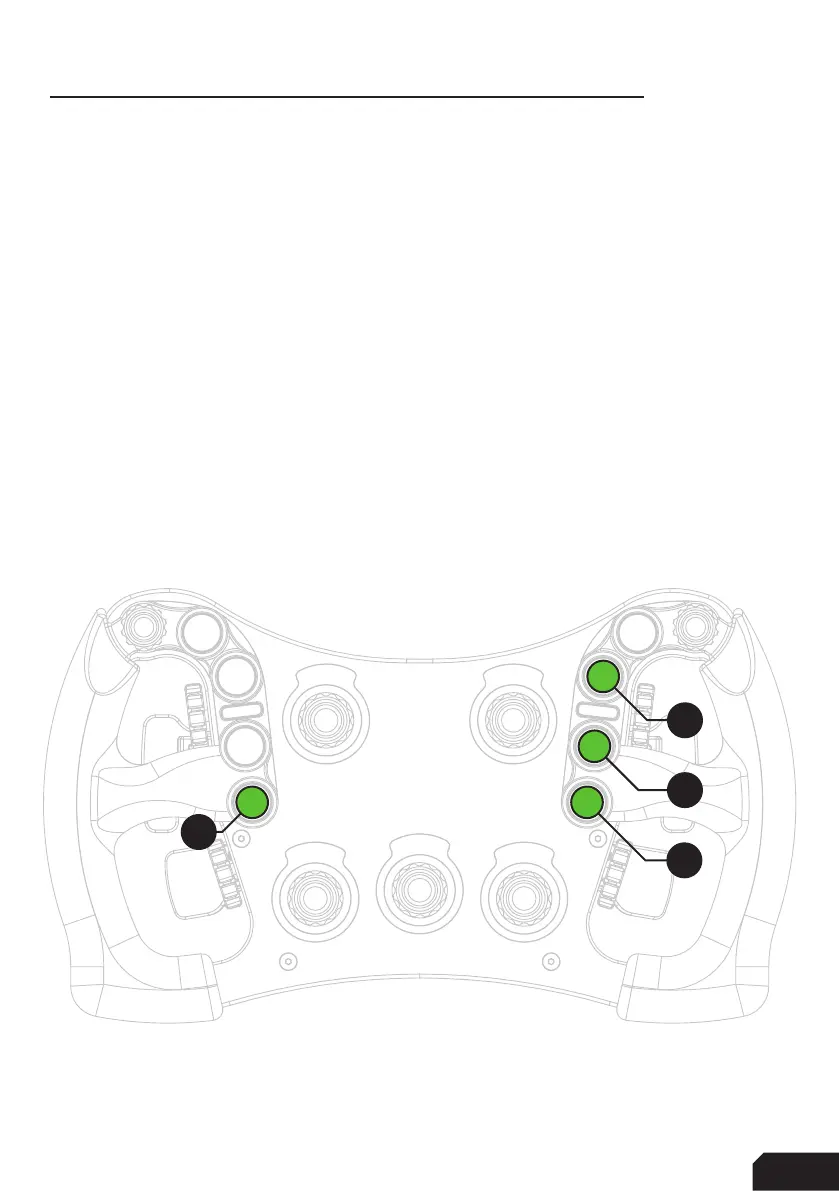
To switch modes, Press and Hold the ADJUST (A) button and Press the mode of
your choice. (1) Dual-Clutch, (2) Analog, (3) Switch. Release both buttons after you
have made a selection.
A
1
2
3



 To Next Page