2 NET485 Quick Start
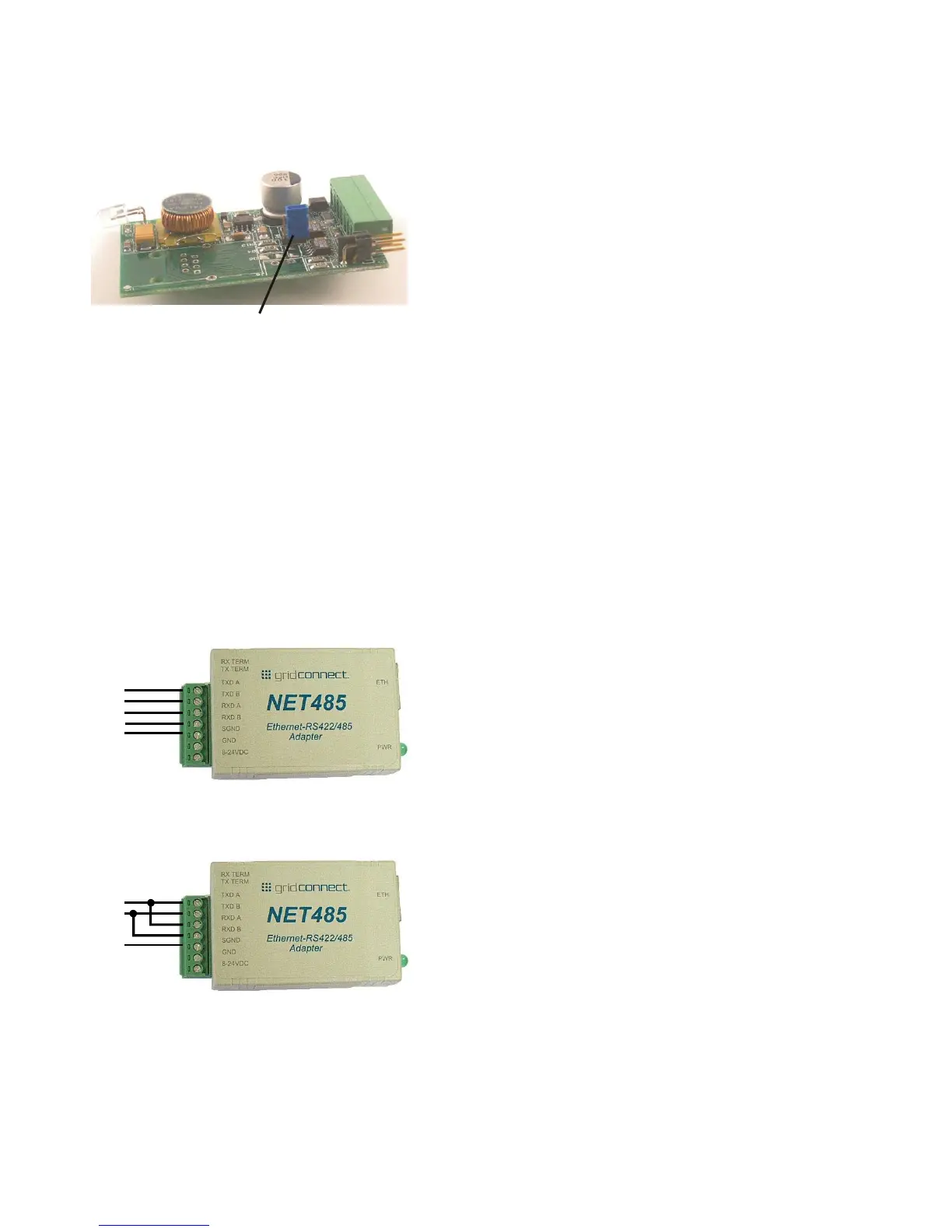
To change the jumper J2 to Full Duplex, open the case and locate the jumper J2. Move the jumper to pins 1
and 2 as shown in the drawing.
Figure 2 - J2 Setting for Full Duplex
Connect the Hardware
Connect your network Ethernet cable to the NET485 RJ45 jack. Do not connect directly to your PC. The
NET485 should be connected to a router or server.
Connect a 5-24VDC power supply to the NET485. The polarity for the terminals is shown on the label.
Verify the Green power LED is ON.
Note: Do NOT use RX Term and TX Term jumpers on short transmission lines. Remove these jumpers to remove the
120 Ohm resistors from the transmit and receive lines.
Note: See the Application Notes on the product CD for more information about networks and termination procedures.
Connect your RS422/485 device to the NET485 terminals.
Connect the wires like this for RS422/485 4-wire, full duplex.
Connect the wires like this for RS485. Make sure there is a jumper between TXDA to RXDA, and TXDB to
RXDB.



 To Next Page