NET485 Quick Start 5
1.3 Configure with Web Manager
Please see the Device Installer user manual for details on using the Web Manager. This section presents
some basic setup parameters necessary to get the unit operational.
You must configure the unit so that it can communicate on a network with your serial device. For example,
you must set the baud rate to match the baud rate of your device. You should also assign it a fixed IP address for
your network.
The unit’s configuration is stored in nonvolatile memory and is retained without power. You can change the
configuration at any time. The unit performs a reset after you change and store the configuration.
1.3.1 Network Configuration
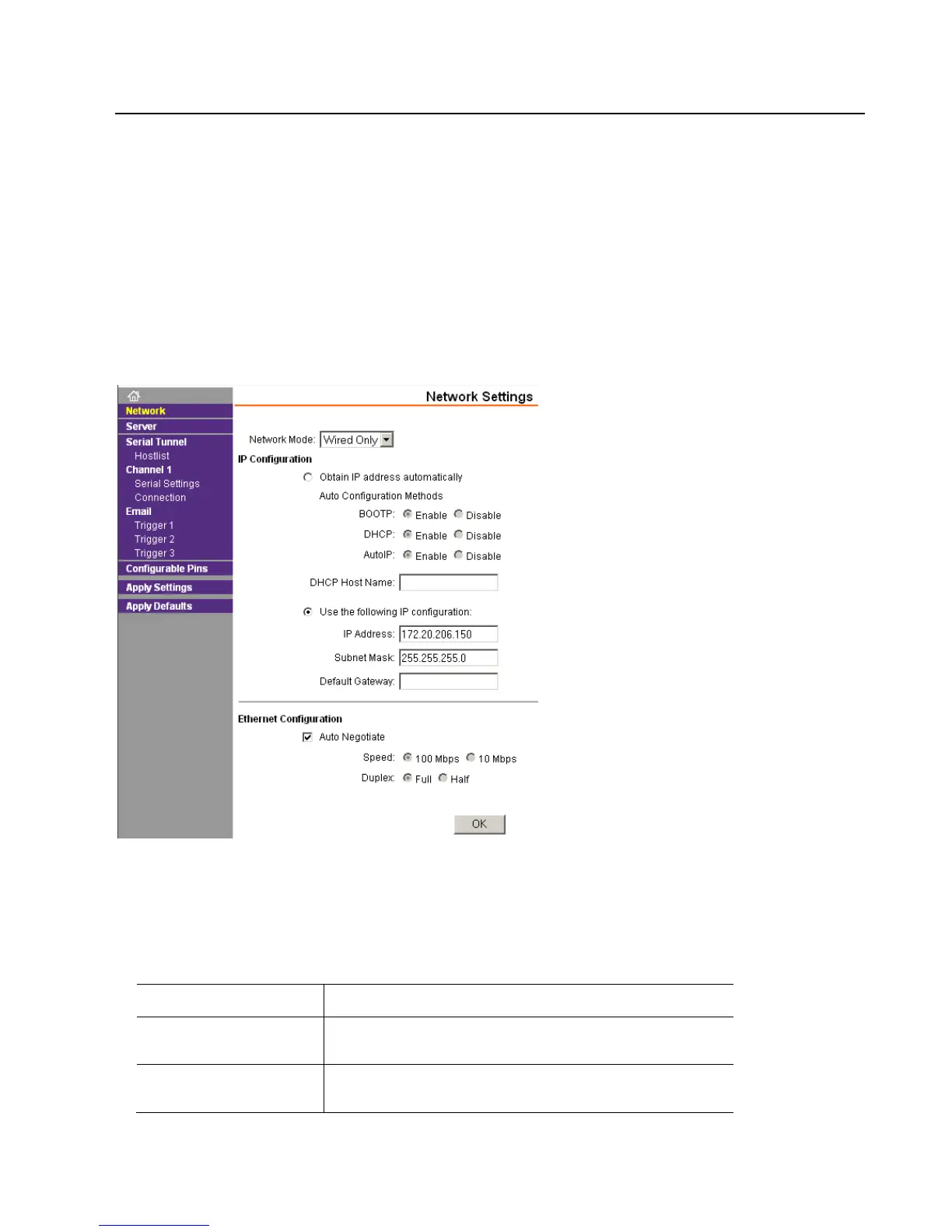
The unit’s network values display when you select Network from the main menu.
Manually assign an IP address to the unit and enter related network settings.
To assign an IP address manually:
1. Select Use the following IP configuration.
2. Enter the following (as necessary):
Assign IP address in decimal-dot notation. The IP address must be
set to a unique value in the network. Example: 172.20.206.150
A subnet mask defines the number of bits taken from the IP
address that are assigned for the host part. Example:
255.255.255.0
The gateway address, or router, allows communication to other
LAN segments. The gateway address should be the IP address of
the router connected to the same LAN segment as the unit. The



 To Next Page