
EasyManua.ls Logo

Grifco C10A - User Manual

Grifco C10A
20 pages
Print Icon
To Next Page IconTo Next Page
Loading...
grifco.com.au
grifco.co.nz
D-M-ACG/086
191118
Chamberlain New Zealand Ltd
PO Box 100-221
Auckland 0745, New Zealand
Phone toll free 0800 653 667
Chamberlain Australia Pty Ltd
PO Box 1446, Lane Cove
NSW 1595, Australia
Phone toll free 1800 474 326
Electronic Wall
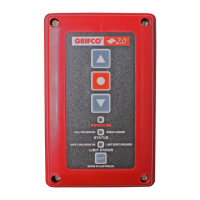
Controller
C10A
Installaon and Users
Manual for C10A ,
C10A Flushmount
and Key Switch Variants:
C21B, C41B
C23B, C43B
C21D-2, C43D-2

Questions and Answers

  • P
    Patrick Wong DDSAug 17, 2025
    How to troubleshoot power failure in Grifco Controller?
    • W
      William Wong DVMAug 17, 2025
      If there are no lights on the MCB or Controller, start by checking the transformer to ensure the power supply is correctly connected. Also, verify the power supply wiring for any bad connections to the Controller. If lights are on at the MCB but not on the Controller, further investigation is needed.
  • M
    Matthew CarterAug 19, 2025
    What to do if Grifco Controller shows an under speed error?
    • P
      pearsonhannahAug 19, 2025
      If the Grifco Controller displays an under speed error, begin by inspecting the door for any obstructions that might be causing interference. Also, check the door installation and inspect the motor for any signs of damage. If the issue persists, consider upgrading to a larger opener.
  • N
    nicholashillAug 23, 2025
    Why is the Grifco Controller open or close button not responding?
    • A
      Amy BrownAug 23, 2025
      If the open or close button on your Grifco Controller isn't responding, but the green light is on, it could be due to coil failure or incorrect motor wiring. Replace the MCB or ensure the motor is correctly wired. This is especially relevant if the green light is on while holding the up or down button, but the opener doesn't move in one direction. Another potential cause is extreme vibration or impact during transit.
  • J
    Jennifer ChanAug 26, 2025
    What causes clutch slip in Grifco Controller?
    • V
      vargasheatherAug 26, 2025
      Clutch slip, no speed detected, or contactor failure in a Grifco Controller can be caused by several factors. First, check the clutch adjustment to ensure it is not set too low. Another possibility is a stalled motor, so inspect the door for mechanical failure or a motor fault. Lastly, extreme vibration or impact during transit could damage the MCB, requiring replacement.
  • P
    Patrick MercadoAug 28, 2025
    Why Grifco C10A opener does not drive up or down?
    • R
      Rachel GallagherAug 28, 2025
      If the Grifco Controller opener isn't driving up or down, check that the RJ45 plugs are securely clipped in at both the Controller and MCB. Inspect the Controller cable for damage and ensure all connections are secure. If the controller buttons are forced and dislodged from the rear of the lid, replace the Controller cable. If the issue persists, consider replacing the Controller.
  • A
    Angel ShawAug 30, 2025
    What to do if Grifco C10A Controller shows APE error 1 or APE error 2?
    • M
      Mrs. Madison MillsAug 31, 2025
      If your Grifco Controller is displaying APE error 1 or APE error 2, it could be due to an APE position jump, in which case you should replace the APE assembly. It might also be caused by severe close range frequency, so try pressing the ‘reset’ (RST) button on the MCB for 3 seconds. Check if the APE cable is disconnected and reconnect it if necessary, or if the APE cable is faulty, replace it.
  • M
    Melissa SotoSep 2, 2025
    How to fix Grifco Controller infrared beam obstruction?
    • T
      Tracy BellSep 2, 2025
      To address an infrared beam obstruction with your Grifco Controller, first clear any obstructions that may be blocking the IR beam. If a bumper edge is pressed, remove the pressure from it. If the issue persists, set DIP 1 to OFF and press the ‘reset’ (RST) button on the MCB for 10 seconds, then re-learn any remaining Entrapment Protection Devices.
  • D
    Dennis GeorgeSep 5, 2025
    What causes thermal overload in Grifco C10A Controller?
    • S
      Stephanie ToddSep 5, 2025
      Thermal overload in a Grifco Controller is often due to the motor overheating. To resolve this, use the opener less frequently. If the problem persists, consider upgrading to a high cycle opener.
  • M
    Michael FosterSep 7, 2025
    What to do when Grifco C10A detects Entrapment Protection Device removal?
    • S
      sarahcainSep 8, 2025
      If the Grifco Controller detects the removal of an Entrapment Protection Device, set DIP 1 to OFF and press the ‘reset’ (RST) button on the MCB for 10 seconds. Then, re-learn any remaining Entrapment Protection Devices.
  • F
    Frank ChristensenSep 12, 2025
    How to resolve direction error on Grifco Controller?
    • C
      Christopher ChapmanSep 12, 2025
      If your Grifco Controller is showing a direction error, it's possible that the motor connections have been altered. To fix this, change the door direction and reset the limits.

Summary

Safety Information

Safety Symbol and Signal Word Review

Explains warning symbols and signal words used in the manual.

Important Safety Instructions

Lists critical instructions for safe installation and operation.

Controller Installation Procedure

Installing the Wall Controller

Step-by-step guide for connecting the controller and cable through conduit.

Initial Controller Operation

Power Check and Door Direction Verification

Verifies power and correct door movement upon initial setup.

Changing Door Movement Direction

Procedure to reverse the door's open/close movement direction.

Setting Door Operational Limits

Setting Open and Closed Limits

Defines the fully open and closed positions for the door.

Advanced Door Control Settings

Controller Interface Wiring

AUTO Mode Wiring Configuration

Enables AUTO mode by removing the R9 Auto Bridge resistor.

Auxiliary Control Device Connections

Advanced Programming - Wireless Features

Wireless Accessory Pairing

Pairing new wireless accessories and erasing existing ones.

Advanced Programming - Auto Close Timer

Troubleshooting Common Issues

Status Indicator Problem Resolution

Correlates status indicator flashes/lights to problems and solutions.

Grifco C10A Specifications

General IconGeneral
BrandGrifco
ModelC10A
CategoryController
LanguageEnglish

Related product manuals