www.ebikes.ca/satiator
info@ebikes.ca
+1(604) 569-0902
- 9 -
2.1.3. Creating Custom Profiles
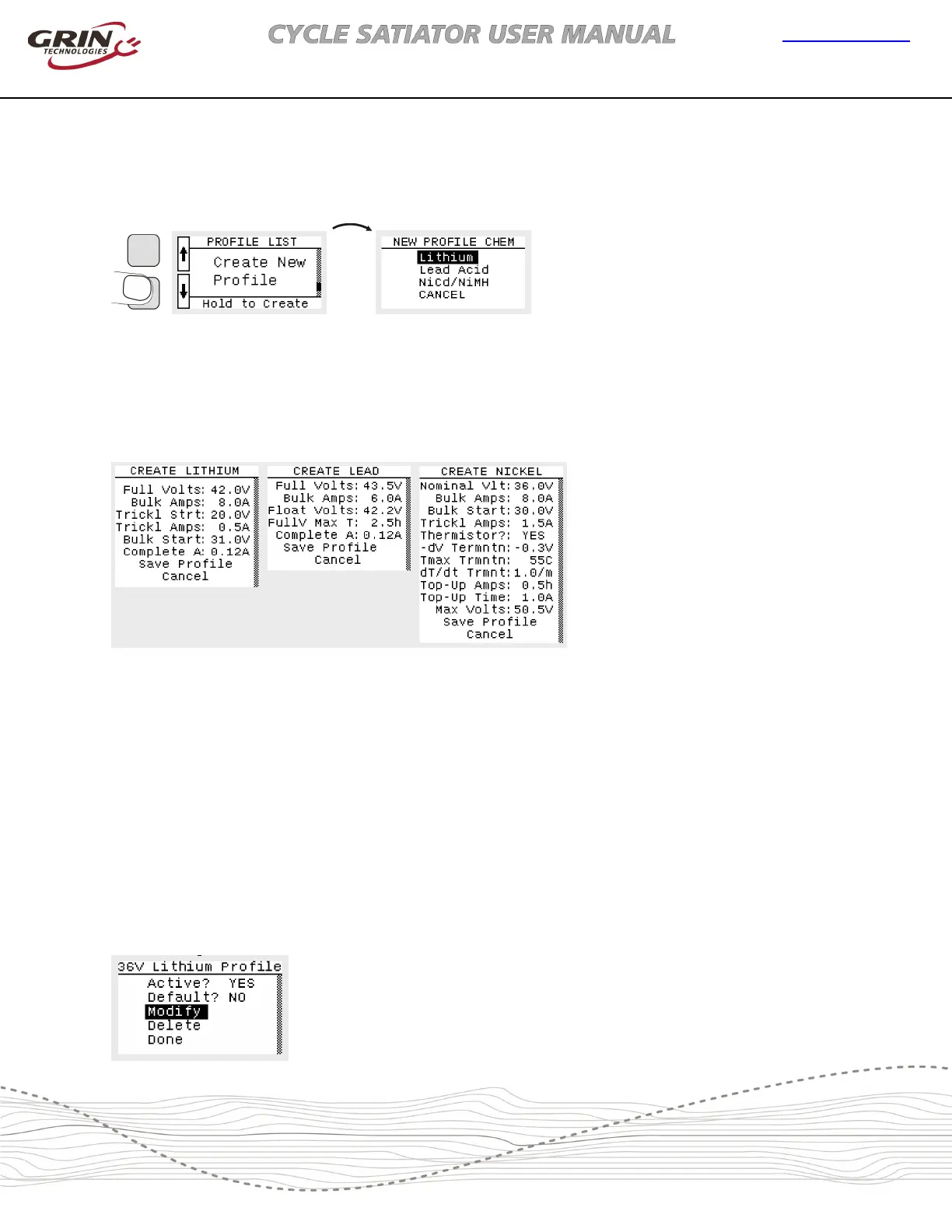
If a desired output is not available in the preset profiles, you can setup your own custom charger
output with the Create New Profile screen at the end of the profile list.
Figure 14: Creating a new profile
You will then select between one of three basic classes of chemistry and associated charge
algorithms. The up and down buttons will scroll through the list of parameters, and pressing and
holding the lower button will allow you to then edit the specific field one digit at a time. The list of
parameters depends on the particular chemistry selected.
Figure 15: Full list of parameters available for custom Lithium, Lead and NiMH/NiCad batteries
Once all the parameters are set and Save Profile executed, then a new profile will be added to
the profile list with the name CUSTOM, along with the general chemistry and charge voltage and
current. A more detailed discussion of the specific parameters for each chemistry and their
associated charge algorithm is included in Section 4.
2.1.4. Modifying Custom Profiles
Once a custom profile has been added to the list, it can be either edited or deleted from the list
entirely using the button menu. Editing or deleting the preset profiles or personalizing the name
of a custom profile is only possible with a computer connection. See Section 2.3
Figure 16: Custom profiles
can have their parameters
modified and can also be
deleted from the list. But
preset profiles cannot.


 To Next Page