Maintenance
AC3OperaonandMaintenance 9
E) AC Motor Replacement:
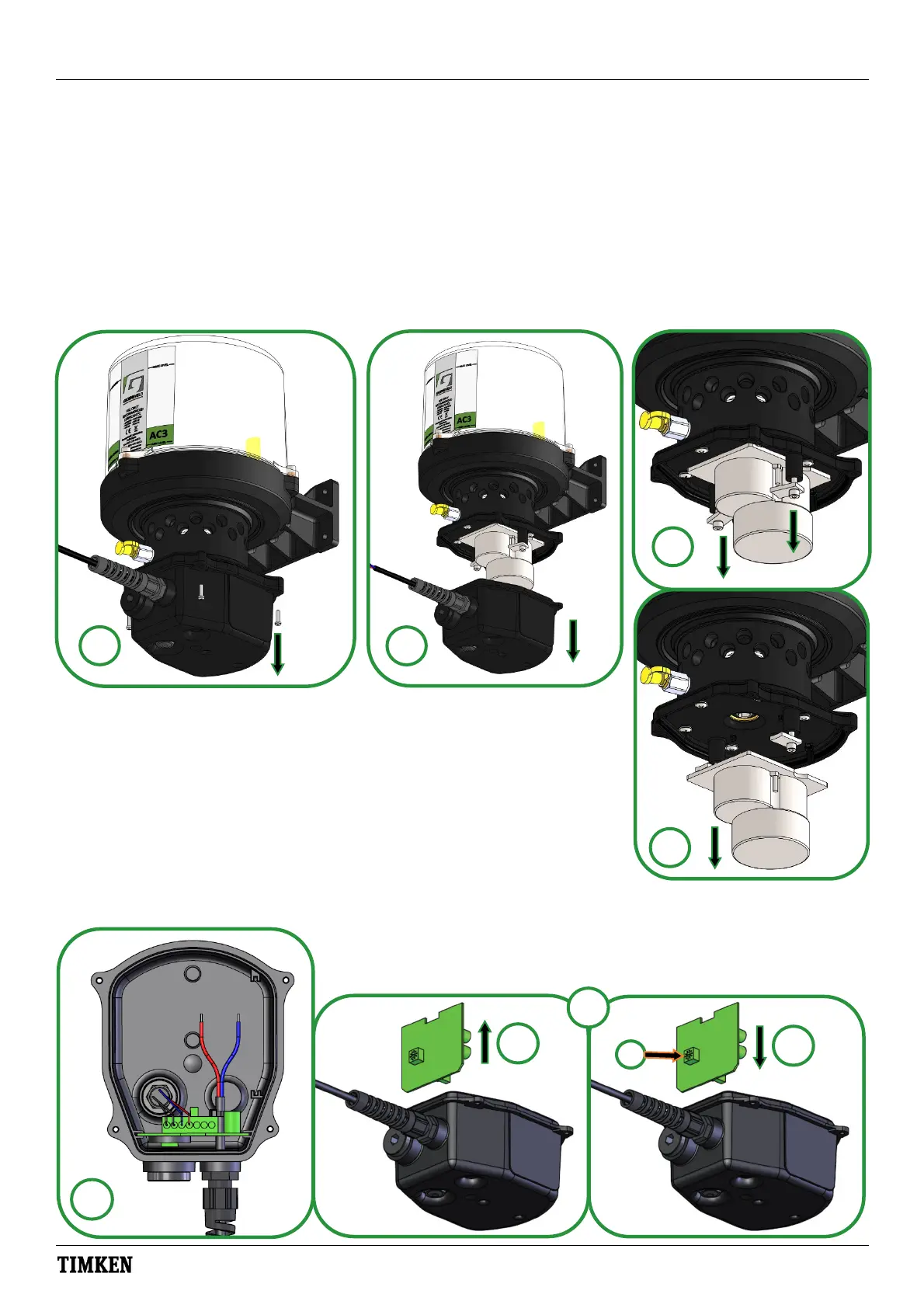
1.Loosenandremovethefourscrewsthatholdthemotorcovertothemotorhousing(seeimage12).
2.Pullthemotorcoverawayfromthehousinganddisposeoftheold‘O’ring(seeimage13).
3.DisconnectthemotorMolexconnectorfromthePCB.Putthemotorhousingassemblyaside.
4.Loosen,butdonotremove,twoscrewsthatholdtheretainingplateoverthemotor(seeimages14and15).
5.Removethemotorandplacethenewoneinposion.Ensurethemotordriveshafitsintothecamshadrive.
6.Placeretainingplatesinposionandghtenthescrewstotorque1.5Nm(1.1lbf.).
7.ReconnecttheMolexconnectorfromthenewmotortothePCB.
8.Locatenew‘O’ringsealonmotorcover.
9.Fitmotorhousingtomotorcoverandfixwiththefouroriginalscrewstotorque0.3Nm(0.22lbf.).
F) AC Replacement of PCB:
1.Refertosteps‘1’ and‘2’ insecon’E’ toaccessPCB,butretainO‐ring.
2.LoosenanddisconnecttheREDandBLUEpowercablesfromthePCB(see—
image16).Loosenanddisconnectmanualoverridecables,takingnoteoftheir
conneconposions.DisconnectthemotorsMolexconnectorfromPCB.
3.RemoveanddisposeofexisngPCB,insertnewone.Settherotaryswitchon
thenewPCBtothesamesengastheoldPCB(seeimage17,right)*.
4.Reconnectwiresfromoverridebuonandpowercable.ReconnectMolex‐
connectorasinstep‘7’insecon‘E’. Seepage5forelectricalschemac.
5.Seestep‘9’insecon’E’ forre‐assemblyofmotorhousing,ensurecorrectfitmentofO‐ring.
17
*
16
15
12
13
14
Loosen only
x4


 To Next Page