HOW IT WORKS
SETTINGS
ENTER
PPDIS
GG
Ground Grab
- Press “GG” to enter “Ground Grab” Mode
- Press “ENTER” to Grab
Discrimination
- Press “DIS” to enter “Discrimination” Mode
(This mode uses your last Settings to detect)
Pin Point
- Press and hold “PP” to enter “Pin Point” Mode
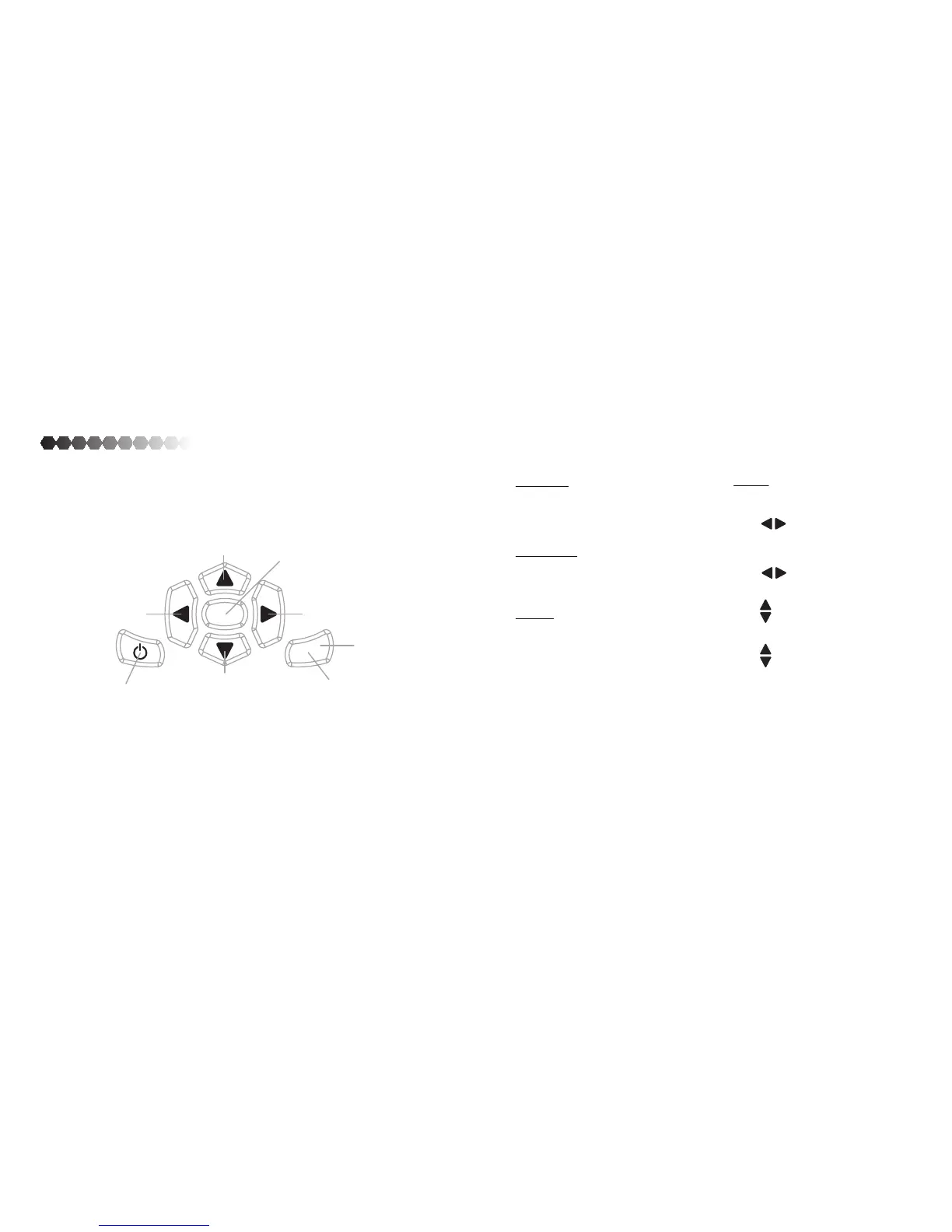
GROUND GRAB/
UP ARROW Button
DISCRIMINATION/
LEFT ARROW Button
PINPONT/
RIGHT ARROW Button
POWER
Button
SETTINGS
Button
ENTER/ SELECTION
Button
Settings
- Press “SETTINGS” to enter “Settings” Mode
- Press to move to “Settings”
- Press “ENTER” to enter “Settings”
- Press to move between Volume
and Sensitivity
PPDIS
PPDIS
13
GPS/DOWN ARROW
Button
- Press while Volume is selected to
change Volume
- Press while Sensitivity is selected to
change Sensitivity
- Press “ENTER” to detect in current settings
GG
GPS
GG
GPS
GPS
DEL
DELETE
Button



 To Next Page