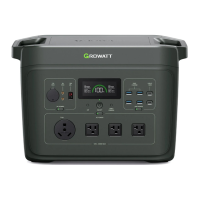
INFINITY 1300 is being charged using the car charger..
Remaining Battery
Percentage
Displays the current remaining battery percentage in real time.
INFINITY 1300 is supplying power to external devices via the car output port.
INFINITY 1300 is supplying power to external devices via USB-A port(s).
INFINITY 1300 is supplying power to external devices via USB-C port(s).
The total output power of DC, AC, and wireless charging.
Output Voltage and
Frequency
Displays the current AC output voltage and frequency.
The remaining discharging time calculated by the system based on the current power consumption, accurate to
0.1 hour.
The current total output power is higher than 1800W, the AC output will be stopped for battery protection.
The product is not working properly. Check the error codes in the appendix to understand the cause of the error
and find the solution.
The temperature of INFINITY 1300 is too high. Please place the product in an open area for cooling.
The current battery temperature is low, and the charging efficiency will be reduced. Keep using the product, and
the charging efficiency will return to normal as the temperature rises.
The product is connected to Bluetooth and can be controlled remotely through the MyGro APP.
The fan is running to cool the product.
The product has turned on UPS mode to provide uninterrupted power to your devices.
The product is connected to Wi-Fi and can be controlled remotely through the MyGro APP.
Before use, please put INFINITY 1300 on a clean and flat ground to ensure that the machine will not be in contact with liquid or tilted, and check
whether there are foreign objects on the body.
Product ON/OFF
A) To turn on the INFINITY 1300, long press the power button until the screen lights up.
B) To turn off the INFINITY 1300, press and hold the power button until you hear a beep and observe the “OFF” prompts on the screen.
LCD Screen
C) After a period of inactivity, the screen will be turned off to save power.
D) To wake up the screen, short press the DC or AC button.
Output Power ON/OFF:
DC:
C) Short press the DC power button to turn on the DC output supply (including all USB ports and car output port). You should hear a “beep”
sound and observe that the DC power indicator lights up.
D) To turn off the DC output power, short press the DC power button. You should observe that the DC power indicator lights off.
When the output power of a single DC port exceeds the rated power below, the system will trigger an overload alarm and cut off the DC output.
The maximum output power of a USB-A port is 12W
The maximum output power of a Fast Charge USB-A port is 18W
The maximum output power of a USB-C port is 100W.
AC Power ON/OFF:



 To Next Page