AC OUTPUT AC OUTPUT
b)Precautions before Using the UPS Feature
This function is a non-professional UPS function and does not support 0ms switching. Please do not connect
it to equipment that is highly sensitive to uninterrupted power supply, or perform multiple tests before use.
UPS only supports the use of electrical appliances below 2000W, and do not use other devices at the same
time during use to avoid overload protection.
UPS function is only supported when one INFINITY 1500 is running independently, and it is not available
when multiple INFINITY 1500 work in series.
Growatt is not responsible for equipment failure or loss of data if the instructions are not followed.
II)Multi-unit Expansion in Series
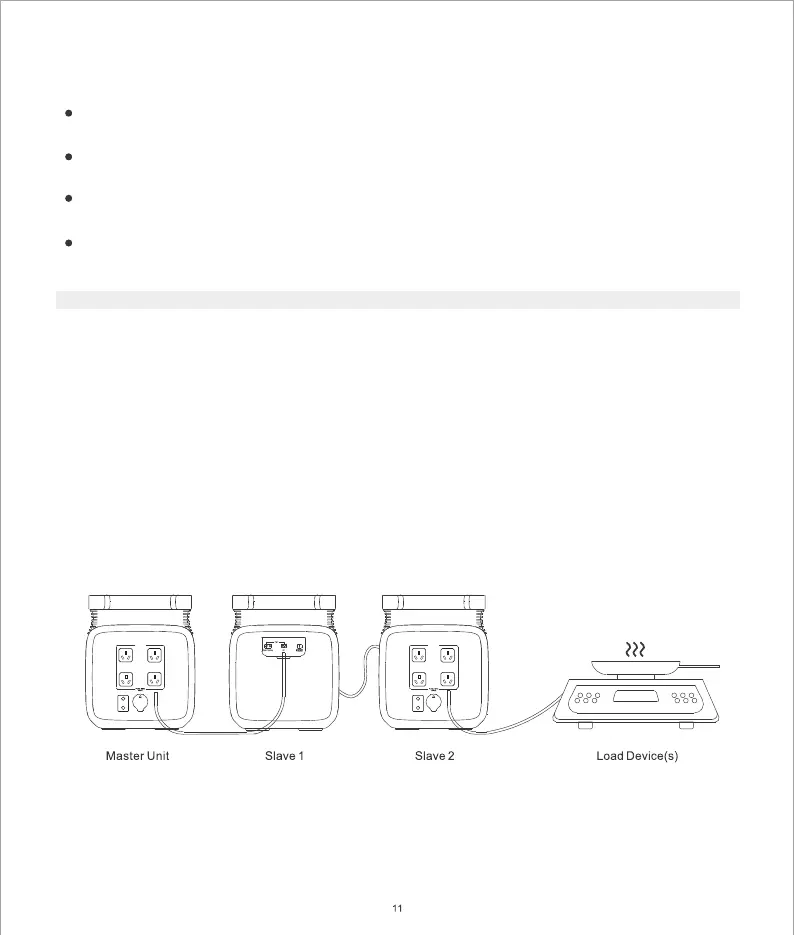
You can use AC adapters to connect up to three INFINITY 1 00 in series to get a larger battery capacity. When 5
you use this expansion method, you will need to define one of the units as the master and the rest as slaves.
You need to connect the AC output port of the Master Unit to the AC input port of Slave 1, then connect the
AC output port of Slave 1 to the AC input port of Slave 2, then plug the load device into the AC output port of
Slave 2(as shown in the figure below), and finally turn on the AC output power of all INFINITY 1 00 to enable 5
battery expansion.
When using this expansion method, make sure that each units are fully charged, otherwise an overload
protection will be triggered. After use, it is recommended to charge each unit separately to avoid
excessive burden on the home grid.


 To Next Page