Add Device
Add Device
I) Pairing the Product with Your Device
How to Connect to APP
When the product is connected to the APP for the first time, you need to use Bluetooth pairing for network
configuration. Please get as close as possible to the product and make sure the phone is within the Bluetooth
coverage of the device.
1. Download "MyGro" APP from App Store or Google Play.Or you may download it from the official website
(For first-time users, you need to follow the instruction and complete account registration on the APP).
2. You may choose either of the following ways to connect your portable power sta
tion:
Remote Wi-Fi Connection
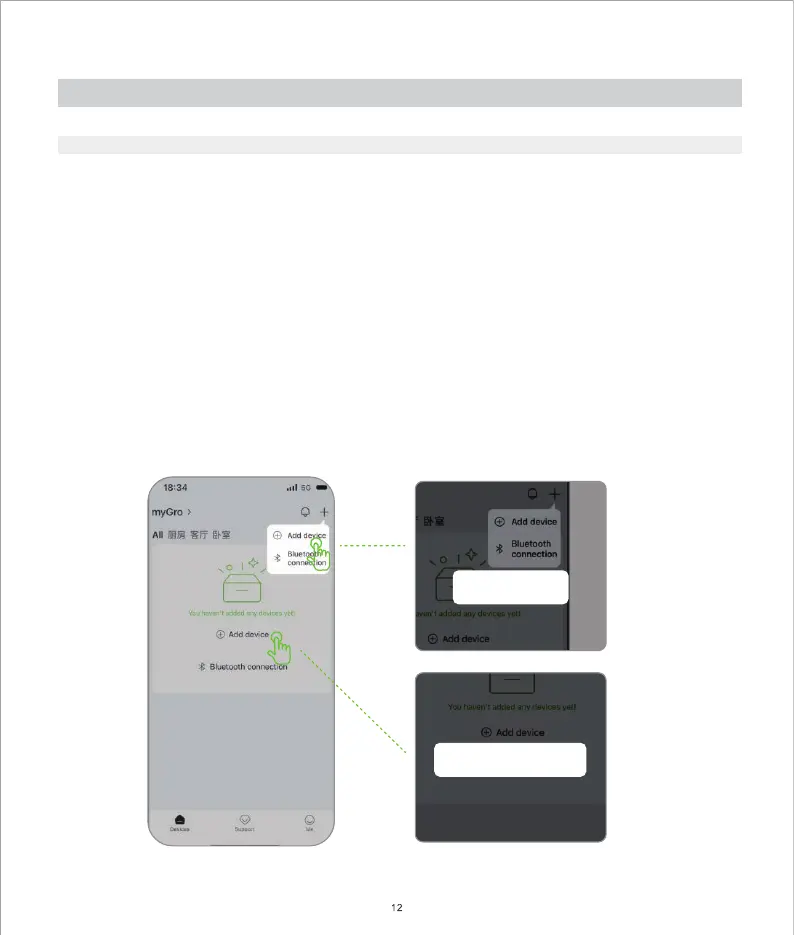
a) Go to the Device
page and click Add Device. Or select the "+" button at the top right of the page, then
select Add Device.
b) Short press the Wi-Fi Reset button to send Bluetooth & Wi-Fi signals and connect with your mobile devices.
c) Follow the instruction on the APP and finish the rest of the setup.


 To Next Page