Error Codes
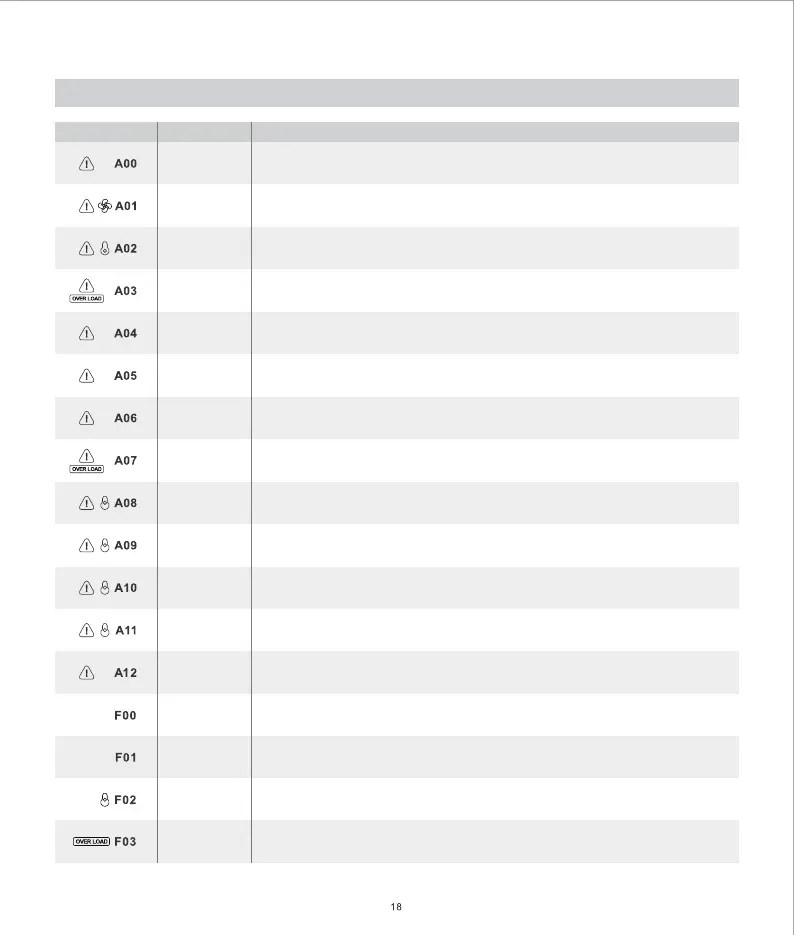
Indicators
Problem
Description
System Alert
Fan Blockage
High Temperature
Warning
Inverter Overload
Low Battery
Voltage
PV Over Voltage
USB Output
Overload
Product Overload
PV Board Over
Temperature
Discharge Over
Temperature
High Battery
Temperature
Low Battery
Temperature
Car Charging
Overcurrent
System Failure
Output Short
Circuit
Product Over
Temperature
Inverter Overload
Restart the portable power station. If the problem persists after several attempts,
please contact Growatt Customer Service for repair.
Please check if the fan is blocked. If there is a blockage, please turn off the machine
and remove the blockage, then restart the product to return to normal. If the problem
persists, please contact Growatt Customer Service for repair.
Turn off the product and place it in an open area for 2-3 hours. After cooling,
the product will continue to work normally.
The AC output is overloaded. Unplug the load(s) on the AC output port(s) and keep the
total AC output power within 2000W to resume normal operation. Overloading for a long
time may cause damage to the product.
The battery voltage is too low. Please recharge the battery in time.
PV input voltage is too high. Please check the status of the solar panel. If the output
voltage of the solar panel is normal, please contact Growatt Customer Service for repair.
Please check the output power of your USB devices. Remove your USB device(s) if the
output exceeds the maximum output of the USB port(s).
The INFINITY 1500 is overloaded. Unplug part or all of the loads and keep the total output
within 2000W (or 2400 surge) to resume normal operation.
Disconnect the solar panels from the portable power station to resume normal operation.
Turn off the product and place it in an open area for 2-3 hours. After cooling, the
product will continue to work normally.
Turn off the product and place it in an open area for 2-3 hours. After cooling, the product
will continue to work normally.
Continue using the portable power station, the temperature will rise and the product
will resume normal status. If the error persists, contact Growatt Customer Service for repair.
Please check whether the input meets the specification of car charging. Remove the car
charger to resume normal operation.
Restart the portable power station. If the problem persists after several attempts,
please contact Growatt Customer Service for repair.
Please check if there is a problem with the output loads. Remove the loads to resume
normal operation. If the problem persists, please contact Growatt Customer Service for repair.
Turn off the product and place it in an open area for 2-3 hours. After cooling, the product
will continue to work normally.
Please make sure the total output power is within the acceptable range. Remove the
excess loads to resume normal operation. If the problem persists, contact Growatt
Customer Service for repair.


 To Next Page
 Loading...