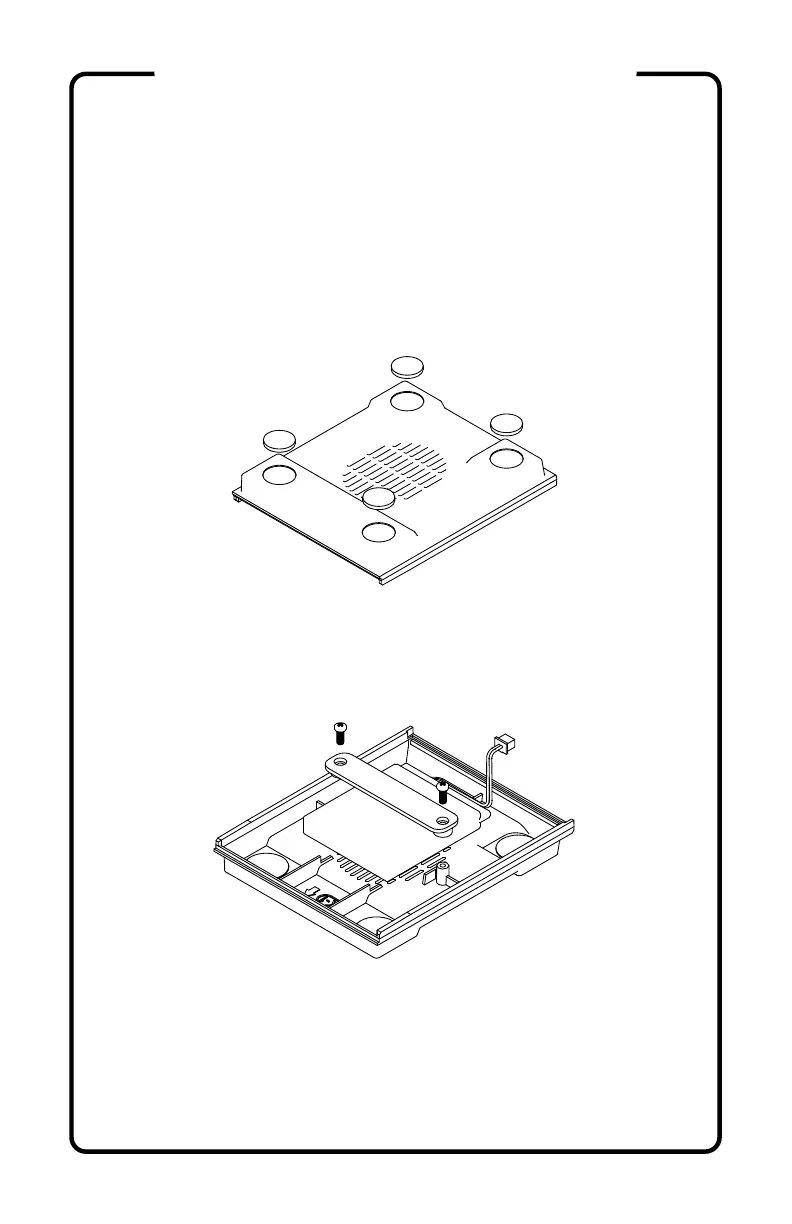
1) Unpack all parts and confirm each with the parts list.
2) (optional) Apply ARTWORK (R) to SCREEN BEZEL
(F1), ACRYLIC MARQUEE (O) (remove protective film
first), LEFT SIDE (A), and RIGHT SIDE (G). Once applied,
remove the clear protective film from the artwork.
3) Apply 4 - RUBBER FEET (Q) to the BOTTOM (K1) in
their marked positions.
4) With the wire at the rear right (arrow on K1 indicates
front), secure the BATTERY (N) into the BOTTOM (K1)
using the BATTERY STRAP (K2) and 2 - M3x8mm self
tapping screws (S6). Set aside.
5) Place a clean, soft cloth or towel on a flat work surface.
Remove the protective film from the SCREEN (M) and set
face down with the DSI connector positoned at the top.
Attach the SCREEN MOUNT (F2) to the SCREEN (M) with
4 - M2.5x5mm screws (S3). The part number "F2" is on
the left side.
ASSEMBLY INSTRUCTIONS



 To Next Page