EasyManua.ls Logo

Grundig TK 245 - Page 10

Grundig TK 245
15 pages
Print Icon
To Next Page IconTo Next Page
To Previous Page IconTo Previous Page
Loading...
Effect
sound
recordings
Your
TK
245
will
help
at
all
problems
to
set
amateur
films
and
slides
to
music
and
to
make
studio
quality
recordings
from
music
bands
and
singers.
Some
examples
are
given
in
the
following
to
explain
how
to
make
effect
sound
recordings,
such
as
playback
and
multiplayback
recordings.
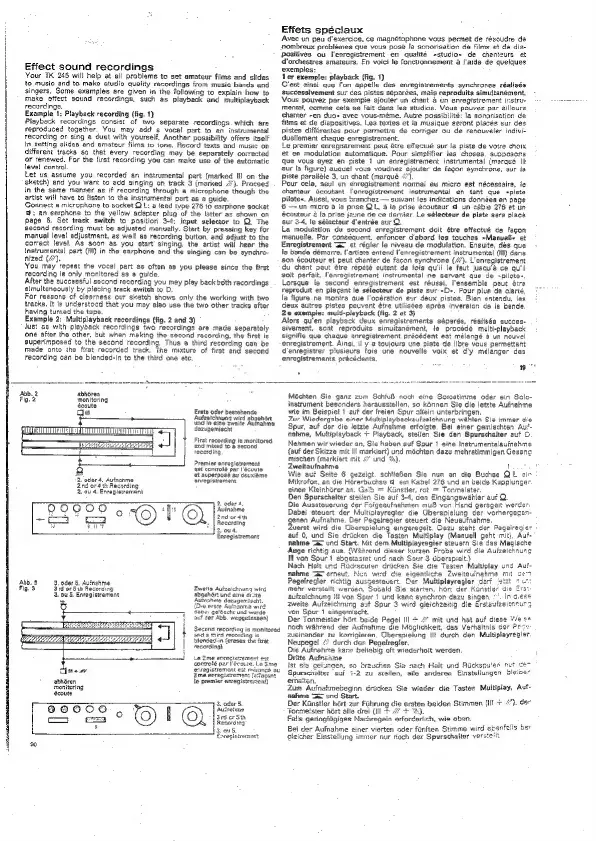
Example
1:
Playback
recording
(fig.
1}
Playback
recordings
consist
of
two
separate
recordings.
which
are
reproduced
together.
You
may
add
a
vocal
part
to
en
instrumental
recording
or
sing
4
duet
with
yourself,
Another
possibility
offers
itself
in
setting
slides
and
amateur
films
to
tone,
Record
texts
and
music
on
different
tracks
so
that
every
recording
may
be
separately
corrected
or
renewed,
For
the
first
recording
you
can
make
use
of
the
eutomatic
level
control.
Let
us
assume
you
recorded
an
instrumental
part
(marked
Hl
on
the
sketch)
and
you
want
ta
add
singing
on
track
3
(marked
#).
Proceed
in
the
same
manner
as
if
recording
through
a
microphone
though
the
artist
will
have
to
listen
to
the
instrumental
part
as
a
guide.
Connect
a
microphone
to
socket
OL:
a
lead
tvpe
276
to
earpnone
socket
w;
an
earphone
to
the
yellow
adapter
piug
of
the
latter
as
shown
on
page
6.
Set
track
switch
to
position
3-4;
input
selector
to
OQ
The
second
recording
must
be
adjusted
manually.
Start
by
pressing
key
for
manual
level
adjustment,
as
well
as
recording
button.
and
adjust
to
the
correct
level.
As
soon
as
you
start’
singing,
the
artist
wili
hear
the
instrumental
part
(Il)
in
the
earphone
and
the
singing
can
be
synchro-
nized
(Ui).
You
may’
repeat
the
vocal
part
as
often
as
you
please
since
the
first
recording
is
only
monitored
as
@
guide.
Alter
the
successful
second
recording
you
mey
play
backtsoth
recordings
simultaneously
by
placing
track
switch
to
D.
For
reasons
of
cleernese
our
sketch
shows
only
the
working
with
two
tracks.
It
is
understood
that
you
may
also
use
the
two
other
tracks
after
having
turned
the
tape,
Example
2:
Multiplayback
recorcings
(fig.
2
and
3)
Just
&s
with
playback
recerdinge
two
recordings
are
made
separately
one
after
the
other,
but
when
making
the
second
recording,
the
first
is
superimposed
to
the
second
recording.
Thus
a
third
recording
can
be
made
onto
the
first
recorded
track.
The
mixture
of
first
and
second
recording
can
be
blended-in
to
the
third
one
ete.
Effets
spéciaux
Avec
un
peu
d'exercice,
ce
magnétophone
vous
permet
de
résoudre
Pombreux
problémes
que
vous
pose
la
senorisation
de
films
et
de
die-
positives
ou
enregistrement
en
qualité
-studio«
de
chenteurs
et
dorchestres
emateurs.
En
voici
le
fonctionnement
a
l'aide
de
quelques
exemples:
ler
exemple: playback
(fig.
1)
C'est
ainsi
que
f'on
appelle
des
enregistrements
synchrones
réalisés
successivement
cur
ces
pistes
séparées,
mais
reproduits
simultanément,
Vous
pouvez
par
exempie
ajouter
un
chant
&
un
enregistrement
instru-
comme
ceia
se
fait
dans
les
studios.
Vous
pouvez
par
aillours
chanter
~en
duos
avec
vous-méme.
Autre
possibilité:
la
sonorisation
de
films
et de
diapositives.
Les
textes
et
Ja
musique
eeront
placés
sur
des
pistes
différentes
pour
permetire
de
corriger
ou
de
renouveler
indivi-
duellement
chaque
enregistrement.
Le
premier
enregistrement
peut
dtre
effectué
sur
la
piste
de
votre
choix
et
en
moduletion
automatique.
Pour
simplifier
ies
choses.
supposons
que
vous
ayez
en
piste
1
un
enregistrement
instrumental
(margué
lt
sur
la
figure)
auauel
vous
voudrez
gjouter
de
fagon
synchrone,
sur
fa
piste
paralidle
3,
un
chant
(marqué
4)
Pour
cela,
seul
un
enregistrement
normai
au
micro
est
nécessaire,
le
chanteur
écoutant
l'enregistrement
instrumental
en
tant
que
spiste
pilotes.
Aussi,
vous
branchez
—
suivant
les
indications
données
en
page
6
—un
micro
@
la
pree
QL,
a
ia
prise
écouteur
d
un
cable
276
et
un
écouteur
2
fa
prise
jaune
Ge ce
dernier.
Le
sélecteur
de
piste
sera
placé
sur
3-4,
le
sélecteur
d’entrée
sur
Q.
Le
modutation
du
second
enregistrement
doit
étre
effectué
de
facon
manuelte.
Par
conséquent,
enfoncer
d'ebord
les
touches
»Manuelle
et
Enregistrement
=x
et
régier
fe
niveau
de
modulation.
Ensuite,
dés
que
la
bende
démarre,
l'artiste
entend
l'enregistrement
instrumental
(Ill)
dans
‘son
écouteur
et
peut
chanter
de
facon
synchrone
(/’).
L'enregistrement
du
chant
peut
étre
répété
eutent
de
fois
qu'il
le
faut
jusqu'a
ce
qu'il
golt
parfait,
l'enregistrement
instrumental
ne
servant
que
de
spilote-
Lorsque
fe
second
enregistrement
est
réussi,
l'ensemble
peut
ére
repredutt
en
piecant
le
sélecteur
de
piste
sur
-Ds.
Pour
plus
de
clarté,
la
figure
ne
montre
que
l'opération
sur
deux
pistes.
Bien
entendy,
les
Geux
autres
pistes
peuvent
étre
utilisées
aprés
inversion
de
la
bande.
2e
exemple:
multi-playbuck
(fig.
2
et
3)
Alors
qu'en
playback
deux
enregistrements
séparés,
réalisés
succes-
sivement,
sont
reproduits
simuitanément,
le
procédé
multi-playback
-
signifie
que
chaque
enregistrement
précédent
est
mélangé
a
un
nouvel
enregistrement.
Ainsi,
il
y
2
toujours
une
piste
de
libre
vous
permettant
denvegistrer
plusieurs
fois
une
nouvelle
voix
et
d'y
mélanger
des
enregistrements
précecents,
eo
Abb,
2
abhoren
Fig.
2
monitoring
écoute
Erste
oder
bestshende
Autzetchnung
wird
abgehser
und
in
eine
zwaite
Auinahme
dazugemiecht
First
racording
ie
monitored
and
mixed
to
a
Second,
recording
Premier
enregistrement
‘ast
controlé
par
I"ésoute
et
superpose
au
deuxiéme
enregistrament
2.
oder
4.
Ayinanme
2nd
or
4th
Recording
2
ou
4,
Enregistrement
2
oder
4,
S60OG60
Auinahme
HY
2nd
ce
4th
-—°
gS
Recerding
2
ov4
Enregistremont
Abb.
3
Zweite
A
‘abgahér:
und
Auinshme
dazege
{Dee
erste
Aur
abe:
galosche
und
wurde,
auf
Ser
AbE.
weogetassen)
Secana
recording
aed
a
third
recording
is
blenced-in
{erases
the
first
recording)
ine
evrecistrem
controle
par
eco
2me
enregisirer
fagant
fe
premier
enzegistrement)
abhéren
monitoring
écoute
8eQ000
a
monttored
ersegistremont
est
marange
au
Méchten
Sie
ganz
zum
SchtuB
noch
eine
Sotostimme
oder
ein
Solo-
instrument
besonders
herausstellen,
so
kénnen
Sie
die
letzte
Aufnahme
wie
im
Beispiel
1
aut
der
freien
Spur
aliein
unterbringen.
Zur
Wiedergabe
einer
Multiplaybackaufzeichnung
wahlen
Sia
immer
d
Spur,
auf
der
die
letzte
Aufnaiime
erfoigte,
Bei
einer
gemischten
At
nahme,
Multiplayback
+
Playback,
stellen
Sie
den
Spurschalter
auf
Nehmen
wir
wieder
an,
Sie
haben
auf
Spur
1
eine
Instrumentalauinahme
{euf
der
Skizze
mit
lll
markiert)
und
méchten
dazu
mehrstimmigen
Gesang
mischen
(markiert
mit
4”
und
%S).
Zweitaufnahme
free
§
Wie
aut
Seite
6
gezeigt.
schtieBen
Sie
nun
an
die
Buchse
QL
eir
Mikrofon,
an
die
Hérerbuchse
@
ein
Kabel
276
und
an
beide
Kupplunger.
einen
Kleinborer
an.
Gai!
Kinetier,
rot
=
Tonmeister.
Den
Spurschalter
sisifen
Sie
auf
3-4,
den
Eingangswahler
aui
Q.
Die
Aussteuerung
der
Foigeaufnahmen
muB
von
Hand
gerageit
werden
Dabei
steuert
der
Multiolayregler
die
Uberspielung
der
vorhergegan-
genen
Aufnahme.
Der
Pegelregier
steuert
die
Nevaufnahme.
uerst
wird
die
Uberspielung
eingeregeit.
Dazu
steht
der
Pegeiregier
|
auf
0,
und
Sie
dricken
die
Testen
Multiplay
(Manuell
geht
mit),
Auf-
nahme
==
und
Start.
Mit
dem.
Multiplayregier
steuern
Sie
das
Magische
Auge
richtig
aus.
{Wénrend
dieser
kurzen
Probe
wird
die
Aufzeichnung
I
von
Spur
1
abgetastet
und
nach
Sour
3
dderspielt.)
Nach
Halt
und
Rucksoulen
dricken
Sie
die
Tasten
Multiplay
und
Aui-
nahme
Te
erneut.
N
vd
¢te
eigentliche
Zweitaunahme
Pegelregler
richtig
auscestevert.
Der
Multiplayregler
dart
mehr
verstellt
wercea.
Sovald
Sie
starten,
hort
der
Kunstler
die
aufzeichnung
il!
von
Spur
1
und
kane
synehron
dazu
singen.
’.
In
o.
zweite
Aufzeichnung
aut
Spur
3
wird
gleichzeitig
die
Erstaufzeicneur
a
von
Spur
1
eingemischt.
Der
Tonmeisier
hart
beide
Pegel
Ill
+
“”
mit
und
hat
auf
diese
We
s+
noch
wahrend
der
Aufnahme
die
Méglichkeit,
das
Verhaltnis
der
Pes
zueinander
zu
kerrigieren.
Uberspielung
{ll
durch
den
Muttiplayregler.
Neupegel
“
durch
der
Pegelregier.
Die
Aufrahme
kann
beliabig
oft
wiederholt
werden.
Dritte
Auth:
Ist
siz
geiung
Spurschalter
e:
Zum
Aufnakmebeginn
éricken
Sie
wieder
die
Tasten
Muitiplay,
Auf
nahme
“ax
und
Start.
os
Der
Kanstler
hért
zur
Fuhrung
die
ersten
beiden
Stimmen
(ilf
+
+").
der
Tormeister
hért
alle
drei
(Ill
+
7
+).
Falls
geringfiigiges
Nachregein
erforderlich,
wie
oben.
Bei
der
Aufnahme
of
Einstellung
im
chen
Sie
nach
Halt
und
Rucksnu'en
nur
cen
anderen
Einstellungen
bleibe
ner
nur
noch
der
Spurschalter
verstetit.