EasyManua.ls Logo

Gsmart T4 - Camera; Multimedia Applications; Music

Gsmart T4
49 pages
Print Icon
To Next Page IconTo Next Page
To Previous Page IconTo Previous Page
Loading...
4. Multimedia Applications
4.1 Camera
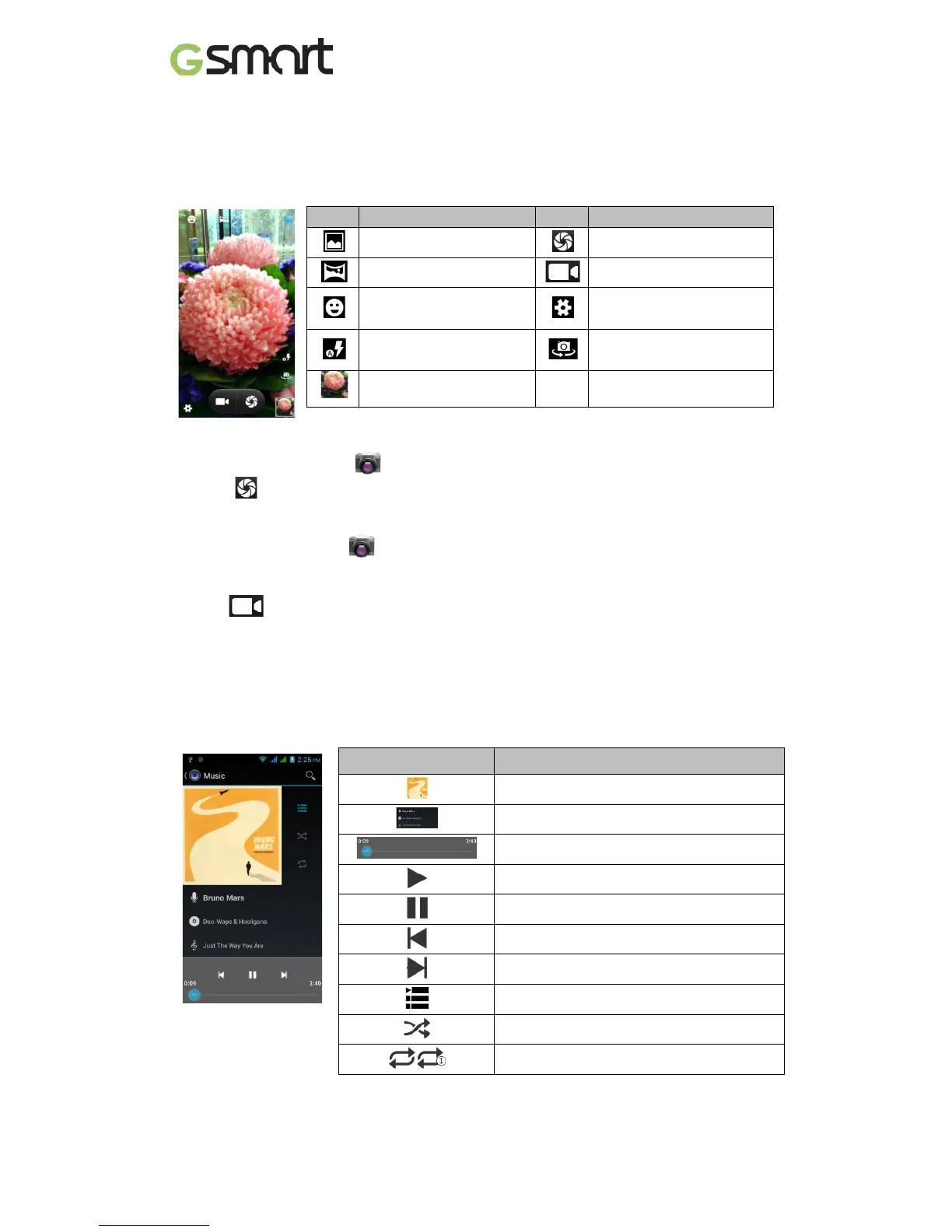
Your phone is equipped with an 8MP camera to take photos and videos.
Camera Function
Icon
Function
Icon
Function
Normal mode
Tap to take a photo
Panorama mode
Tap to record a video
Smile shot mode
Configure camera
settings.
Display the flash mode
Switch between rear and
front camera
Displays the last image
Taking a photo
(1) Tap Applications tab > . The screen switches to landscape view automatically.
(2) Tap to take a picture.
Recording a video
(1) Tap Applications tab > .
(2) Switch to recorder mode.
(3) Aim the phone at the subject.
(4) Tap to start to record, tap again to stop recording.
4.2 Music
You have to copy your audio files to the storage card before playing music, because the music
player only plays audio files saved in the storage card of your phone. Tap Applications tab >
Music.
Playback screen: Displays the playback area with the playback controls.
Icon Function
Album art picture or animation

The area of audio information
Slide to go forward or backward
To play the song
To pause the song
Previous song
Next song
Tap to go to playlists
To start or close shuffle function
To repeat the current song/ all songs
T4 14

Related product manuals