5
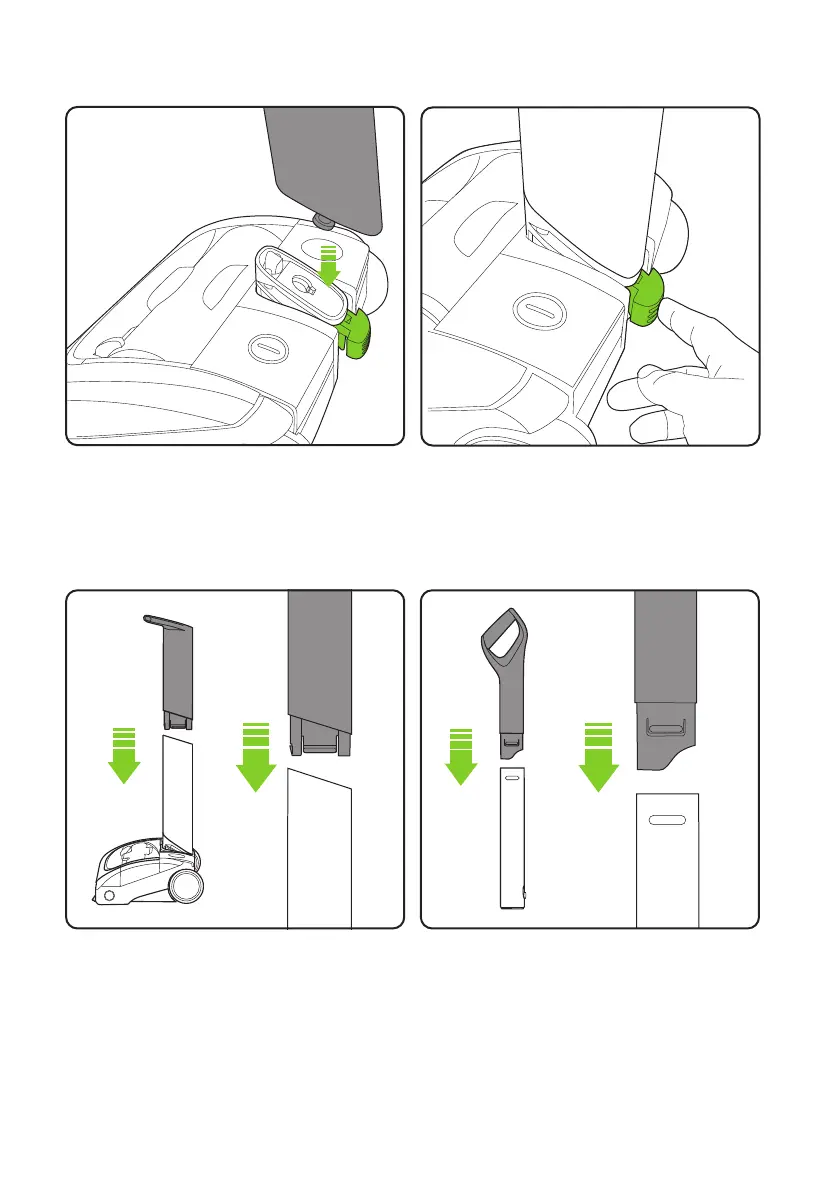
Ensure the lower handle is sitting completely
flush against the yoke. Then push the green
locking clip into the back of the head.
Assembly
To attach the lower handle to the head
assembly, insert the metal pin on the lower
handle into the hole located on the pivot yoke.
Make sure the green locking clip is unlocked to
allow the lower handle to fit.
Fit the two components of the Upper Handle
together in the orientation shown in the image
above. They will only fit together one way.
The components will click into place and will
remain permanently fixed.
Fit the two components of the lower handle
together in the orientation shown in the image
above. They will only fit together one way.
The components will click into place and will
remain permanently fixed.
4092_AR29_UK_manual_aw.indd 54092_AR29_UK_manual_aw.indd 5 10/02/2020 14:3010/02/2020 14:30














 To Next Page