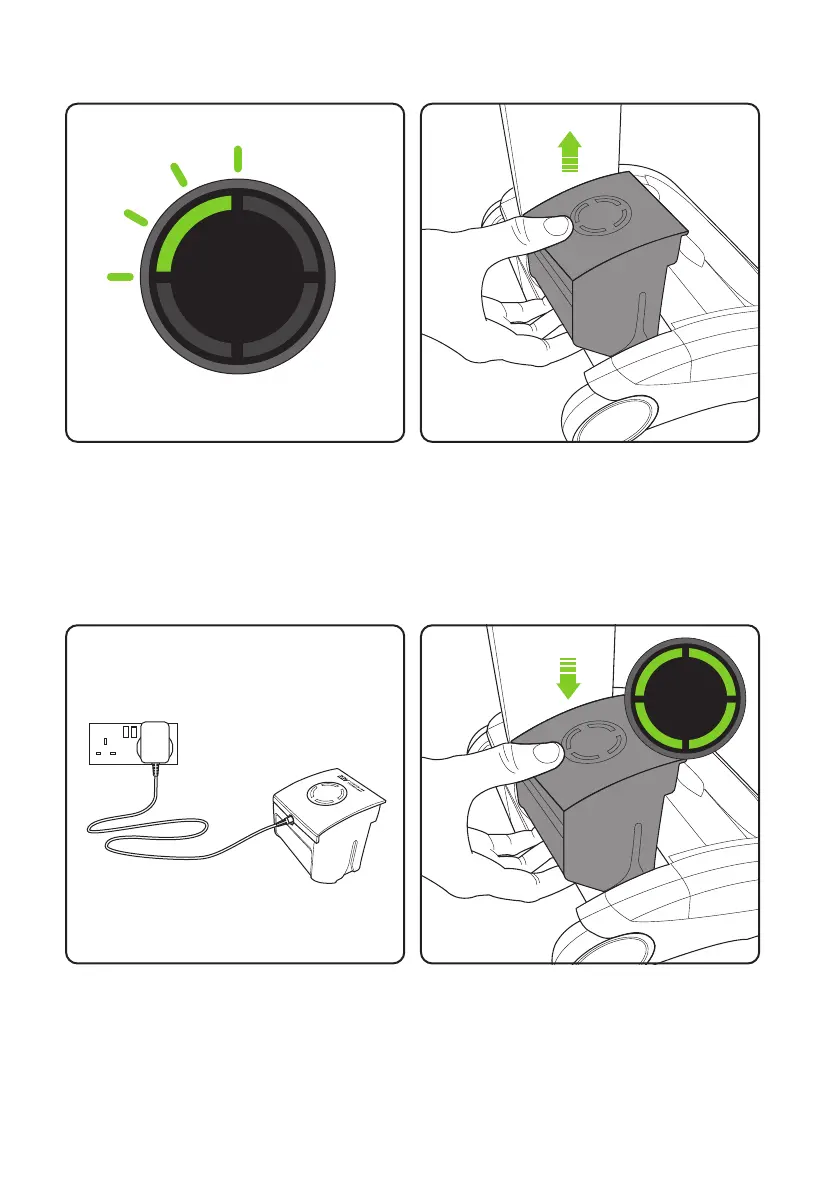
When the state of charge indicator starts to
flash one green LED, recharge the battery.
Plug the charger into the mains and connect it
to the battery. Switch on at the mains.
The battery can be charged from flat in 4
hours. The state of charge indicator will show
4 solid green lights when it is charged. It is
OK to charge for 1 hour for a burst of cleaning.
Replace the battery by sliding it down into the
head assembly. It will click into place.
The battery can be charged whilst it’s in the
AirRAM, or when it’s off the product.
To remove the battery, squeeze the latch
underneath and pull upwards.
Battery charging
8
4
hours
4092_AR29_UK_manual_aw.indd 84092_AR29_UK_manual_aw.indd 8 10/02/2020 14:3010/02/2020 14:30














 To Next Page