7
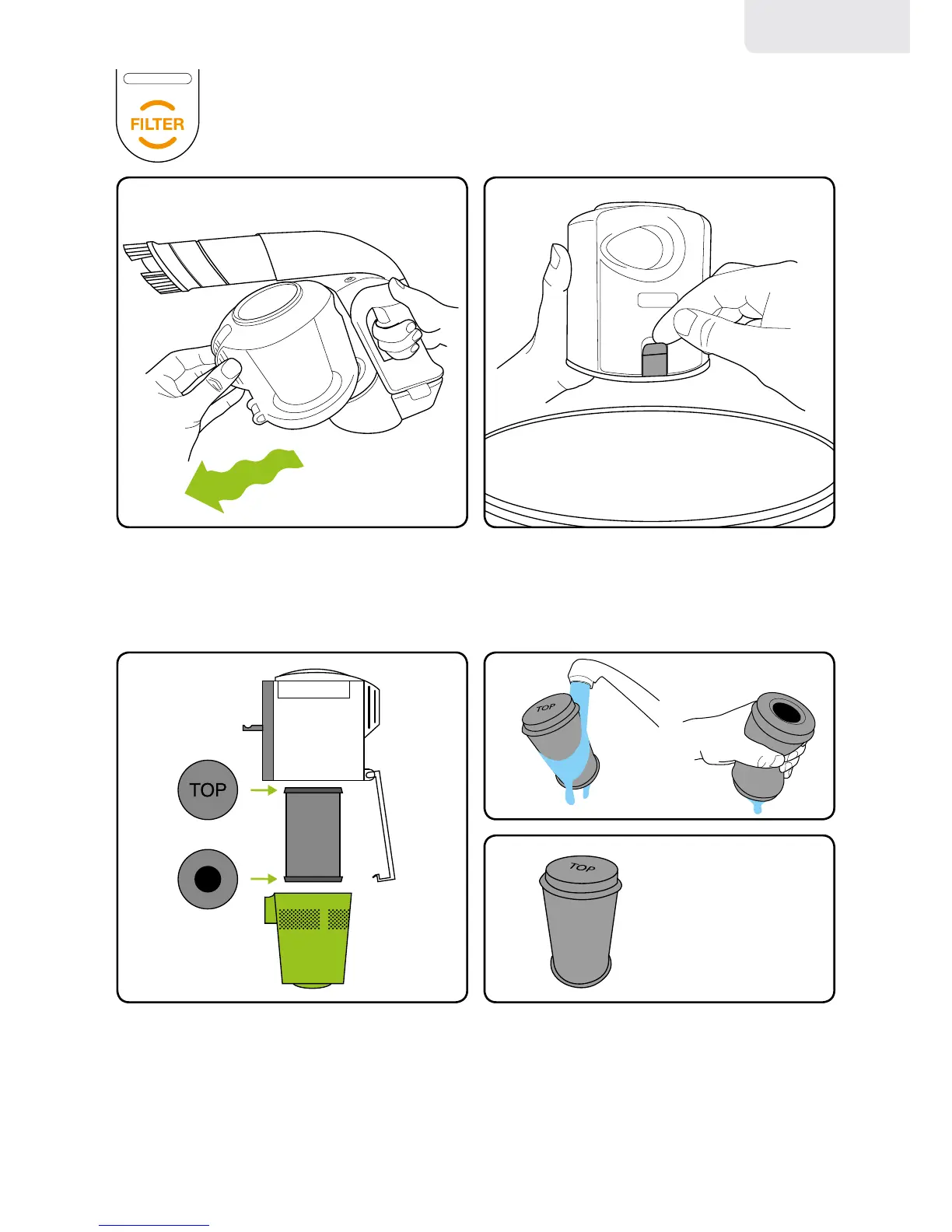
There’snolatch,thebinjustpullsoff.
It’seasierifyouwiggleitasyoupullit.
Ifthelterlightcomesonwhenthebinis
notfull,washthelter.Thelterisinside
thegreenltercasewhichjustpullsout
oftheMulti’sbin.
HoldtheMulti’sbinoveryourwastebasket
andreleasethelatchtoemptythedirt.
Checktheholesonthegreenltercasearen’t
blockedandremoveanydirtstucktoit.
Washthelterunderatap,squeezeitout
thenletitdrycompletelybeforeusingit.
(Youcangetasparelter.
Call 855-483-2440)
Never put the bin back without
the lter inside. You could damage
the motor.
Whenplacingthe
lterbackintothebin,
makesuretheword
TOPisatthetopofthe
bin,andtheholeisat
thebottom.
Empty the bin regularly, especially
if the lter light comes on.
Cleaning the lter
english



 To Next Page