F320 Instruction Manual 5
rev 03.26.13
Gate Control
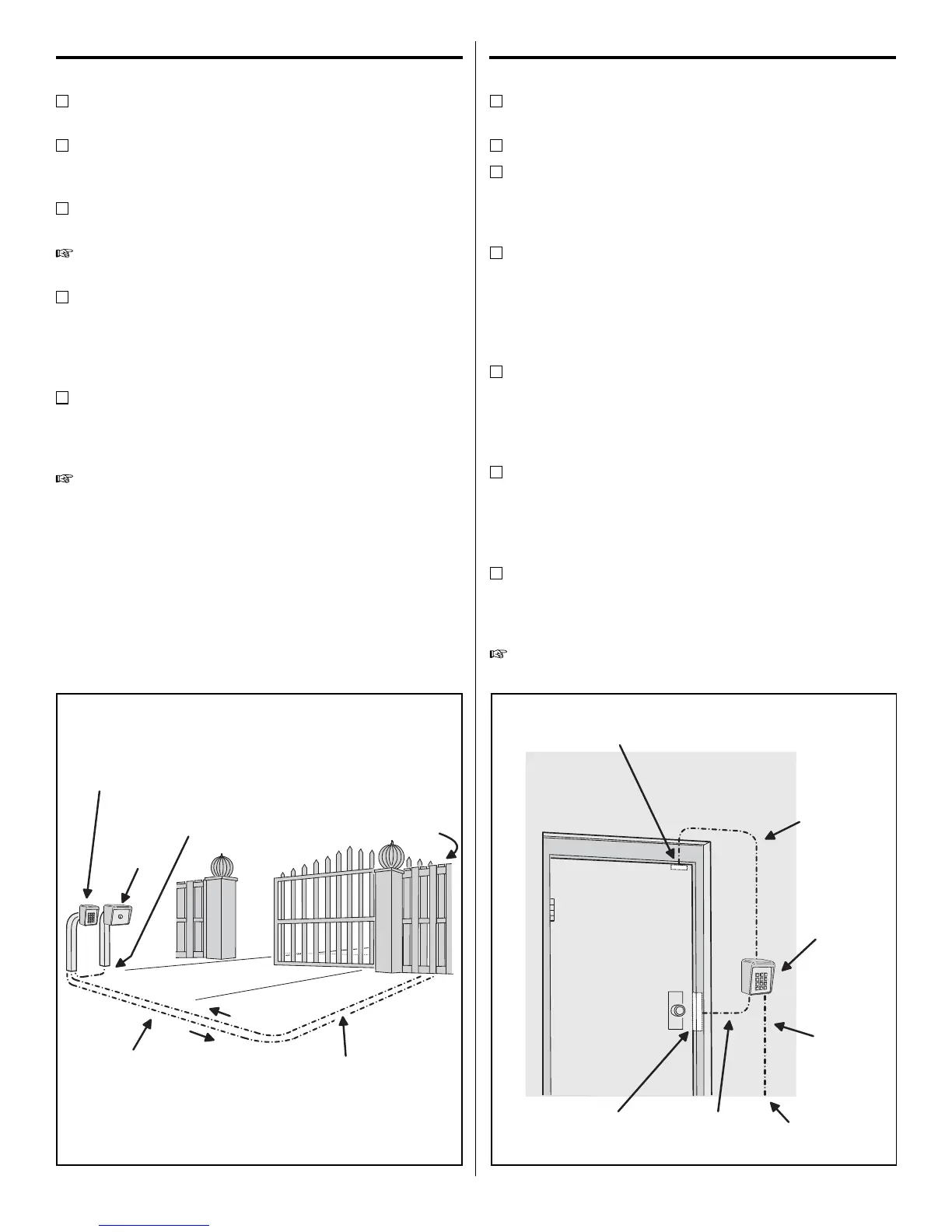
Route four wires between the gate and the keypad
(two for power, two for control).
Connect the gate operator’s auxiliary or radio power
output terminals to the keypads POWER input
terminals (observe wiring polarity).
Connect the gate operator’s OPEN terminals to the
keypad’s Relay #1 COMMON & N.O. terminals.
NOTE: For operator wiring specics, refer to the gate
operator’s wiring diagram.
If a request-to-enter pushbutton or re access
keyswitch is going to be used, route two wires from
the keypad to the normally open switch. Connect the
wires to the normally open switch and to the keypad’s
REQUEST-TO-ENTER and COMMON terminals.
If an inhibit switch or timer is going to be used, route
two wires from the keypad to the inhibit switch or
timer relay. Connect the inhibit switch/timer terminals
to the keypad’s INHIBIT and COMMON terminals.
NOTE: If the INHIBIT input is going to be used, it must
be programmed to select that input type. See the
Programming Options section of this manual.
Door Control
Install a low voltage electric door strike for unlocking
the door.
Choose a location for the power supply or transformer.
Route two wires between the power supply and the
keypad. Connect the power supply’s output terminals
to the keypad’s POWER input terminals (observe
wiring polarity).
Route two wires between the door strike and the
keypad. Connect one of the door strike wires to the
keypad’s Relay #1 N.O. terminal. Connect the other
door strike wire to the keypad’s POWER + terminal.
Connect a wire between the keypad’s POWER –
terminal and the Relay #1 COMMON terminal.
If a request-to-enter pushbutton or re access
keyswitch is going to be used, route two wires from
the keypad to the normally open switch. Connect the
wires to the normally open switch and to the keypad’s
REQUEST-TO-ENTER and COMMON terminals.
To use the door sense feature to detect forced entry
or door ajar conditions, install a normally closed door
switch on the door and route two wires from the
switch to the keypad. Connect the door switch to the
keypad’s DOOR SENSE and COMMON terminals.
If an inhibit switch or timer is going to be used, route
two wires from the switch or timer to the keypad.
Connect the inhibit switch/timer terminals to the
keypad’s INHIBIT and COMMON terminals.
NOTE: Either door sense or inhibit can be used. Both
features cannot be used at the same time.
F320
KEYPAD
FIRE
ACCESS
KEYSWITCH
2 WIRES FROM OPERATOR
FOR F320 POWER
GATE
OPERATOR
(BEHIND GATE)
2 WIRES FROM AK-11
TO TRIGGER GATE OPEN
2 WIRES FOR
REQUEST-TO-ENTER
Figure 5. Gate Installation
FROM
POWER
SUPPLY
DOOR
SENSE
SWITCH
ELECTRIC
DOOR
STRIKE
F320
KEYPAD
2 WIRES
FOR DOOR
STRIKE
2 WIRES
FOR DOOR
SENSE
2 WIRES
FOR
POWER
Figure 6. Door Installation


 To Next Page
 Loading...