Remote Controller
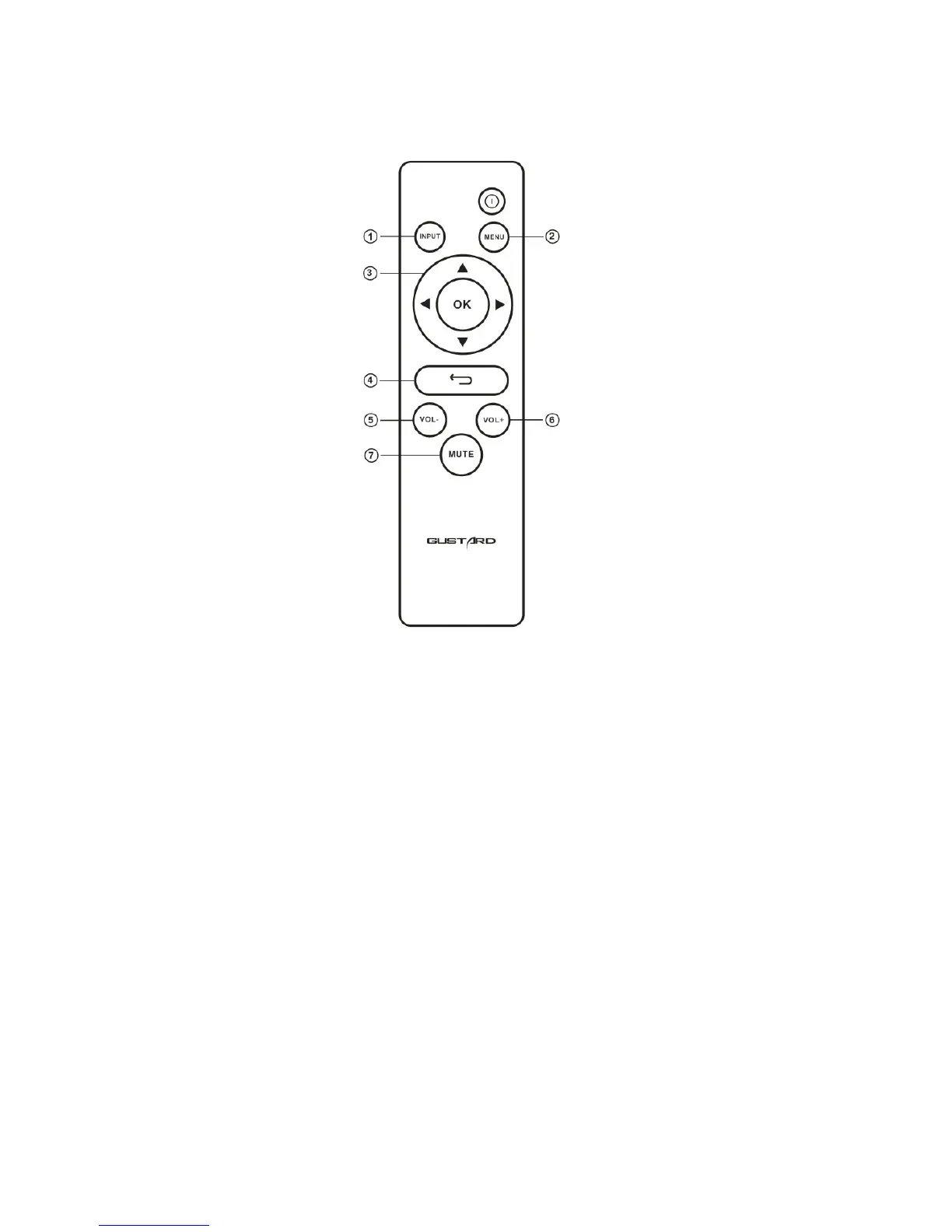
① Input Button: Input source will be switch to the next after pressing this button by the following
cycle sequence: COAX - BNC - AES - USB – IIS - OPT
② Menu Button: Main menu will be shown after pressing this button.
③ Four Directions Button :In A20H main menu status,the items can be toggled by UP and DOWN
buttons, and different options in current item can be selected by LEFT and RIGHT buttons.
④ Return Button: Turn back to the Main Menu status.
⑤ Volume Decrease Button: It can reduce volume only if A20H shows the main menu on the screen.
⑥ Volume Increase Button: It can increase volume only if A20H shows the main menu on the screen.
⑦ Mute Button: A20H will be muted when this button is pressed once. And mute will be released after
another pressing.
Note
1) Operating distance of the remote controller varies depending on the angle.
2) If there something blocks the remote controller and the sensor, operation might be failed.
3) If the remote controller will not be used for a long time (one month or longer), the battery is recommended to be removed.
4) If battery liquid leakage happens, battery compartment should be clean immediately and installed a new battery
5) This remote controller might cause the wrong operation of other infrared-red controlled devices.


 To Next Page