35
2.10 Sound Type
This item is used to select desired Sound
Type.
Available options: Stereo, Dual I, Dual II,
Mixed.
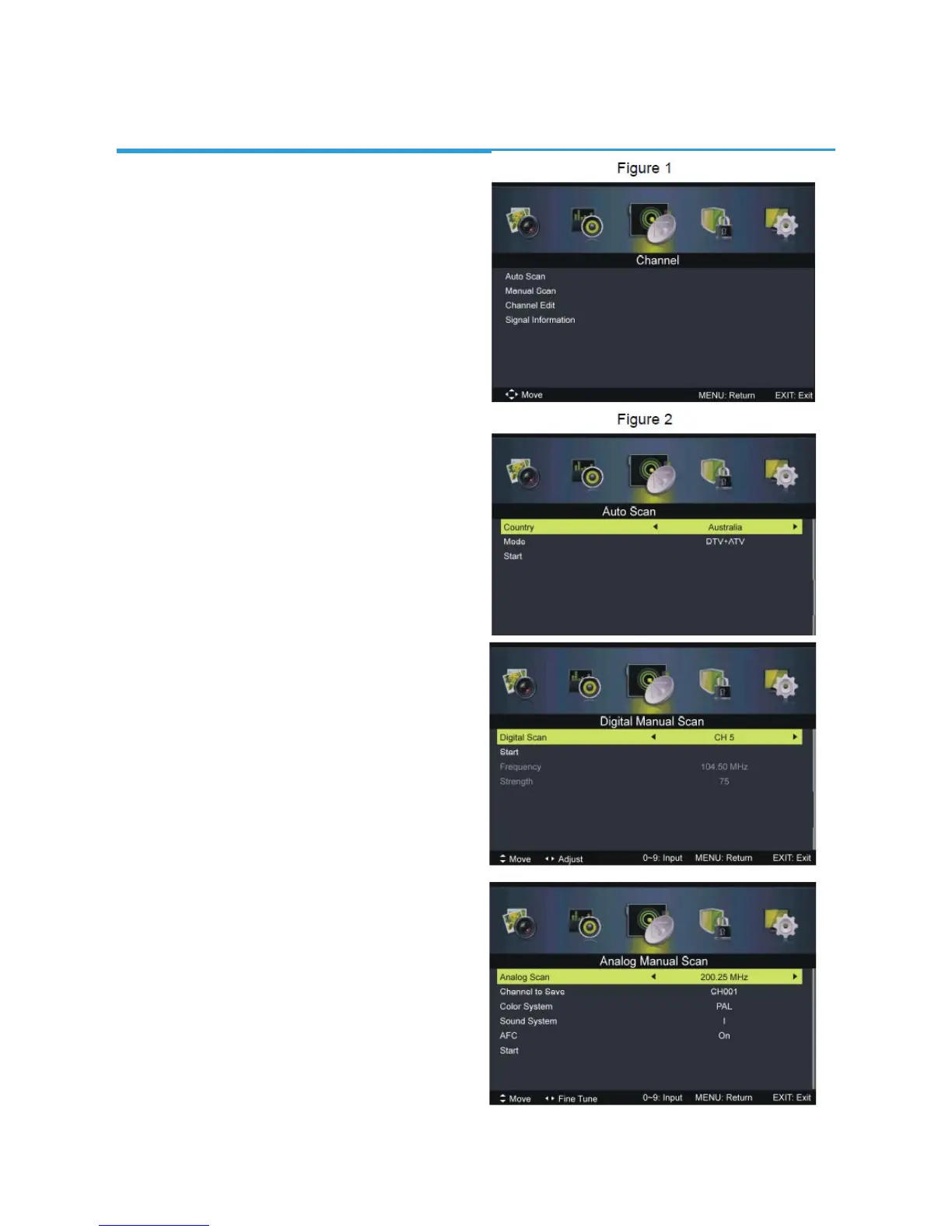
3. Channel (Figure 1)
3.1 Auto Scan (Figure 2)
- Press OK or RIGHT navigation button to
enter it.
Country: Select your country.
Mode: Select your scanning type.
Start: Start scanning.
3.2 Manual Scan
- Press OK or RIGHT navigation button to
enter it and then you can select digital or
analog manual scan.
3.21 Digital Manual Scan
- Press OK or RIGHT navigation button to
enter it.
Digital Scan: Select the channel.
Start: Start scanning.
Frequency: For this TV, it’s not user
adjustable.
Strength: Display the signal strength of
current program and it’s not user adjustable.
3.22 Analog Manual Scan
- Press OK or RIGHT navigation button to
enter it.
Analog Scan: Use LEFT/RIGHT navigation
button to fine tune it.
Channel to Save: Select the channel
number to be saved.
Color System: Select desired color system
Sound System: Select desired sound
system.
AFC: Turn on/off automatic fine tune.
Start: Start scanning
NOTE: Color System, Sound System and AFC will not be adjustable if there’s no signal.
CHANNEL


 To Next Page