3
2
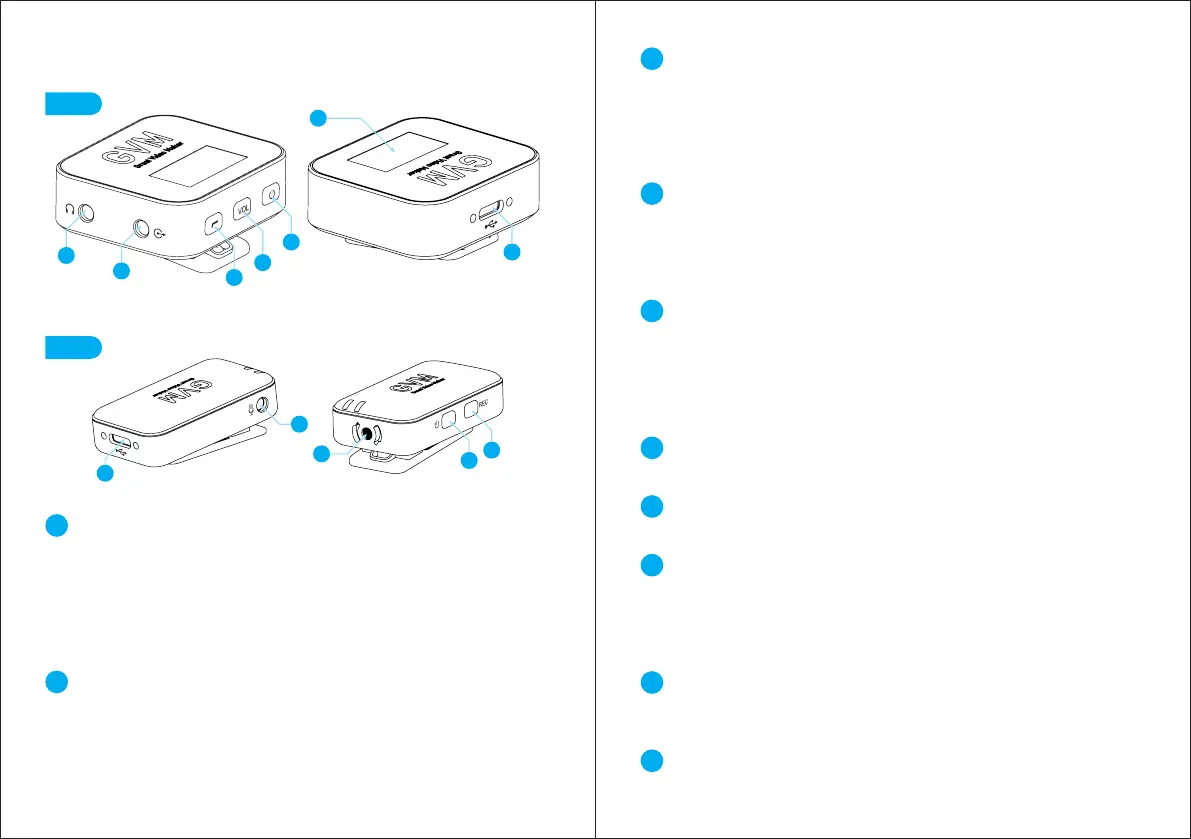
Type-c socket (TX RX):
① Charging (TX RX).
② Connect to a computer or mobile phone for USB microphone (RX)
function.
③ Connect to the computer to read the recording file (TX) in the FLASH
IC.
ON/OFF (TX RX):
① Long press on/off (2 seconds).
② Press and hold for 5 seconds to enter pairing when the device is
powered off.
③ Press and hold for 5 seconds to reset the system in the power-on
state.
1
3
4
5
6
7
8
10
9
Volume key/mute key (RX):
① Short press to adjust the volume The volume is divided into three
levels: low, medium and high. (reboot after shutting downRecall the
volume before shutdown) 3RX.
② Long press for 2 seconds to mute, the mute symbol will be displayed
on the LCD screen, long press again to exit mute.
Noise reduction key/American tone key (RX):
① Short press to enter noise reduction (TX enters ambient noise
reduction), short press again to turn off noise reduction.
② Long press to enter the fixed EQ value sound effect (enhance middle
and low frequency), long press again to exit EQ.
TFT 0.96(RX):
① Display TX and RX battery power or charging indication, connection
status, microphone voice input strength, system volume, EQ, mute,
noise reduction, etc.
② Reduce the brightness of the LCD screen after 10 seconds of no
operation, and trigger any button to restore the brightness.
Audio output/LINE OUT (RX):
output audio to recording equipment.
Headphone output/HEADPHONE (RX):
plug in a 3.5mm headphone to monitor the volume of the transmitter.
Record key (TX):
① Short press to enter recording. (-6DB safe recording to built-in eMMC
flash memory, eMMC capacity: 8GB)
② Automatic loop recording, when the memory is full, it will automatically
delete the recording file at the earliest time.
External microphone (TX):
external microphone input. (disconnect the built-in microphone when the
external microphone is plugged in)
Built-in microphone (TX):
built-in microphone audio Input.
4
PRODUCT HANDLING INSTRUCTIONS
TX
RX
7
6
2
3
4
1
9
10
2
8
1
5



 To Next Page