7 8
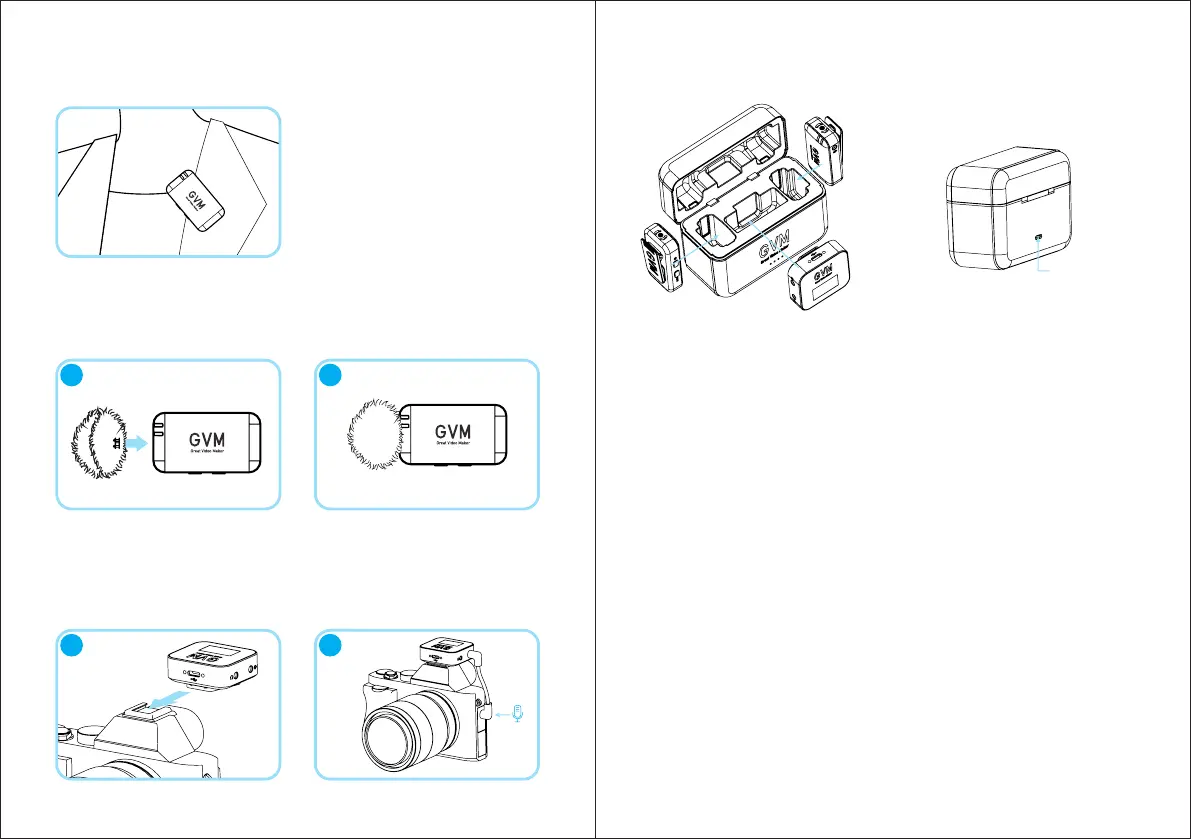
1. Clip the transmitter to the collar.
2. It is recommended to use a windproof wool cover for outdoor or windy
environments. Align the wool cover with the built-in microphone bayonet
of the transmitter, insert it, and rotate it to lock it.
4. Charging case operation:
3. Install the camera cold shoe and hot shoe on the receiver, connect the 90-
degree bent TRS head of the camera audio cable to the LINE OUT port of
the receiver, and connect the straight TRS head of the other end to the
microphone port of the camera.
* It is recommended to use a USB interface output power adapter with a
voltage of 5V and a current greater than 2A to charge the charging box,
adaptive charging current regulation, and adaptive adapter.
* The charging box has a built-in 2800mAh battery, which can charge two
transmitters and one receiver more than 3 times at the same time.
* Intelligent identification of machines entering the warehouse, intelligent
identification of loads, when the machine in the warehouse is fully
charged, it will automatically enter standby.
* 4 LEDs in the charging box indicate the battery level of the charging box:
25%, 50%, 75%, 100%.
TYPE-C charging
interface
INSTRUCTIONS
21
21



 To Next Page