EasyManua.ls Logo

Gyroor G2 - User Manual

Gyroor G2
12 pages
Print Icon
To Next Page IconTo Next Page
Loading...
USER MANUAL
Hoverboard
G2
The manufacturer reserves the right to make changes to the product, and update this manual at any time.
Visit www.gyroorboard.com to download the latest user manual.
www gyroor.com.
@Gyroor@Gyroor@Gyroor
www gyroor.com.
More promotion and giveaway on the facebook,
Scan on "Gyroor" Messenger QR code to get it soon.
More promotion and giveaway on the facebook,
Scan on "Gyroor" Messenger QR code to get it soon.
Question and Answer IconNeed help?

Do you have a question about the Gyroor G2 and is the answer not in the manual?

Summary

Riding Safety

Wear a Helmet

Always wear an approved bicycle or skateboard helmet with chin strap. Provides protection for the back of your head.

First Ride Location

Do not attempt your first ride in areas with children, pedestrians, pets, vehicles, or other potential hazards.

Respecting Pedestrians

Yield the right of way to pedestrians, pass on the left, announce yourself when passing from behind.

New Rider Supervision

Ensure new riders have read the manual and watched the safety video. Assist until comfortable.

Pre-Ride Checks

Check for loose fasteners, damaged components, and tire pressure before each ride.

Situational Awareness

Be alert, scan ahead, and watch for obstacles and low-traction surfaces.

General Safety Precautions

General Safety Precautions

Follow all CAUTION and WARNING notices. Do not ride at unsafe speeds or on roads with motor vehicles.

Rider Restrictions

Do not ride under influence of alcohol/drugs, with diseases, or if balance/motor skills are impaired.

Age and Supervision

Riders under 16 require adult supervision. Recommended age is 6+ years.

Stunt and Riding Limitations

First Ride Guidance

Learning to Ride

Rider Requirements

Rider must weigh 44-256lbs (20-120 kg) and be over 4ft (121cm) tall. Wear protective gear.

Child Mode Adjustment

Adjust G2 to child mode via app or hands for new users.

Assisted Practice Setup

Go to a large open area and ask a friend for assistance on your first ride.

Initial Foot Placement

Place one foot on the mat lightly, keeping the other on the ground. Do not press the steering bar.

Weight Transfer to G2

Slowly transfer weight onto the G2. It will beep, indicating Balance Mode.

Balanced Stance

Stand with weight evenly distributed on both feet, looking straight ahead.

Forward;Backward Control

Gently lean your body forward and backward to control movement.

Turning Control

To turn, gently lean left or right against the steering bar.

Warnings and Riding Restrictions

Obstacle Avoidance

Avoid contacting obstacles with the tire/wheel.

Road Restrictions

Do not ride on public roads, motorways, highways, or streets.

Acceleration Limits

Do not accelerate when G2 tilts back or sounds an alarm. Do not override speed limiter.

Rider Limit

G2 is for one rider only. Do not ride double or carry passengers/children.

Additional Safety and Usage Warnings

Maintenance and Battery Care

Calibration, Alarms, and App Usage

Hoverboard Calibration

Calibrate if G2 moves on its own. Turn off, hold power for 5s, release when sound is heard.

Overview

This document serves as the user manual for the Gyroor G2 Hoverboard, a recreational self-balancing electric vehicle. It provides comprehensive instructions for safe operation, maintenance, and troubleshooting, ensuring users can enjoy its features responsibly.

Function Description

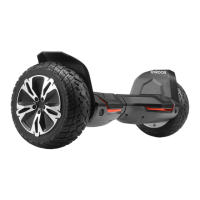
The Gyroor G2 is a self-balancing electric hoverboard designed for personal recreation and transportation. It utilizes an internal gyroscope and acceleration sensors to maintain balance, allowing riders to control movement by shifting their body weight. The hoverboard features two wheels, foot mats for standing, and a steering bar for directional control. It is equipped with LED lamps for visibility and a stereo Bluetooth speaker for entertainment during rides. The G2 supports app connectivity, enabling users to monitor and adjust various settings, including riding modes (child/adult), speed control, and light colors. It also includes a self-balance function that can be enabled or disabled via the app or manual adjustment. The hoverboard is powered by a rechargeable battery, with a charging port located on the device. Safety mechanisms include alarms for overheating and speeding, and the ability to detect and warn against various operational issues.

Usage Features

The Gyroor G2 is designed for riders aged 6 and above, with a recommended weight range of 44-256 lbs (20-120 kg) and a height of over 4ft (121cm). Before the first ride, users are strongly advised to read the safety instructions and watch the instructional video provided by Gyroor. The hoverboard comes in an inactivated state and will beep upon power-on until activated.

First Ride and Learning:

  • Begin in a large, open area with assistance from a friend.
  • Always wear an approved helmet and other protective gear.
  • Place one foot lightly on the foot mat, keeping the other foot on the ground.
  • Slowly transfer weight onto the G2; it will beep, indicating Balance Mode activation.
  • Step on with the other foot, distributing weight evenly, and look straight ahead.
  • Control movement by gently leaning the body forward and backward.
  • To turn, gently lean left or right against the steering bar.
  • Always step off from the back of the G2.
  • For new users, adjusting the G2 to "child mode" via the app or manually is recommended to reduce shaking and ease learning.

App Connectivity:

  • Download the "Gyroor scooter" app from the app store or Google Play.
  • Connect to the app via Bluetooth to access features like speed monitoring, battery reminders, switch control, light color adjustment, model adjustment, and speed control.
  • The app also provides fault analysis to help diagnose problems.
  • For Bluetooth speaker connectivity, search for the device's unique Bluetooth name (e.g., "12:13:34:58:33:9C") in your phone's Bluetooth settings.

Riding Safety and Warnings:

  • Do not ride under the influence of alcohol or drugs, or if you have health conditions affecting balance or physical activity.
  • Comply with local laws and regulations; do not ride where prohibited or on public roads with motor vehicles.
  • Maintain a safe distance from others and slow down in unfamiliar areas.
  • Avoid sudden acceleration or deceleration, and do not override the speed limiter.
  • Do not ride in snow, rain, or on wet, muddy, icy, or slippery surfaces.
  • Avoid riding over obstacles like sand, loose gravel, or sticks.
  • When traversing small bumps or uneven terrain, maintain a moderate speed (2-6 mph / 3-10 km/h) with bent knees.
  • Avoid slopes steeper than 15° (or 10° if payload exceeds 176 lbs / 80 kg).
  • Do not ride through puddles or other bodies of water.
  • The G2 is for one rider only; do not ride double or carry passengers/children.
  • Do not attempt stunts, jump, or lift the G2 by its fenders when turned on to avoid injury.
  • Be aware of your head when passing through doorways.

Calibration:

  • If the G2 moves forward or backward on its own in Balance Mode, it needs calibration.
  • To calibrate, ensure the hoverboard is off and on a horizontal plane. Press and hold the power switch for 5 seconds until a sound is heard. The red light will flash 3 times, then remain on, indicating calibration is complete. Restart the hoverboard.
  • Self-balance can be adjusted via the app or manually by placing the hoverboard horizontally, turning it on, and pressing the power switch for about 6 seconds until a beep is heard, then restarting.
  • Child/Adult mode switching can also be done via the app or manually by standing up the G2, turning it on, and pressing the power button for about 6 seconds until a beep is heard, then restarting.

Maintenance Features

Proper maintenance is crucial for the longevity and performance of the Gyroor G2.

Cleaning and Storage:

  • Clean the mainframe with a soft, wet cloth. For stubborn dirt, use a toothbrush and toothpaste, then wipe with a wet cloth.
  • Scratches on plastic parts can be polished with extra fine grit abrasive paper.
  • Do not use alcohol, gasoline, acetone, or other corrosive/volatile solvents, as these can damage the hoverboard's appearance and internal structure.
  • Do not wash the G2 with a power washer or high-pressure hose.
  • Ensure the G2 is powered OFF, the charging cable is unplugged, and the rubber cap on the charge port is tightly sealed before cleaning to prevent electric shock or damage to electronic components.
  • Store the G2 in a cool, dry place. Avoid storing it outdoors for extended periods, as exposure to sunlight and extreme temperatures can accelerate the aging of plastic components and reduce battery life.

Battery Pack Maintenance:

  • Do not store or charge the battery outside the specified temperature limits.
  • Charge the battery after each ride and avoid draining it completely, as this can cause permanent damage and void the warranty.
  • A fully charged battery typically retains charge for 60-90 days in Standby Mode.
  • Refer to local laws and regulations for battery recycling and disposal.
  • Battery performance is optimal at room temperature (70°F / 22°C) and decreases at lower temperatures.

Troubleshooting and Alarms:

  • If the G2 makes abnormal sounds or signals an alarm, stop riding immediately.
  • Overheating: If the internal temperature exceeds 122°F (50°C), the glow lights will flash red, an alarm will sound, and charging will be disabled. Step off, power off, and allow it to cool down.
  • Speeding: Riding too fast will trigger a lift alarm. Adjust the speed setting in the app.
  • For other alarms or persistent problems, restart the G2. If issues continue, contact customer service with a video demonstrating the problem and your order number.

Warranty:

  • The G2 comes with a 1-year warranty for the vehicle (excluding battery and consumables) and a 6-month warranty for the battery.
  • The warranty is invalid if the vehicle is opened by an unlicensed person, the receipt does not match the vehicle, there is inappropriate handling/use/maintenance, or non-compliance with manual instructions.
  • Damage from inappropriate handling, modification, storage, accidents, surface damage, or riding in rain/soaking in water is not covered.

Gyroor G2 Specifications

General IconGeneral
Battery Capacity36V/4.0Ah
Charging Time2-3 hours
Bluetooth SpeakerYes
LED LightsYes
App ControlYes
Waterproof LevelIPX4
Motor Power700W (350W x 2)
Max Load100 kg (220 lbs)
Tire Size8.5 inches
Range7.5 - 9.5 miles

Related product manuals