Digital Video Recorder User Manual
15
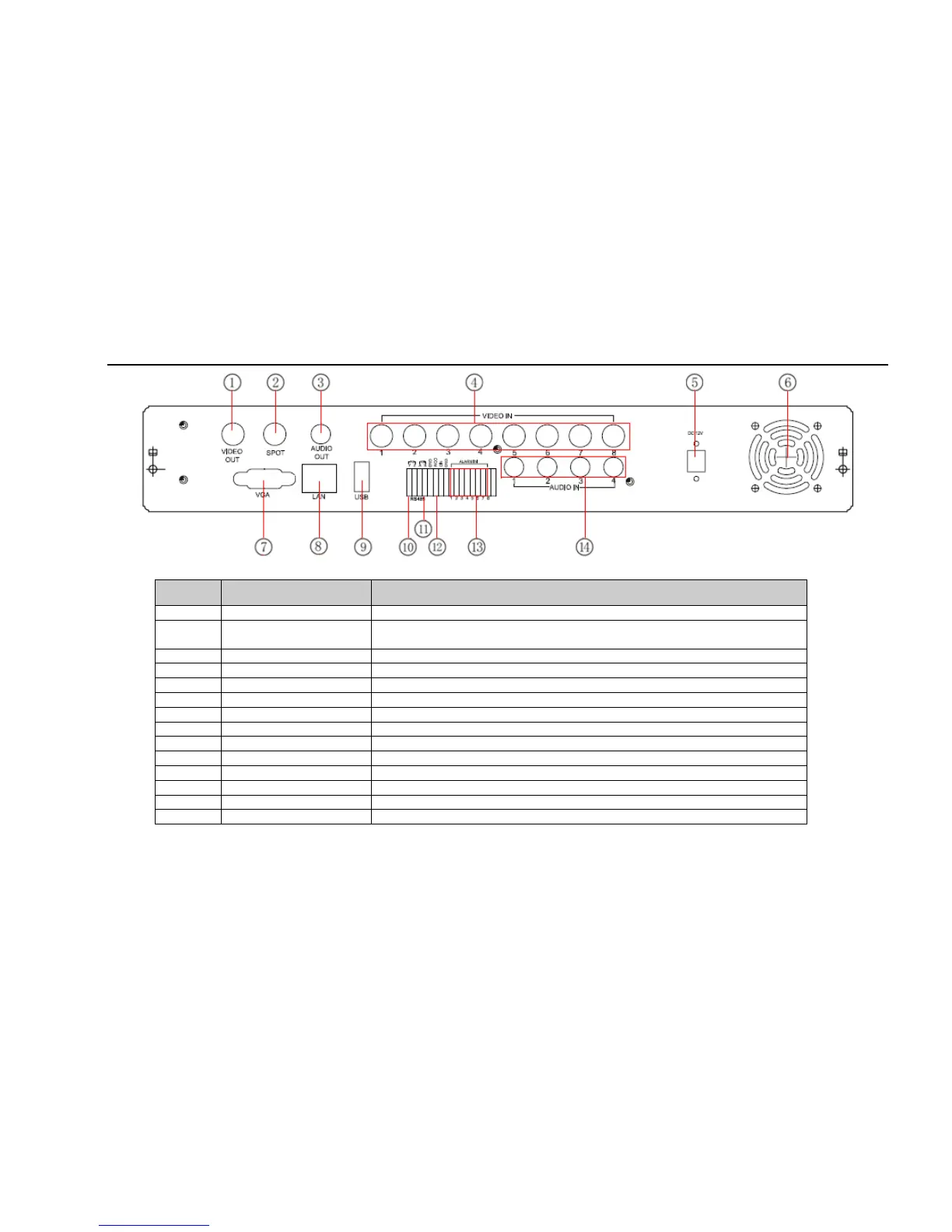
Fig 2.7 Rear Panel for 8-ch
Item Name Description
1 Video out Connect to monitor
2 Spot out
Connect to monitor as an AUX output channel by channel. Only video display,
no menu show
3 Audio out Audio output, connect to the sound box
4 Video in Video input channels from 1-8
5 POWER INPUT DC12V
6 FAN For cooling the device
7 VGA port VGA output, connect to monitor
8 LAN Network port
9 USB MOUSE Only for USB mouse
10 P/Z Connect to speed dome
11 K/B Connect to keyboard
12 + 5V and GND +5 V and Grounding
13 ALARM IN Connect to external sensor1-4
14 Audio in 4 CH Audio input
Tab 2.3 Definitions of Front Panel Buttons



 To Next Page