Digital Video Recorder User Manual
16
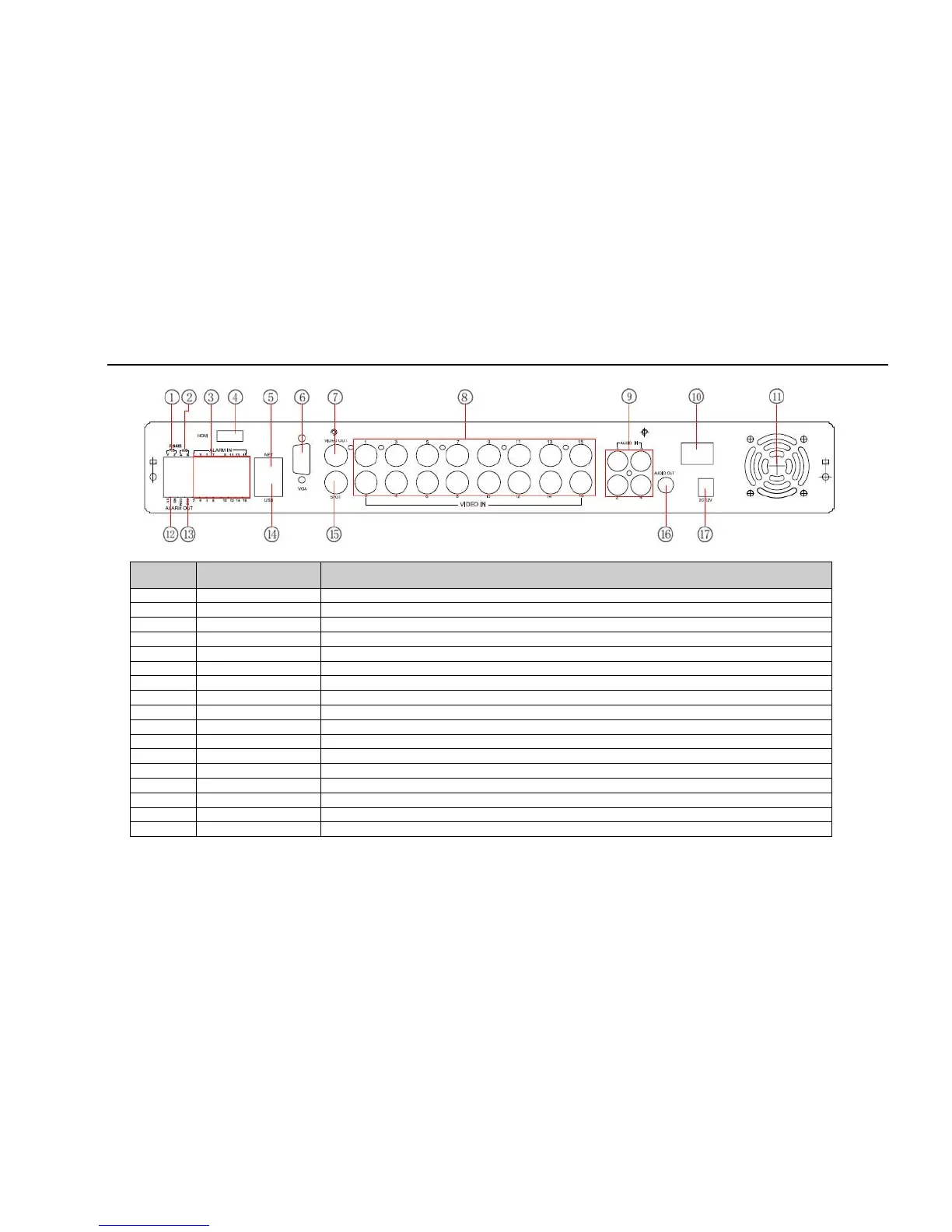
The rear Panel interface for 16-ch is shown as Fig 2.8:
Fig 2.8 Rear Panel for 16-ch
Item Name Description
1 P/Z Connect to speed dome
2 K/B Connect to keyboard
3 ALARM IN Connect to external sensor1-16
4 HDMI port Connect to high-definition display device (optional)
5 NET Network port
6 VGA port VGA output, connect to monitor
7 Video out Connect to monitor
8 Video in Video input channels from 1-16
9 Audio in 4 CH Audio input
10 POWER SWITCH Power on/off
11 FAN For cooling the device
12 + 5V and GND +5 V and Grounding
13 ALARM OUT 1-ch relay output. Connect to external alarm.
14 USB MOUSE Only for USB mouse
15 Spot out Connect to monitor as an AUX output channel by channel. Only video display, no menu show
16 Audio out Audio output, connect to the sound box
17 POWER INPUT DC12V
Tab 2.4 Definitions of Rear Panel Buttons



 To Next Page